







Question: Using this previous code in Microsoft Visual Studio 2015 & using C# Programming: using System; using System.Collections.Generic; using System.ComponentModel; using System.Data; using System.Drawing; using System.Linq;
Using this previous code in Microsoft Visual Studio 2015 & using C# Programming:
using System;
using System.Collections.Generic;
using System.ComponentModel;
using System.Data;
using System.Drawing;
using System.Linq;
using System.Text;
using System.Threading.Tasks;
using System.Windows.Forms;
namespace TaxCalculator
{
public partial class frmTaxCalculator : Form
{
public frmTaxCalculator()
{
InitializeComponent();
}
///
/// This is the event handler for the click event of the Calculate button
///
///
///
private void btnCalculate_Click(object sender, EventArgs e)
{
//Get the inputs
decimal decTaxableIncome = Convert.ToDecimal(txtTaxableIncome.Text);
decimal decIncomeTaxOwed = 0;
//Compute the calculations for all cases
if (decTaxableIncome > 0 && decTaxableIncome
{
decIncomeTaxOwed = ((decTaxableIncome - 0) * 10) / 100 + 0;
}
else if (decTaxableIncome > 3530 && decTaxableIncome
{
decIncomeTaxOwed = ((decTaxableIncome - 8700) * 15) / 100 + 870;
}
else if (decTaxableIncome > 85650 && decTaxableIncome 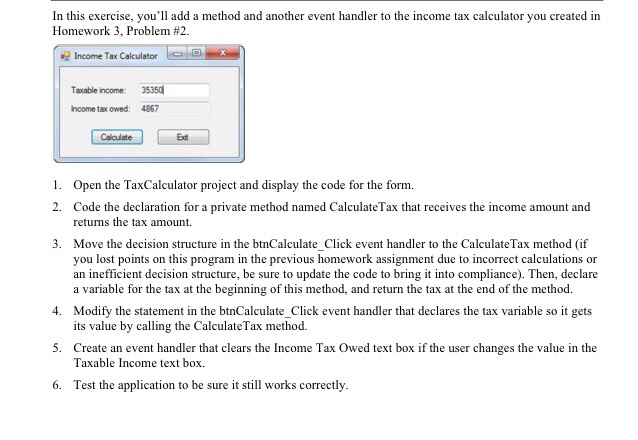
In this exercise, you'll add a method and another event handler to the income tax calculator you created in Homework 3, Problem #2 Income Tax Calculatoree Taxable income: 35350 ncome tax owed: 486:7 Calculate Exdt 1. Open the TaxCalculator project and display the code for the form. 2. Code the declaration for a private method named CalculateTax that receives the income amount and returns the tax amount 3. Move the decision structure in the btnCalculate Click event handler to the CalculateTax method (if you lost points on this program in the previous homework assignment due to incorrect calculations or an inefficient decision structure, be sure to update the code to bring it into compliance). Then, declare a variable for the tax at the beginning of this method, and return the tax at the end of the method. 4. Modify the statement in the btnCalculate_Click event handler that declares the tax variable so it gets 5. Create an event handler that clears the Income Tax Owed text box if the user changes the value in the 6. Test the application to be sure it still works correctly its value by calling the CalculateTax method. Taxable Income text box {
decIncomeTaxOwed = ((decTaxableIncome - 85650) * 28) / 100 + 17442;
}
else if (decTaxableIncome > 178650 && decTaxableIncome
{
decIncomeTaxOwed = ((decTaxableIncome - 178650) * 33) / 100 + 43482;
}
else if (decTaxableIncome > 388350)
{
decIncomeTaxOwed = ((decTaxableIncome - 388350) * 35) / 100 + 112683;
}
//Round the decimal value to two places
decIncomeTaxOwed = decimal.Round(decIncomeTaxOwed, 2);
//Display the result as currency
txtIncomeTaxOwed.Text = decIncomeTaxOwed.ToString("c");
}
///
/// This the click event for the Exit button
///
///
///
private void btnExit_Click(object sender, EventArgs e)
{
//Close the form
this.Close();
}
how would you code the following?:
Step by Step Solution
There are 3 Steps involved in it
1 Expert Approved Answer
Step: 1 Unlock

Question Has Been Solved by an Expert!
Get step-by-step solutions from verified subject matter experts
Step: 2 Unlock
Step: 3 Unlock
 Study Help