







Question: Using Visual Basic, I need help coding this program that -displays records in the Grades array -adds a record to the grades array -deletes a
Using Visual Basic, I need help coding this program that
-displays records in the Grades array
-adds a record to the grades array
-deletes a record from the Grades array
-displays a student average query
-new record query
I need to use sub procedures throughout. JagNumber is the student number beginning with "J00" (ex. J00123456).
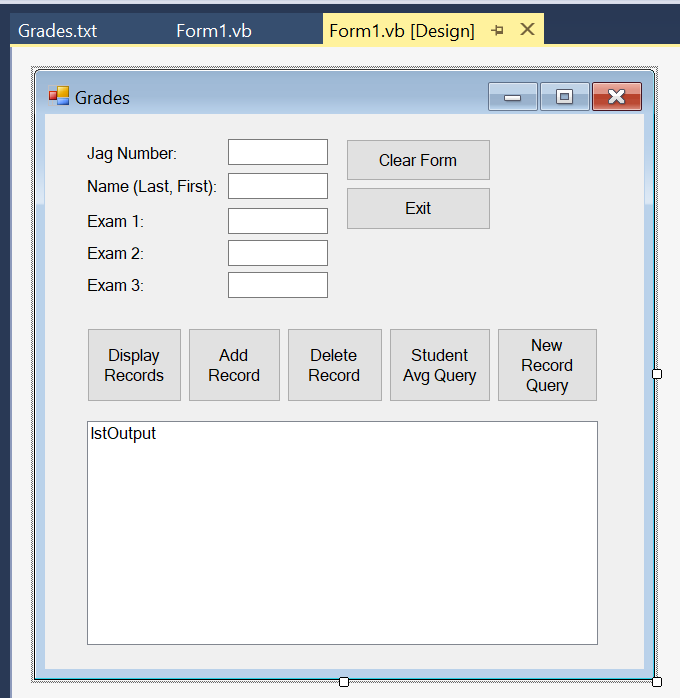
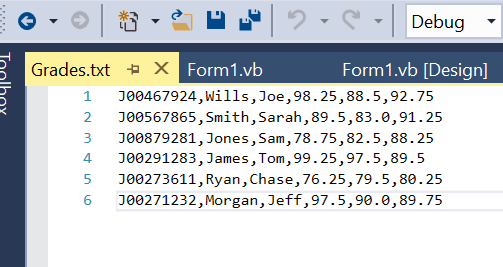
Grades.txt Form 1.vb Form1.vb [Design) + X Grades Clear Form Jag Number: Name (Last, First): Exit Exam 1: Exam 2 Exam 3 Display Records Add Record Delete Record Student Avg Query New Record Query IstOutput @ 0 3 -& P 9-9 - Debug- Toalhoy Grades.txt - X Form 1.vb Form 1.vb [Design 1 300467924, Wills, Joe, 98.25, 88.5,92.75 2 J00567865, Smith, Sarah, 89.5,83.0,91.25 3 J00879281, Jones, Sam, 78.75,82.5,88.25 4 J00291283, James, Tom, 99.25,97.5,89.5 5 J00273611, Ryan, Chase, 76.25, 79.5,80.25 6 J00271232, Morgan, Jeff, 97.5,90.0,89.75 Grades.txt Form 1.vb Form1.vb [Design) + X Grades Clear Form Jag Number: Name (Last, First): Exit Exam 1: Exam 2 Exam 3 Display Records Add Record Delete Record Student Avg Query New Record Query IstOutput @ 0 3 -& P 9-9 - Debug- Toalhoy Grades.txt - X Form 1.vb Form 1.vb [Design 1 300467924, Wills, Joe, 98.25, 88.5,92.75 2 J00567865, Smith, Sarah, 89.5,83.0,91.25 3 J00879281, Jones, Sam, 78.75,82.5,88.25 4 J00291283, James, Tom, 99.25,97.5,89.5 5 J00273611, Ryan, Chase, 76.25, 79.5,80.25 6 J00271232, Morgan, Jeff, 97.5,90.0,89.75
Step by Step Solution
There are 3 Steps involved in it

Get step-by-step solutions from verified subject matter experts
 Study Help