







Question: Using Visual Basic The application will use one form to display simple data and three classes to represent a Shape, a Rectangle, and a Circle.
Using Visual Basic
The application will use one form to display simple data and three classes to represent a Shape, a Rectangle, and a Circle. No executable is needed for this project as it simply displays the following output: 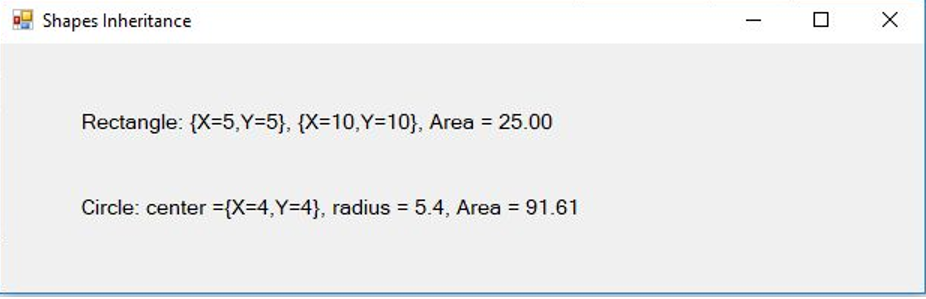 Project Instructions
Class Relationships The Shape class is a parent of the Rectangle and Circle classes. AKA the Rectangle and Circle classes are children of the Shape class 1. Create the Shape class. a. Define a string property as Name. b. Define a method called GetArea that returns a double. It must be overridden.
i. For MustOverride functions, you do not need to write any more than the function header because it will be completed by the children anyways. Example:
Public MustOverride Function Valdidate() As Boolean c. Override the ToString method to return the name property. 2. Create the Rectangle class.
a. Inherit the Shape class.
b. Define two properties that are instances of the Point structure, one representing the top left corner and the other representing the bottom right corner of your rectangle.
i. The Point structure has two properties, X and Y. These represent where the point is in a 2D space / graph.
ii. This structure already exists in Visual Basic. You dont have to write one for it, just create two instances. c. Override the GetArea method from its parent Shape class. Calculate the area using the two points.
i. General Formula:
1. Area = Length * Width
2. Length = Math.Abs(topLeft.X - bottomRight.X)
3. Width = Math.Abs(topLeft.Y - bottomRight.Y) d. Override the ToString method.
i. Return the parents ToString method combined with each points ToString method.
1. Remember that structures already have nice ToString methods so we can use it to print out X and Y of the point. 3. Create the Circle class.
a. Inherit the Shape class.
b. Define a Point property as the center of the circle.
c. Define a double property as the radius of the circle. d. Override the GetArea method from its parent Shape class. Calculate the area using the center and radius.
i. General Formula:
1. Area = Math.PI * radius * radius e. Override the ToString method.
i. Return the parents ToString method added with the centers ToString method and the radius ToString method. 4. Program the form.
a. Put two labels on the form. One will be used to display Rectangle info, and one will be used to display Circle info. b. Create a form load event.
i. Declare a Rectangle object with points at (5,5) and (10,10)
ii. Set the first labels text to the rectangles ToString method and its GetArea method. Match the first line of the output example.
iii. Declare a circle object with center point at (4,4) and a radius of 5.4 iv. Set the second labels text to the circles ToString method and its GetArea method. Match the second line of the output example.
shapes Inheritance Rectangle: {X=5.Y=5}, {X=10.Y=10}, Area = 25.00 Circle: center ={X=4,Y=4}, radius = 5.4, Area = 91.61 shapes Inheritance Rectangle: {X=5.Y=5}, {X=10.Y=10}, Area = 25.00 Circle: center ={X=4,Y=4}, radius = 5.4, Area = 91.61
Step by Step Solution
There are 3 Steps involved in it

Get step-by-step solutions from verified subject matter experts
 Study Help