







Question: I'm trying to implement 2-D csg using Python.. and I am lost from class Drawable (not sure if above code is also correct..) It would
I'm trying to implement 2-D csg using Python.. and I am lost from class Drawable (not sure if above code is also correct..)
It would be great if you could give me the advice:
import tkinter as tk from PIL import Image, ImageTk import math from abc import *
# Primitives (Circle, Rectangle) class Circle: # (object)? '''Represents a circle of given radius centered at a given location''' def __init__(self, x, y, r): ''' input: x- and y- coordinate of center of circle, and its radius Stores them im instance attributes ''' self.x = x # y-coordinate of circle center self.y = y # x-coordinate of circle center self.r = r # radius self.center = (self.x, self.y) #start_x=self.x-self.r #start_y=self.y-self.r #end_x=self.x+self.r #end_y=self.y+self.r def dist(self, other): return math.hypot(self.x - other.x, self.y-other.y)
def __repr__(self): ''' returns: string representation of class ''' return 'Circle(x={self.x}, y={self.y}, r={self.r})' def __contains__(self, point): ''' Allows one to use "in" operator to check whether given (x,y) pt is inside corresponding shape i.e) circ = Circle(x=0., y=0., r=5.) (1, 1) in circ -> True (10. -5) in circ -> False Input: list or tuple of 2 items (representing (x,y) coordinate) Determine: whether that point is inside the circle ''' return self.center.dist(point)
class Rectangle:# (object)? def __init__(self, x0, y0, x1, y1): ''' Input: lower-left(x0,y0) and upper-right(x1,y1) co-ordinates of rectangle Stores them in instance attribute ''' self.x0 = x0 self.x1 = x1 self.y0 = y0 self.y1 = y1 self.lower_left = (x0, y0) self.upper_right = (x1, y1) def width(self): return self.x1-self.x0 def length(self): return self.y1-self.y0 def distance(self, other): return math.hypot(self.width()- other.x, self.length()-other.y)
def __repr__(self): ''' returns: string representation of class ''' return 'Rectangle(lower_left={self.lower_left}, upper_right={self.upper_right})' def __contains__(self, point): ''' Allows one to use "in" operator to check whether given (x,y) pt is inside corresponding shape Input: list or tuple of 2 items (representing (x,y) coordinate) Determine: whether that point is inside the Rectangle ''' return point in range(self.x0, self.x1) and range(self.y0, self.y1)
# Operators (Intersection, Union, Difference)
class Intersection(Circle, Rectangle): # Inherit both shape? def __init__(self, shape1, shape2):# Circle or Rectangle self.shape1 = shape1 self.shape2 = shape2 def __repr__(self): ''' returns: string representation of class ''' return f"{self.shape1} & {self.shape2}" def __contains__(self, point): ''' Returns: True if "point" is in both shapes specified in the initializer ''' return point in self.shape1 and self.shape2 # in both shapeS?
class Union(Circle, Rectangle): # Inherit both shape? def __init__(self, shape1, shape2):# Circle or Rectangle self.shape1 = shape1 self.shape2 = shape2 def __repr__(self): ''' returns: string representation of class ''' return f"{self.shape1} | {self.shape2}" def __contains__(self, point): ''' Returns: True if "point" is in at least 1 of shapes specified in the initializer ''' return point in self.shape1 or self.shape2
class Difference(Circle, Rectangle): # Inherit both shape? def __init__(self, shape1, shape2):# Circle or Rectangle self.shape1 = shape1 self.shape2 = shape2
def __repr__(self): ''' returns: string representation of class ''' return f"{self.shape1} - {self.shape2}" def __contains__(self, point): ''' Returns: True if "point" is in the 1st shape but not in the 2nd ''' return point in self.shape1 and not in self.shape2 or in self.shape2 and not in self.shape1
from abc import * class Drawble(metaclass=ABCMeta): # abstract base class ''' No need for __repr__() method ''' @abstractmethod def __contains__(self):# This method issomething that child class must override pass def __and__(self, other): ''' Overloads & operator Return: instance of 'Intersection', represent intersection of 2 operands ''' if isinstance(other, Intersection): return Intersection(self.Drawable + other.Drawble) def __or__(self, other): ''' Overloads | operator Return: instance of 'Union', represent union of 2 operands ''' #if isinstance(other, Union): # return Union(other).__add__(self) #?
def __sub__(self, other): ''' Return: instance of 'Difference', represent difference b/w 2 operands ''' #if isinstance(other, Difference): # return Difference(other).__sub__(self) #? if isinstance(other, Difference): return Difference(self.Drawable - other.Drawble) def draw(self, canvas): ''' Accepts: instance of "tkinter.Canvas" Draws shape rep- represented by 'self' Example) Must translate from canvas coordinates to physical coordinates of CSG obj - physical coord (0,0) appear in center of canvas - if canvas is 100 * 100 -> canvas loc (50,50) = (0,0) physical loc -> canvas loc (0,0) = (-50. 50) physical loc To draw, loop over each (x, y) pixel in canvas and check whether the corresponding physical coordinates is "in" the shape i.e. check whether ""(x,y) in self" -> if so call draw_pixel() func ''' # width = canvas['width'] = str (not int) # height = canvas['height'] = str (not int) tk.Tk.__init__(self) self.x = self.y = 0 self.canvas = tkinter.Canvas(self, width=400, height=400, bg="white") pass
def draw_pixel(canvas, x, y, color='blue'): """ Draw a single pixel at given(x,y) location i.e. top-left = (0,0) """ x1, y1 = x - 1, y - 1 x2, y2 = x + 1, y + 1 canvas.create_oval(x1, y1, x2, y2, fill=color, outline=color)
# A simple method to draw an image of a shape then is to iterate over all pixels in a grid, # check whether each point is in the shape, and if it is color the pixel.
def main(shape): """ Accepts instance of Drawable Create a main window with a canvas to draw on Should draw shape by calling its draw() method """ master = tk.Tk() master.title("Drawing") canvas = tk.Canvas(master, width=CANVAS_WIDTH, height=CANVAS_HEIGHT) canvas.pack(expand=tk.YES, fill=tk.BOTH)
# Render the user-defined shape shape.draw(canvas) self.canvas.create
# Start the Tk event loop (in this case, it doesn't do anything other than # show the window, but we could have defined "event handlers" that intercept # mouse clicks, keyboard presses, etc.) tk.mainloop()
if __name__ == '__main__': # Create a "happy" face # by subtracting two eyes and a mouth from a head ##### IMPLEMENT ME ##########
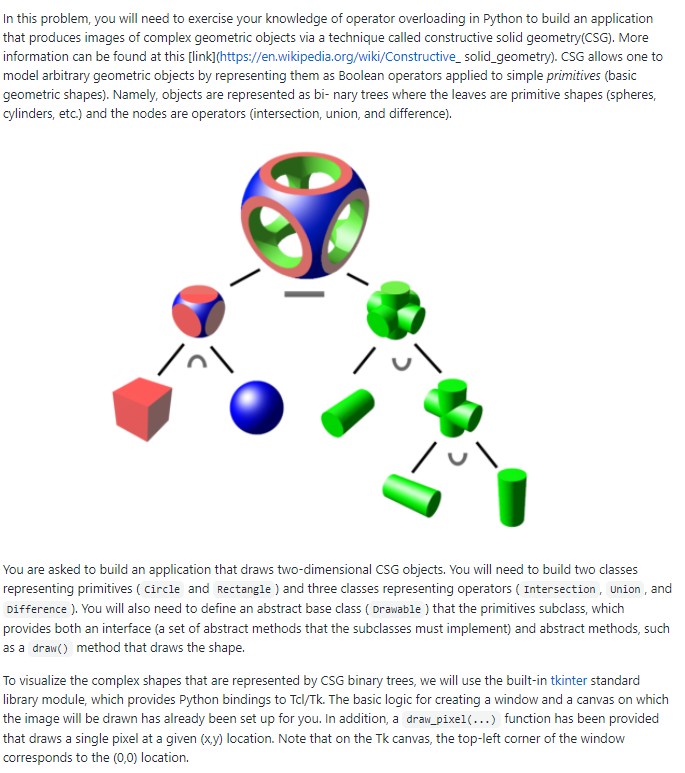
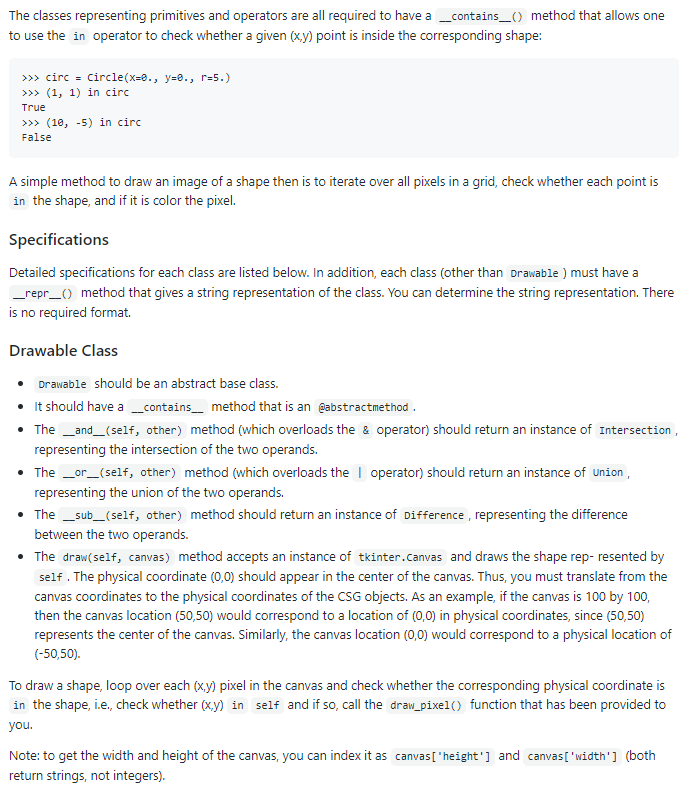
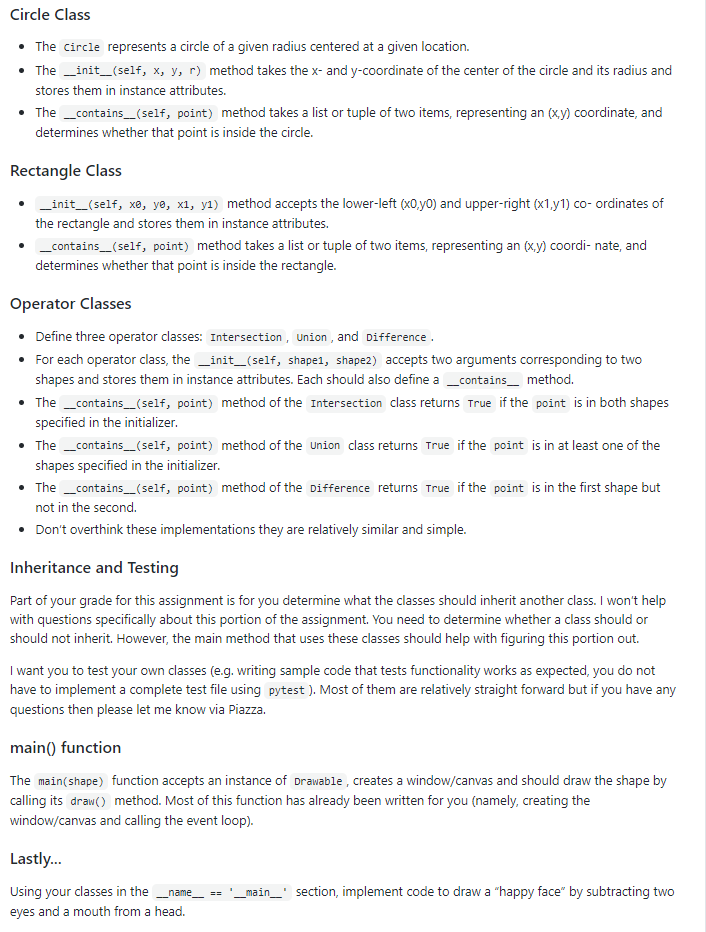
In this problem, you will need to exercise your knowledge of operator overloading in Python to build an application that produces images of complex geometric objects via a technique called constructive solid geometry(CSG). More information can be found at this [link](https://en.wikipedia.org/wiki/Constructive_solid_geometry). CSG allows one to model arbitrary geometric objects by representing them as Boolean operators applied to simple primitives (basic geometric shapes). Namely, objects are represented as bi-nary trees where the leaves are primitive shapes (spheres, cylinders, etc.) and the nodes are operators (intersection, union, and difference). inl lul You are asked to build an application that draws two-dimensional CSG objects. You will need to build two classes representing primitives (Circle and Rectangle ) and three classes representing operators ( Intersection, Union, and Difference ). You will also need to define an abstract base class (Drawable ) that the primitives subclass, which provides both an interface (a set of abstract methods that the subclasses must implement) and abstract methods, such as a draw() method that draws the shape. To visualize the complex shapes that are represented by CSG binary trees, we will use the built-in tkinter standard library module, which provides Python bindings to Tel/Tk. The basic logic for creating a window and a canvas on which the image will be drawn has already been set up for you. In addition, a draw_pixel(...) function has been provided that draws a single pixel at a given (x,y) location. Note that on the Tk canvas, the top-left corner of the window corresponds to the (0,0) location. The classes representing primitives and operators are all required to have a _contains_0 method that allows one to use the in operator to check whether a given (x,y) point is inside the corresponding shape: >>> circ = Circle(x-e., y=e., r=5.) >>> (1, 1) in circ True >>> (10,-5) in circ False A simple method to draw an image of a shape then is to iterate over all pixels in a grid, check whether each point is in the shape, and if it is color the pixel. Specifications Detailed specifications for each class are listed below. In addition, each class (other than Drawable ) must have a _repr_0 method that gives a string representation of the class. You can determine the string representation. There is no required format Drawable Class Drawable should be an abstract base class. It should have a _contains_ method that is an gabstractmethod. The _and_(self, other) method (which overloads the & operator) should return an instance of Intersection, representing the intersection of the two operands. The _or_(self, other) method (which overloads the operator) should return an instance of Union, representing the union of the two operands. The _sub_(self, other) method should return an instance of difference , representing the difference between the two operands. The draw(self, canvas) method accepts an instance of tkinter.Canvas and draws the shape represented by self. The physical coordinate (0,0) should appear in the center of the canvas. Thus, you must translate from the canvas coordinates to the physical coordinates of the CSG objects. As an example, if the canvas is 100 by 100, then the canvas location (50,50) would correspond to a location of (0,0) in physical coordinates, since (50,50) represents the center of the canvas. Similarly, the canvas location (0,0) would correspond to a physical location of (-50,50) To draw a shape, loop over each (x,y) pixel in the canvas and check whether the corresponding physical coordinate is in the shape, i.e., check whether (x,y) in self and if so, call the draw_pixel() function that has been provided to you. Note: to get the width and height of the canvas, you can index it as canvas['height'] and canvas['width'] (both return strings, not integers). Circle Class The circle represents a circle of a given radius centered at a given location. The _init__(self, x, y, r) method takes the x- and y-coordinate of the center of the circle and its radius and stores them in instance attributes. The _contains__(self, point) method takes a list or tuple of two items, representing an (xy) coordinate, and determines whether that point is inside the circle. Rectangle Class _init__(self, x, yo, x, y) method accepts the lower-left (XO.yo) and upper-right (x1,91) co-ordinates of the rectangle and stores them in instance attributes. _contains_(self, point) method takes a list or tuple of two items, representing an (x,y) coordi- nate, and determines whether that point is inside the rectangle. Operator Classes Define three operator classes: Intersection, Union, and difference. For each operator class, the _init_(self, shapei, shapez) accepts two arguments corresponding to two shapes and stores them in instance attributes. Each should also define a _contains_ method. The _contains__(self, point) method of the Intersection class returns True if the point is in both shapes specified in the initializer The _contains_(self, point) method of the Union class returns True if the point is in at least one of the shapes specified in the initializer. The _contains_(self, point) method of the Difference returns True if the point is in the first shape but not in the second. Don't overthink these implementations they are relatively similar and simple. Inheritance and Testing Part of your grade for this assignment is for you determine what the classes should inherit another class. I won't help with questions specifically about this portion of the assignment. You need to determine whether a class should or should not inherit. However, the main method that uses these classes should help with figuring this portion out. I want you to test your own classes (eg. writing sample code that tests functionality works as expected, you do not have to implement a complete test file using pytest). Most of them are relatively straight forward but if you have any questions then please let me know via Piazza. main() function The main(shape) function accepts an instance of Drawable , creates a window/canvas and should draw the shape by calling its draw() method. Most of this function has already been written for you (namely, creating the window/canvas and calling the event loop). Lastly... Using your classes in the eyes and a mouth from a head. _name__ == _main_' section, implement code to draw a "happy face" by subtracting two In this problem, you will need to exercise your knowledge of operator overloading in Python to build an application that produces images of complex geometric objects via a technique called constructive solid geometry(CSG). More information can be found at this [link](https://en.wikipedia.org/wiki/Constructive_solid_geometry). CSG allows one to model arbitrary geometric objects by representing them as Boolean operators applied to simple primitives (basic geometric shapes). Namely, objects are represented as bi-nary trees where the leaves are primitive shapes (spheres, cylinders, etc.) and the nodes are operators (intersection, union, and difference). inl lul You are asked to build an application that draws two-dimensional CSG objects. You will need to build two classes representing primitives (Circle and Rectangle ) and three classes representing operators ( Intersection, Union, and Difference ). You will also need to define an abstract base class (Drawable ) that the primitives subclass, which provides both an interface (a set of abstract methods that the subclasses must implement) and abstract methods, such as a draw() method that draws the shape. To visualize the complex shapes that are represented by CSG binary trees, we will use the built-in tkinter standard library module, which provides Python bindings to Tel/Tk. The basic logic for creating a window and a canvas on which the image will be drawn has already been set up for you. In addition, a draw_pixel(...) function has been provided that draws a single pixel at a given (x,y) location. Note that on the Tk canvas, the top-left corner of the window corresponds to the (0,0) location. The classes representing primitives and operators are all required to have a _contains_0 method that allows one to use the in operator to check whether a given (x,y) point is inside the corresponding shape: >>> circ = Circle(x-e., y=e., r=5.) >>> (1, 1) in circ True >>> (10,-5) in circ False A simple method to draw an image of a shape then is to iterate over all pixels in a grid, check whether each point is in the shape, and if it is color the pixel. Specifications Detailed specifications for each class are listed below. In addition, each class (other than Drawable ) must have a _repr_0 method that gives a string representation of the class. You can determine the string representation. There is no required format Drawable Class Drawable should be an abstract base class. It should have a _contains_ method that is an gabstractmethod. The _and_(self, other) method (which overloads the & operator) should return an instance of Intersection, representing the intersection of the two operands. The _or_(self, other) method (which overloads the operator) should return an instance of Union, representing the union of the two operands. The _sub_(self, other) method should return an instance of difference , representing the difference between the two operands. The draw(self, canvas) method accepts an instance of tkinter.Canvas and draws the shape represented by self. The physical coordinate (0,0) should appear in the center of the canvas. Thus, you must translate from the canvas coordinates to the physical coordinates of the CSG objects. As an example, if the canvas is 100 by 100, then the canvas location (50,50) would correspond to a location of (0,0) in physical coordinates, since (50,50) represents the center of the canvas. Similarly, the canvas location (0,0) would correspond to a physical location of (-50,50) To draw a shape, loop over each (x,y) pixel in the canvas and check whether the corresponding physical coordinate is in the shape, i.e., check whether (x,y) in self and if so, call the draw_pixel() function that has been provided to you. Note: to get the width and height of the canvas, you can index it as canvas['height'] and canvas['width'] (both return strings, not integers). Circle Class The circle represents a circle of a given radius centered at a given location. The _init__(self, x, y, r) method takes the x- and y-coordinate of the center of the circle and its radius and stores them in instance attributes. The _contains__(self, point) method takes a list or tuple of two items, representing an (xy) coordinate, and determines whether that point is inside the circle. Rectangle Class _init__(self, x, yo, x, y) method accepts the lower-left (XO.yo) and upper-right (x1,91) co-ordinates of the rectangle and stores them in instance attributes. _contains_(self, point) method takes a list or tuple of two items, representing an (x,y) coordi- nate, and determines whether that point is inside the rectangle. Operator Classes Define three operator classes: Intersection, Union, and difference. For each operator class, the _init_(self, shapei, shapez) accepts two arguments corresponding to two shapes and stores them in instance attributes. Each should also define a _contains_ method. The _contains__(self, point) method of the Intersection class returns True if the point is in both shapes specified in the initializer The _contains_(self, point) method of the Union class returns True if the point is in at least one of the shapes specified in the initializer. The _contains_(self, point) method of the Difference returns True if the point is in the first shape but not in the second. Don't overthink these implementations they are relatively similar and simple. Inheritance and Testing Part of your grade for this assignment is for you determine what the classes should inherit another class. I won't help with questions specifically about this portion of the assignment. You need to determine whether a class should or should not inherit. However, the main method that uses these classes should help with figuring this portion out. I want you to test your own classes (eg. writing sample code that tests functionality works as expected, you do not have to implement a complete test file using pytest). Most of them are relatively straight forward but if you have any questions then please let me know via Piazza. main() function The main(shape) function accepts an instance of Drawable , creates a window/canvas and should draw the shape by calling its draw() method. Most of this function has already been written for you (namely, creating the window/canvas and calling the event loop). Lastly... Using your classes in the eyes and a mouth from a head. _name__ == _main_' section, implement code to draw a "happy face" by subtracting two
Step by Step Solution
There are 3 Steps involved in it

Get step-by-step solutions from verified subject matter experts
 Study Help