







Question: Using Xilinx Vivado, generate this: For example, if your student matriculation number is A3456789N, then it means that the character to appear on the display
Using Xilinx Vivado, generate this:
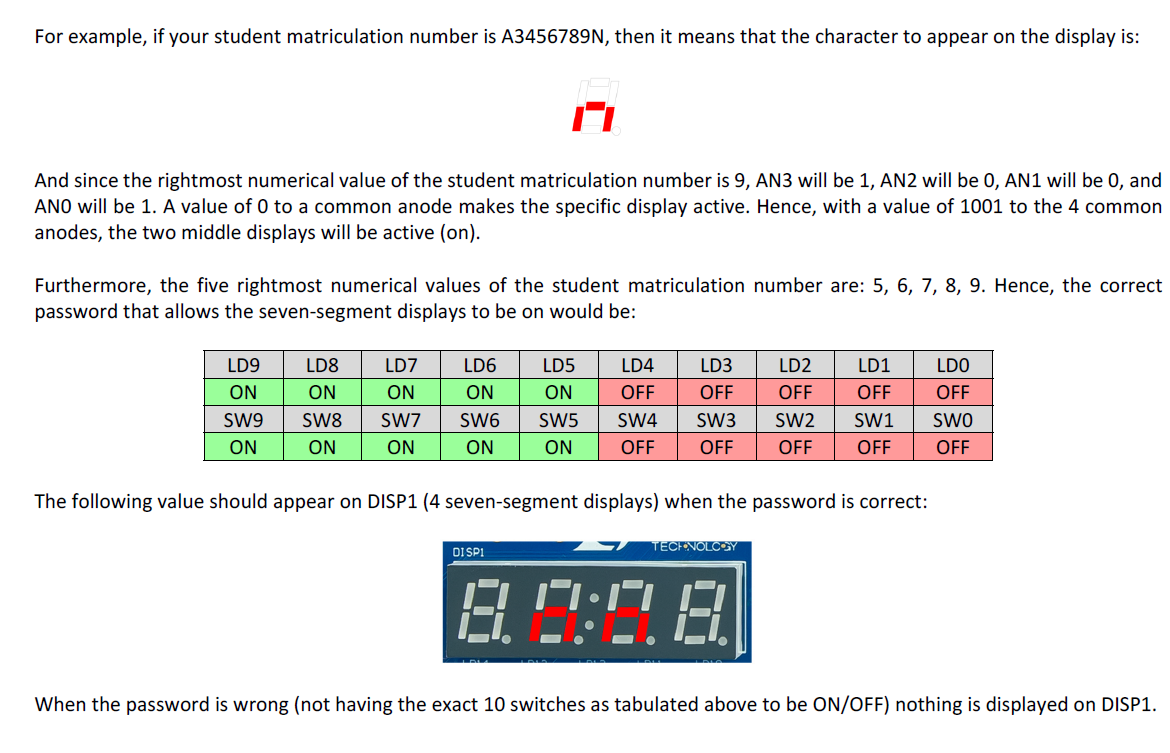
For example, if your student matriculation number is A3456789N, then it means that the character to appear on the display is: And since the rightmost numerical value of the student matriculation number is 9, AN3 will be 1, AN2 will be 0, AN1 will be 0, and ANO will be 1. A value of 0 to a common anode makes the specific display active. Hence, with a value of 1001 to the 4 common anodes, the two middle displays will be active (on). Furthermore, the five rightmost numerical values of the student matriculation number are: 5, 6, 7, 8, 9. Hence, the correct password that allows the seven-segment displays to be on would be: LD9 ON SW9 ON LD8 ON SW8 ON LD7 ON SW7 ON LD6 ON SW6 LD5 ON SW5 ON LD4 OFF SW4 OFF LD3 OFF SW3 OFF LD2 OFF SW2 OFF LD1 OFF SW1 OFF LDO OFF SWO OFF ON The following value should appear on DISP1 (4 seven-segment displays) when the password is correct: TECE VOLCOY DI SP1 A. :- 1.8 When the password is wrong (not having the exact 10 switches as tabulated above to be ON/OFF) nothing is displayed on DISP1. For example, if your student matriculation number is A3456789N, then it means that the character to appear on the display is: And since the rightmost numerical value of the student matriculation number is 9, AN3 will be 1, AN2 will be 0, AN1 will be 0, and ANO will be 1. A value of 0 to a common anode makes the specific display active. Hence, with a value of 1001 to the 4 common anodes, the two middle displays will be active (on). Furthermore, the five rightmost numerical values of the student matriculation number are: 5, 6, 7, 8, 9. Hence, the correct password that allows the seven-segment displays to be on would be: LD9 ON SW9 ON LD8 ON SW8 ON LD7 ON SW7 ON LD6 ON SW6 LD5 ON SW5 ON LD4 OFF SW4 OFF LD3 OFF SW3 OFF LD2 OFF SW2 OFF LD1 OFF SW1 OFF LDO OFF SWO OFF ON The following value should appear on DISP1 (4 seven-segment displays) when the password is correct: TECE VOLCOY DI SP1 A. :- 1.8 When the password is wrong (not having the exact 10 switches as tabulated above to be ON/OFF) nothing is displayed on DISP1
Step by Step Solution
There are 3 Steps involved in it

Get step-by-step solutions from verified subject matter experts
 Study Help