







Question: UUUULIOMU POMILJ. Purpose: Practice using the keyboard event handler in Processing and colours. Degree of Difficulty: Easy When you look at the same object under
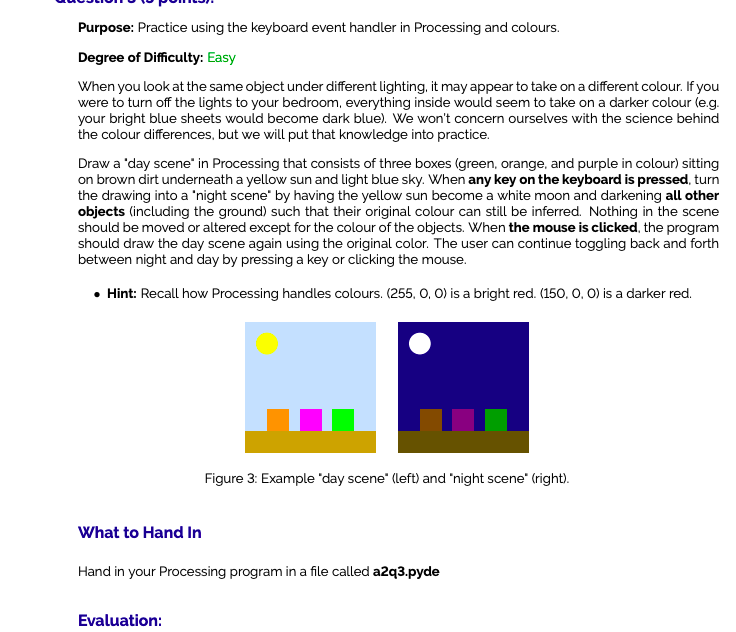
UUUULIOMU POMILJ. Purpose: Practice using the keyboard event handler in Processing and colours. Degree of Difficulty: Easy When you look at the same object under different lighting, it may appear to take on a different colour. If you were to turn off the lights to your bedroom, everything inside would seem to take on a darker colour (e.g. your bright blue sheets would become dark blue). We won't concern ourselves with the science behind the colour differences, but we will put that knowledge into practice. Draw a 'day scene in Processing that consists of three boxes (green, orange, and purple in colour) sitting on brown dirt underneath a yellow sun and light blue sky. When any key on the keyboard is pressed, turn the drawing into a 'night scene' by having the yellow sun become a white moon and darkening all other objects (including the ground) such that their original colour can still be inferred. Nothing in the scene should be moved or altered except for the colour of the objects. When the mouse is clicked, the program should draw the day scene again using the original color. The user can continue toggling back and forth between night and day by pressing a key or clicking the mouse. Hint: Recall how Processing handles colours. (255, O, O) is a bright red. (150, 0, 0) is a darker red. Figure 3: Example day scene" (left) and night scene' (right). What to Hand In Hand in your Processing program in a file called a2q3.pyde Evaluation: UUUULIOMU POMILJ. Purpose: Practice using the keyboard event handler in Processing and colours. Degree of Difficulty: Easy When you look at the same object under different lighting, it may appear to take on a different colour. If you were to turn off the lights to your bedroom, everything inside would seem to take on a darker colour (e.g. your bright blue sheets would become dark blue). We won't concern ourselves with the science behind the colour differences, but we will put that knowledge into practice. Draw a 'day scene in Processing that consists of three boxes (green, orange, and purple in colour) sitting on brown dirt underneath a yellow sun and light blue sky. When any key on the keyboard is pressed, turn the drawing into a 'night scene' by having the yellow sun become a white moon and darkening all other objects (including the ground) such that their original colour can still be inferred. Nothing in the scene should be moved or altered except for the colour of the objects. When the mouse is clicked, the program should draw the day scene again using the original color. The user can continue toggling back and forth between night and day by pressing a key or clicking the mouse. Hint: Recall how Processing handles colours. (255, O, O) is a bright red. (150, 0, 0) is a darker red. Figure 3: Example day scene" (left) and night scene' (right). What to Hand In Hand in your Processing program in a file called a2q3.pyde Evaluation
Step by Step Solution
There are 3 Steps involved in it

Get step-by-step solutions from verified subject matter experts
 Study Help