







Question: V1.Control an LED using Assembly subroutines Partitioning code into smaller subroutines results in more readable code, and further results in code that is more likely
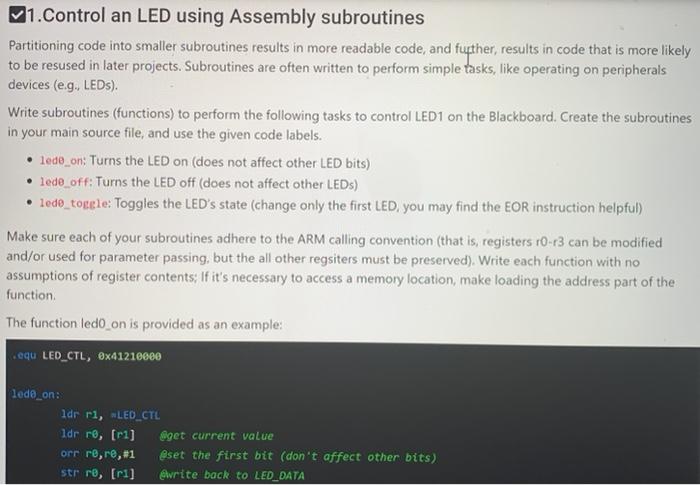
V1.Control an LED using Assembly subroutines Partitioning code into smaller subroutines results in more readable code, and further results in code that is more likely to be resused in later projects. Subroutines are often written to perform simple tasks, like operating on peripherals devices (e.g., LEDs). Write subroutines (functions) to perform the following tasks to control LED1 on the Blackboard. Create the subroutines in your main source file, and use the given code labels. 1ed0_on: Turns the LED on (does not affect other LED bits) lede off: Turns the LED off does not affect other LEDs) lede_toggle: Toggles the LED's state (change only the first LED, you may find the EOR instruction helpful) Make sure each of your subroutines adhere to the ARM calling convention (that is registers 10-13 can be modified and/or used for parameter passing, but the all other regsiters must be preserved). Write each function with no assumptions of register contents: If it's necessary to access a memory location, make loading the address part of the function The function ledo on is provided as an example: equ LED_CTL, @x41210000 lede_on: dr ri, LED_CTL Idr r, fri] eget current value orr re,r,#1 @set the first bit (don't affect other bits) str ro, [ri] @write back to LED_DATA V1.Control an LED using Assembly subroutines Partitioning code into smaller subroutines results in more readable code, and further results in code that is more likely to be resused in later projects. Subroutines are often written to perform simple tasks, like operating on peripherals devices (e.g., LEDs). Write subroutines (functions) to perform the following tasks to control LED1 on the Blackboard. Create the subroutines in your main source file, and use the given code labels. 1ed0_on: Turns the LED on (does not affect other LED bits) lede off: Turns the LED off does not affect other LEDs) lede_toggle: Toggles the LED's state (change only the first LED, you may find the EOR instruction helpful) Make sure each of your subroutines adhere to the ARM calling convention (that is registers 10-13 can be modified and/or used for parameter passing, but the all other regsiters must be preserved). Write each function with no assumptions of register contents: If it's necessary to access a memory location, make loading the address part of the function The function ledo on is provided as an example: equ LED_CTL, @x41210000 lede_on: dr ri, LED_CTL Idr r, fri] eget current value orr re,r,#1 @set the first bit (don't affect other bits) str ro, [ri] @write back to LED_DATA
Step by Step Solution
There are 3 Steps involved in it

Get step-by-step solutions from verified subject matter experts
 Study Help