







Question: Variables and Data Types Calculate Area and Perimeter Operation The user enters values for the length and width of a rectangle and clicks on the
Variables and Data Types
Calculate Area and Perimeter
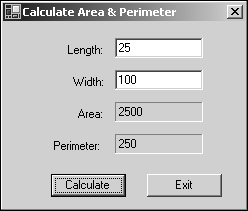
Operation
- The user enters values for the length and width of a rectangle and clicks on the Calculate button or presses the Enter key to activate the Calculate button.
- The application then displays the area and perimeter of the rectangle in two labels.
Specifications
- The formula for calculating the area: width * length.
- The formula for calculating the perimeter: 2 * width + 2 * length.
- The application should accept fractional decimal values like 10.5 and 20.65 for the user entries.
- Assume that the user will enter valid numeric data for the length and width.
Calculate Area & Perimeter Length: 25 Width: 100 Area: 2500 Perimeter: 250 Calculate Exit
Step by Step Solution
There are 3 Steps involved in it
1 Expert Approved Answer
Step: 1 Unlock

Question Has Been Solved by an Expert!
Get step-by-step solutions from verified subject matter experts
Step: 2 Unlock
Step: 3 Unlock
 Study Help