







Question: VB Topics Introduced: Windows Form, Array, Variable and Data Types, Data Assignment, Conditional Statements, Error Handling, Checkbox Control, Group Box Control, ToolTip Control, For-Next Loop,
VB Topics Introduced:
Windows Form, Array, Variable and Data Types, Data Assignment, Conditional Statements, Error Handling, Checkbox Control, Group Box Control, ToolTip Control, For-Next Loop, Listbox Control, Arrays, MsgBox
Develop a Windows Form application to calculate and display the average, standard deviation, minimum value, and maximum value 6 grades. All grades are to be stored in an Array
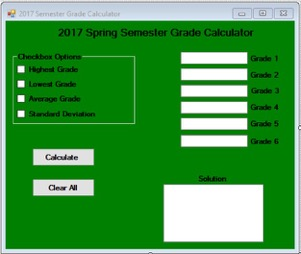
General Requirements The following must be included in your project:
The Windows Form should be easy to understand using appropriate Label and ToolTip controls to help the user navigate through the application
Comments should be placed throughout your VB code. Variables and control objects should follow common naming conventions (see common naming conventions handout)
Array : Data entered into Textbox control objects should be stored in an Array using an appropriate data type
Use Textbox controls to enter the data and to display the output.
Use a ListBox control to display the solutions
Use Error Handling (Try...CatchFinally) to account for common errors. For example, if a user enters incorrect data types into the data point textboxes
Display a message (using a MsgBox)to the user where necessary
Use a GroupBox control to contain the Checkbox controls
You can use a For-Next Loop to find the minimum and maximum values in the array
Use a Buton control to calculate the solutions and to clear all the data on the Form
2017 Spring Semester Grade Calculator Checkbox Options hkhest Grade Grade Grade Deviation Calalde Clear All
Step by Step Solution
There are 3 Steps involved in it

Get step-by-step solutions from verified subject matter experts
 Study Help