







Question: VBA question '1. Use the score data in Sheet1 (wsData) '2. Define a range variable (anchorCell) and assign it Cell A1 '3. Using the offset
VBA question
'1. Use the score data in Sheet1 (wsData)
'2. Define a range variable (anchorCell) and assign it Cell A1
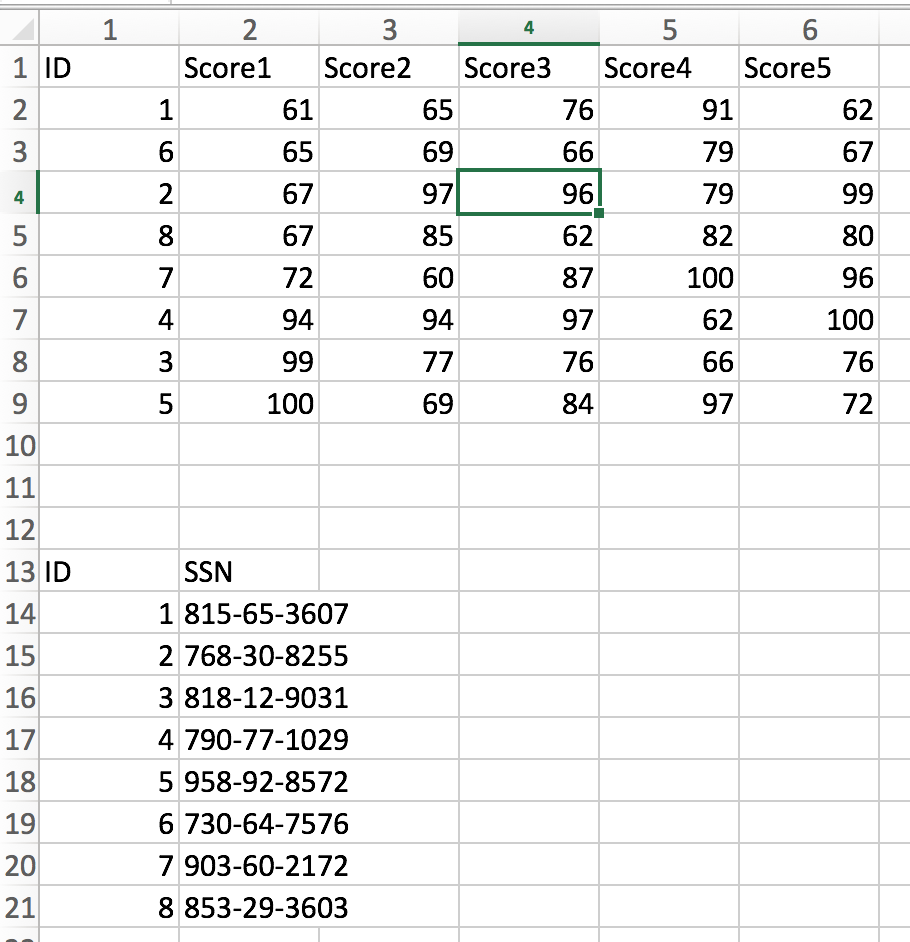
'3. Using the offset property of the anchorCell, use a message box to display the value in cell D5
'4. Using the cells property of the anchorCell, use a message box to display the value in cell C3
'5. Using range, anchorCell, the end property, select the range for the cells with the ID and SSN (Hint: Use xlDown two times to get to the top of the desired range and three times to get to the bottom of the desired range.)
'6. Using range, anchorCell, the end property and the currentRegion property to select the range for the cells with the ID and SSN
'7. Using the anchorCell, offset with the end property and the FormulaR1C1 properties place a formula under the column H that calculates the average over scores 1 to 5 for all rows 2 to 9.
'8. Using the copy and paste methods and using the anchorCell and offset to reference a cell, copy the SSN from the range B13:B21 to column I1.
'9. Sort cells in range A2:I9 according to a) descending SSN, b) ascending Score1 (note: step through the code to see the effect because once b) is ' executed, then the sorting by a) is no longer valid.)
'10. Using the anchorCell and the offset property, redefine a new range with 4 ' rows and 4 columns with the upper left-hand corner being cell C4 (Hing: use ' the property Resize(#Rows, #Cols). Then highlight the following:
' a. the 3-rd row from the top of the range of the data in yellow
' b. the fifth column from the left of the range of the data in red
' c. the Complete 7-th row from the top of the data in magenta
' d. the complete 6-th column from the left of the data in green wsData.Cells.ClearFormats End Sub
1 ID Score1 Score2 Score3 Score4 Score5 62 67 91 79 79 82 100 62 76 61 65 67 67 72 94 65 69 97 85 60 94 6 96 62 87 97 76 84 80 96 100 76 72 100 69 97 10 12 13 ID 14 15 16 17 18 19 20 21 SSN 1815-65-3607 2768-30-8255 3818-12-9031 4 790-77-1029 5958-92-8572 6 730-64-7576 7 903-60-2172 8 853-29-3603 1 ID Score1 Score2 Score3 Score4 Score5 62 67 91 79 79 82 100 62 76 61 65 67 67 72 94 65 69 97 85 60 94 6 96 62 87 97 76 84 80 96 100 76 72 100 69 97 10 12 13 ID 14 15 16 17 18 19 20 21 SSN 1815-65-3607 2768-30-8255 3818-12-9031 4 790-77-1029 5958-92-8572 6 730-64-7576 7 903-60-2172 8 853-29-3603
Step by Step Solution
There are 3 Steps involved in it

Get step-by-step solutions from verified subject matter experts
 Study Help