







Question: Vendor sheet is listed below for reference. Steps 1-4 have been completed, need help with steps 5-8. Vendor sheet: 1 Remove the duplicated entry of
Vendor sheet is listed below for reference. Steps 1-4 have been completed, need help with steps 5-8.
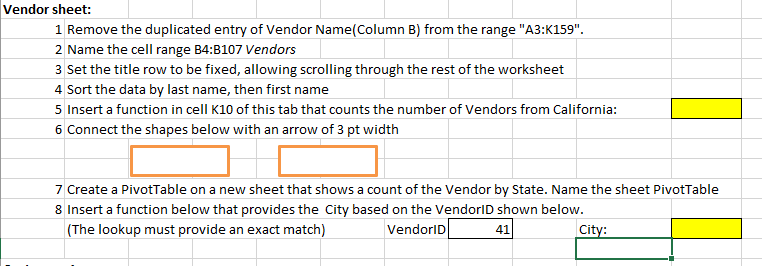
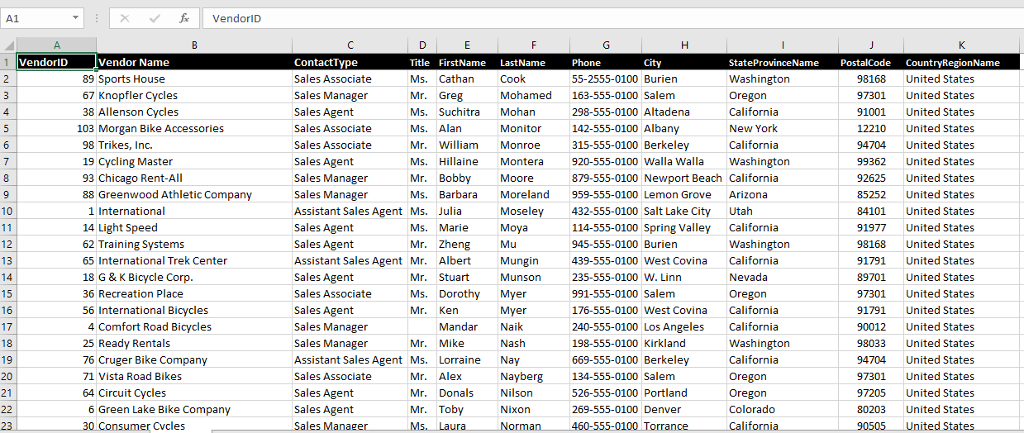
Vendor sheet: 1 Remove the duplicated entry of Vendor Name(Column B) from the range "A3:K159" 2 Name the cell range B4:B107 Vendors 3 Set the title row to be fixed, allowing scrolling through the rest of the worksheet 4 Sort the data by last name, then first name 5 Insert a function in cell K10 of this tab that counts the number of Vendors from California: 6 Connect the shapes below with an arrow of 3 pt width 7 Create a PivotTable on a new sheet that shows a count of the Vendor by State. Name the sheet PivotTable 8 Insert a function below that provides the City based on the VendorlID shown below. (The lookup must provide an exact match) VendorlD 41
Step by Step Solution
There are 3 Steps involved in it

Get step-by-step solutions from verified subject matter experts
 Study Help