







Question: Verizon 1:46 PM ?Excel-2016-ACP-4 with comme ?? Excel 2016-Application Capstone Project 4 (Chapters 5-7) For this project, you will format and modify a spreadsheet for
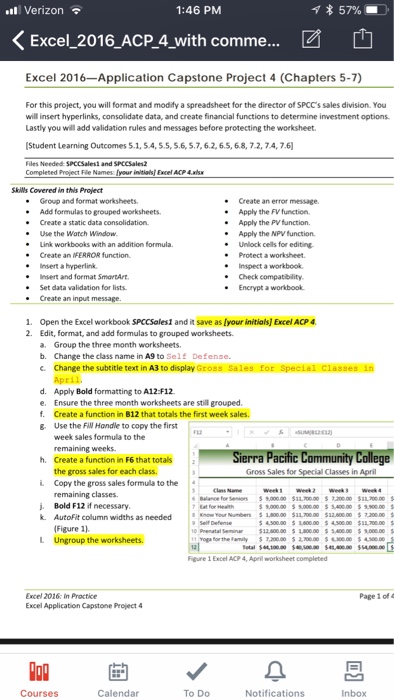
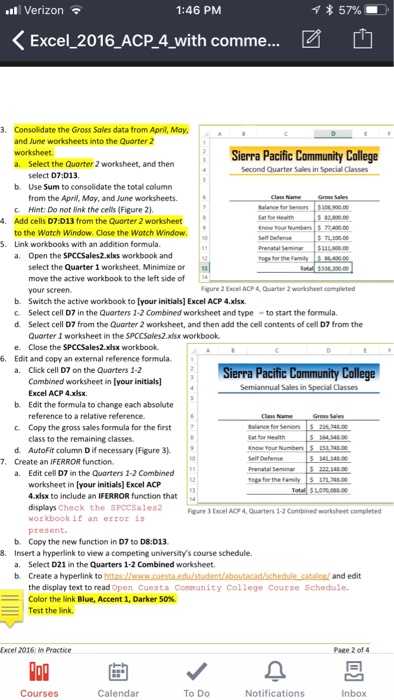
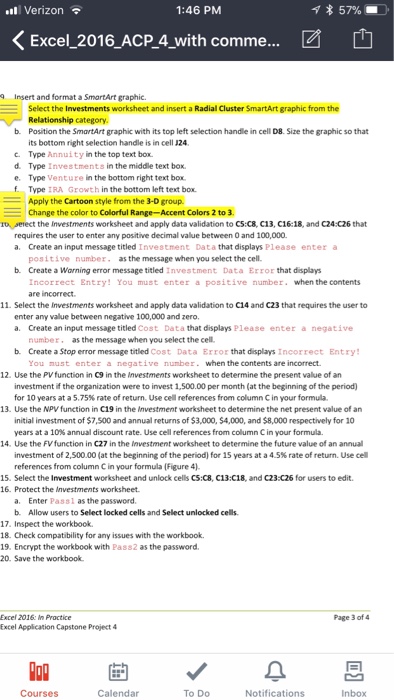
Verizon 1:46 PM ?Excel-2016-ACP-4 with comme ?? Excel 2016-Application Capstone Project 4 (Chapters 5-7) For this project, you will format and modify a spreadsheet for the director of SPCC's sales division. You will insert hyperlinks, consolidate data, and create financial functions to determine investment options. Lastly you will add validation rules and messages before protecting the worksheet. Student Learning Outcomes 5.1,5.4,5.5,5.6,5.7,6.2,6.5,6.8, 72,7.4,7.6 1 and SPCcSales Completed Project File Names your initiaisj Excel ACP 4.is SkWs Covered in this Project Group and format worksheets Add formulas to grouped worksheets Create a static data consolidation - Create an error message Apply the FV function Apply the PV function. Apply the NPV function. . Unlock cells for editing. Protect a worksheet. e Use the Wotch Window Link workbooks with an addition formula. Create an FERROR function. e Insert a hyperlink e Insert and format SmartArt * Inspect a workbook e Check compatibility. Encrypt a workbook Set data validation for lists Create an input message. 1. Open the Excel workbook SPCcSales1 and it save as [your initialsj Excel ACP4 Edit, format, and add formulas to grouped worksheets. 2. a. Group the three month worksheets b. Change the class name in A9 to Self Defense. April. d. Apply Bold formatting to A12 F12 e. Ensure the three month worksheets are still grouped f. Create a function in B12 that totals the first week sales g Use the FW Hondle to copy the first week sales formula to the h. Create a function in F6 that totalsa L Copy the gross sales formula to the j Bold F12 if necessary remaining weeks the gross sales for each class. remaining classes Gross Sales for Classes in week wet2 wee k AutoFit column widths as needed Figure 1) Figure 1 Excel A/CP 4, April worksheet completed Page 1 of Excel 2016: In Proctice Excel Application Capstone Project 4 Courses Calendar To Do Notifications Inbox Verizon 1:46 PM ?Excel-2016-ACP-4 with comme ?? Excel 2016-Application Capstone Project 4 (Chapters 5-7) For this project, you will format and modify a spreadsheet for the director of SPCC's sales division. You will insert hyperlinks, consolidate data, and create financial functions to determine investment options. Lastly you will add validation rules and messages before protecting the worksheet. Student Learning Outcomes 5.1,5.4,5.5,5.6,5.7,6.2,6.5,6.8, 72,7.4,7.6 1 and SPCcSales Completed Project File Names your initiaisj Excel ACP 4.is SkWs Covered in this Project Group and format worksheets Add formulas to grouped worksheets Create a static data consolidation - Create an error message Apply the FV function Apply the PV function. Apply the NPV function. . Unlock cells for editing. Protect a worksheet. e Use the Wotch Window Link workbooks with an addition formula. Create an FERROR function. e Insert a hyperlink e Insert and format SmartArt * Inspect a workbook e Check compatibility. Encrypt a workbook Set data validation for lists Create an input message. 1. Open the Excel workbook SPCcSales1 and it save as [your initialsj Excel ACP4 Edit, format, and add formulas to grouped worksheets. 2. a. Group the three month worksheets b. Change the class name in A9 to Self Defense. April. d. Apply Bold formatting to A12 F12 e. Ensure the three month worksheets are still grouped f. Create a function in B12 that totals the first week sales g Use the FW Hondle to copy the first week sales formula to the h. Create a function in F6 that totalsa L Copy the gross sales formula to the j Bold F12 if necessary remaining weeks the gross sales for each class. remaining classes Gross Sales for Classes in week wet2 wee k AutoFit column widths as needed Figure 1) Figure 1 Excel A/CP 4, April worksheet completed Page 1 of Excel 2016: In Proctice Excel Application Capstone Project 4 Courses Calendar To Do Notifications Inbox
Step by Step Solution
There are 3 Steps involved in it

Get step-by-step solutions from verified subject matter experts
 Study Help