







Question: Very Simple Python Sort Program! Note from teacher: Students dont have to implement the search or sort algorithms; use Python libraries if necessary. Here is
Very Simple Python Sort Program!
Note from teacher: "Students dont have to implement the search or sort algorithms; use Python libraries if necessary."
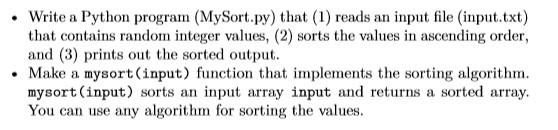
Here is the code given to us (so please use it):
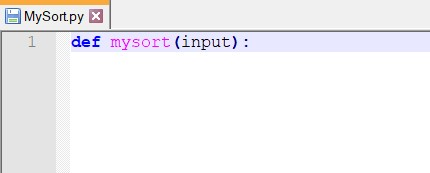
And here is the input to use:
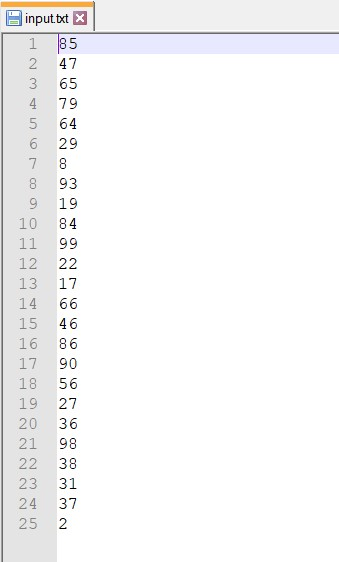
If you know how to do the steps below, that would be very helpful!
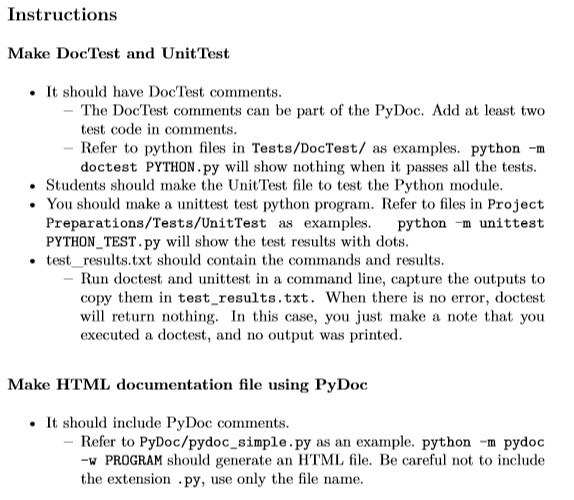
Write a Python program (MySort.py) that (1) reads an input file (input.txt) that contains random integer values, (2) sorts the values in ascending order, and (3) prints out the sorted output. Make a mysort(input) function that implements the sorting algorithm. mysort (input) sorts an input array input and returns a sorted array You can use any algorithm for sorting the values. B MySort.py X def mysort (input): input.txt 185 47 65 93 19 84 99 13 18 Instructions Make DocTest and Unit Test It should have DocTest comments. - The Doc Test comments can be part of the PyDoc. Add at least two test code in comments. - Refer to python files in Tests/DocTest/ as examples. python-m doctest PYTHON.py will show nothing when it passes all the tests. Students should make the Unit Test file to test the Python module. You should make a unittest test python program. Refer to files in Project Preparations/Tests/UnitTest as examples. python -m unittest PYTHON TEST.py will show the test results with dots. test_results.txt should contain the commands and results. - Run doctest and unittest in a command line, capture the outputs to copy them in test results.txt. When there is no error, doctest will return nothing. In this case, you just make a note that you executed a doctest, and no output was printed. Make HTML documentation file using PyDoc It should include PyDoc comments. - Refer to PyDoc/pydoc_simple.py as an example. python-m pydoc -W PROGRAM should generate an HTML file. Be careful not to include the extension .py, use only the file name
Step by Step Solution
There are 3 Steps involved in it

Get step-by-step solutions from verified subject matter experts
 Study Help