







Question: VHDL Code: Design the 16-bit Arithmetic Logic Unit (ALU) shown in the figure below. A (16-bit), B (16-bit), Opcode (3-bit), and Mode (1-bit) are the
VHDL Code:
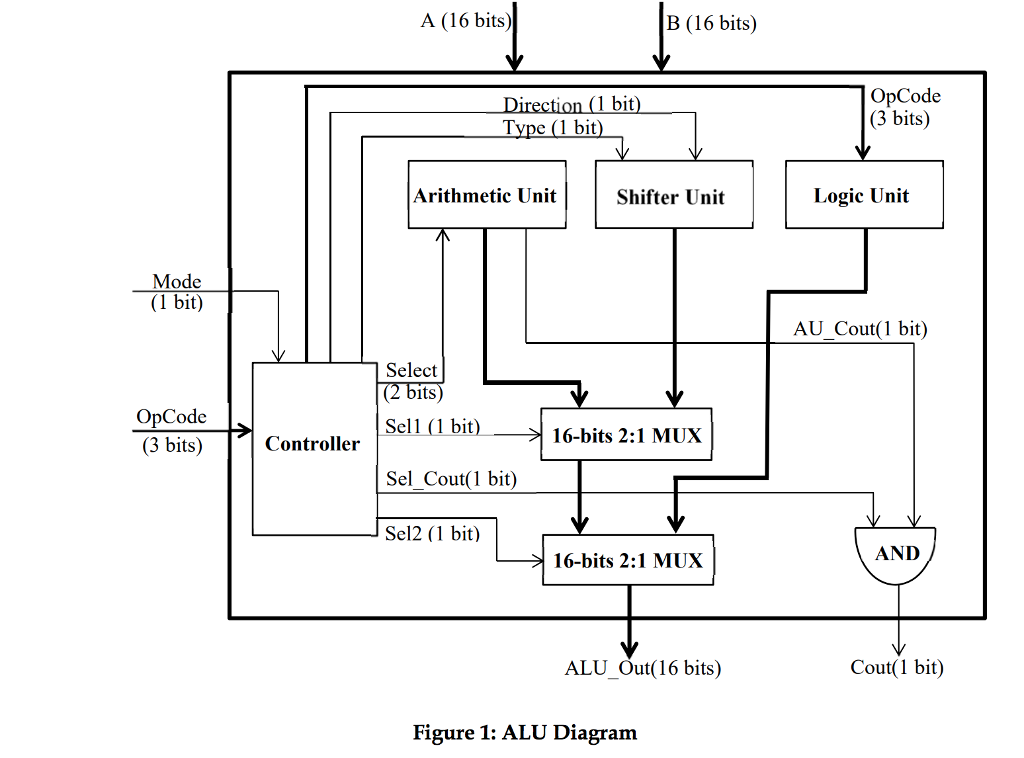
Design the 16-bit Arithmetic Logic Unit (ALU) shown in the figure below. A (16-bit), B (16-bit), Opcode (3-bit), and Mode (1-bit) are the inputs; and ALUOut (16-bit) and Cout (1-bit) are the outputs of the design. A and B hold the values of the operands. Mode and Opcode together indicate the type of the operation performed by ALU.
Components:
-Design the Arithmetic Unit that consists of one 16-bit adder, 16-bit subtractor, 16-bit incrementer, and 8-bit multiplier. The least-significant eight bits of A and B are used as inputs of the multiplier. The output will be 16-bit.
-Design a 16-bit Logic Unit which performs the following operations: A and B, A or B, A nand B, A nor B, A xor B, A xnor B, Not A and Not B.
-Design a 16-bit Shifter unit with A, B, Type and Direction as inputs and ShiftOut as output. The value of A should be shifted by the value specified in B. The Direction bit is used to determine whether to shift left (0) or right (1) and the Type bit is used to determine whether to Shift (0) or Rotate (1) the data.
-Design a 16-bit 2-to-1 Multiplexer. The MUXes are utilized in order to route the outputs of functional units to ALU output.
-Design the controller that is responsible for generating the required control signals for all functional blocks in your design. Select is used to select the functional unit for the corresponding operation in Arithmetic Unit. Sel1 and Sel2 are utilized as select signals of MUXes. Sel_Cout is used to control the cout of ALU, its value is 1 when ALU doing arithmetical operations; otherwise, it is 0. Direction bit determines the direction of shift operation and Type bit determines the way of shifting. Opcode is used to select the type of operation and could be used as input to all three functional units.
Step by Step Solution
There are 3 Steps involved in it

Get step-by-step solutions from verified subject matter experts
 Study Help