







Question: View and interpret information from the following table Answer the following questions based on the information in the image below: a. What does the letter
View and interpret information from the following table
Answer the following questions based on the information in the image below:
a. What does the letter to the left of each line represent? (C, L, R, S*)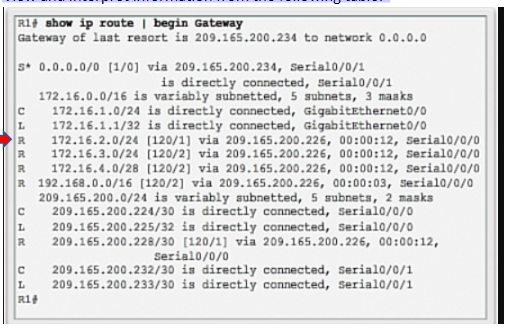 b. Why are some lines indented?
c. Interpret the line noted with a red arrow. How would this information be used by a router or a network admin when troubleshooting? (Explain each item on the row.) R 172.16.2.0/24 120/1 Via 109.165.200.226 00:00:12 Serial 0/0/0
UH L R R R1show ip route begin Gateway Gateway of last resort is 209.165.200.234 to network 0.0.0.0 s* 0.0.0.0/0 [1/0] via 209.165.200.234, Serial0/0/1 is directly connected, Serial0/0/1 172.16.0.0/16 is variably subnetted, 5 subnets, 3 masks 172.16.1.0/24 is directly connected, GigabitEthernet0/0 172.16.1.1/32 is directly connected, GigabitEthernet0/0 172.16.2.0/24 (120/1] via 209.165.200.226, 00:00:12, Serial0/0/0 172.16.3.0/24 (120/2] via 209.165.200.226, 00:00:12, Serial0/0/0 R 172.16.4.0/28 (120/2] via 209.165.200.226, 00:00:12, Serial0/0/0 R 192.168.0.0/16 (120/2] via 209.165.200.226, 00:00:03, Serial0/0/0 209.165.200.0/24 is variably subnetted, 5 subnets, 2 masks 209.165.200.224/30 is directly connected, Serial0/0/0 209.165.200.225/32 is directly connected, Serial0/0/0 R 209.165.200.228/30 [120/1] via 209.165.200.226, 00:00:12, Serial0/0/0 209.165.200.232/30 is directly connected, Serial0/0/1 209.165.200.233/30 is directly connected, Serial0/0/1 R1 L L
Step by Step Solution
There are 3 Steps involved in it

Get step-by-step solutions from verified subject matter experts
 Study Help