







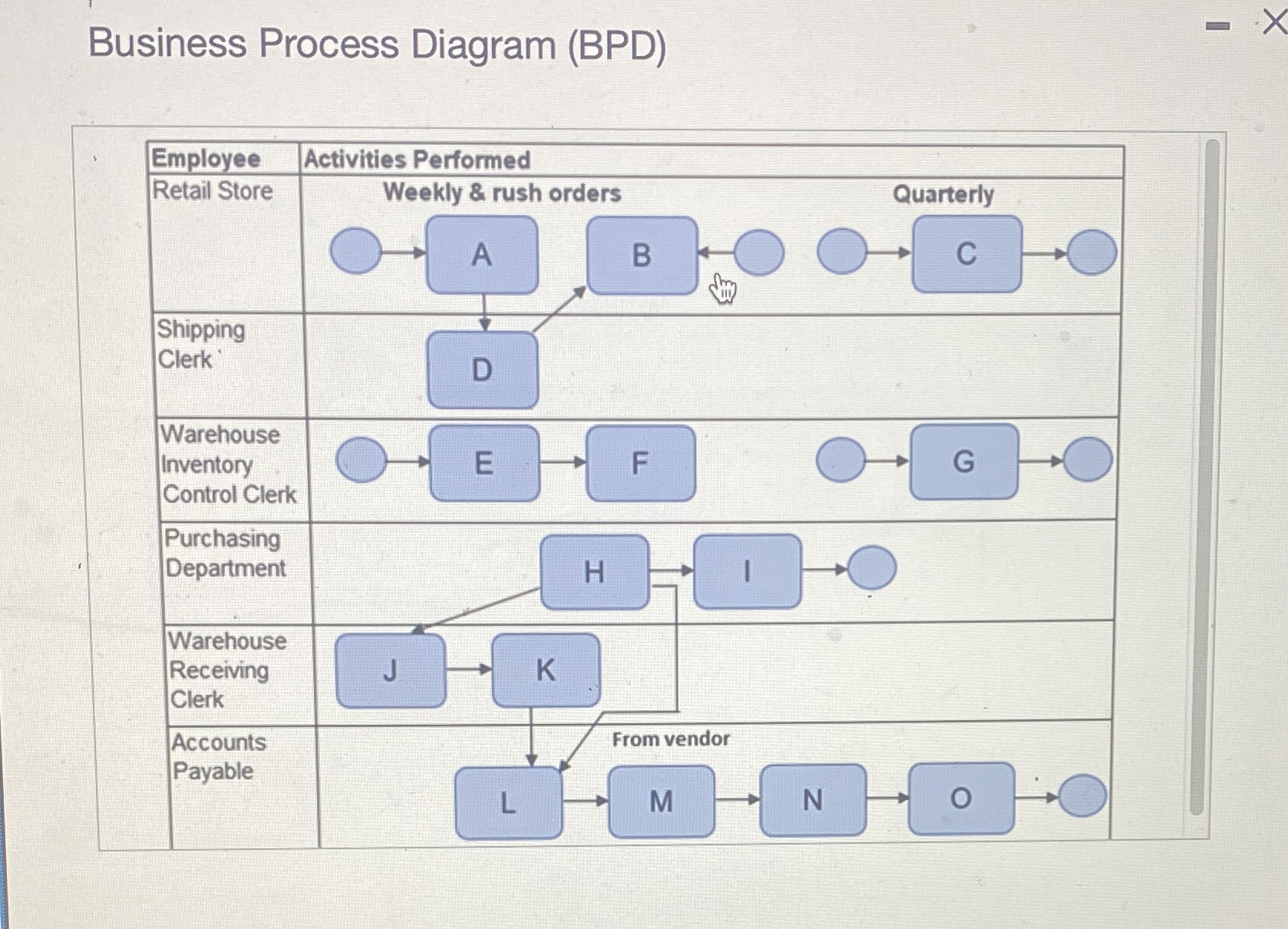
Question: View the Business Process Diagram ( BPD ) that documents Beccans Business processes and select the description for each symbol. Begin by selecting the description
View the Business Process Diagram BPD that documents Beccans Business processes and select the description for each symbol.
Begin by selecting the description for the symbols A through O
Description
Adjust and approve purchase requisition
Approve inventory count
Approve the receiving report
Count inventory and reconcile to corporate database
Disburse funds to vendors
Fill orders, authorize delivery, ship goods
Finalize and approve system generated PO
Forward cash disburement vouchers
Get receiving report and PO
Maintain and update perpetual inventory system
Receive goods
Receive goods, complete receiving report: date and quantity
Receive system prepared receiving report
Receive vendor invoice
Reconcile P O receiving report, invoice
Review disburse funds to vendors
Review inventory, place order
Send PO to vendor
System generates purchse requisition
Step by Step Solution
There are 3 Steps involved in it
1 Expert Approved Answer
Step: 1 Unlock

Question Has Been Solved by an Expert!
Get step-by-step solutions from verified subject matter experts
Step: 2 Unlock
Step: 3 Unlock
 Study Help