







Question: Visual Basic Create a new project Account Class Table I: Properties of class to be used in this application. Serial # Class Name Purpose 1
Visual Basic
Create a new project Account Class
Table I: Properties of class to be used in this application.
Serial # Class Name Purpose
Balance Holds the current account balance
IntRate Holds the interest rate for the period
Interest Holds the interest earned for the current period
Transactions Holds the number of transactions for the current period
Table II: Methods to be used in the current application.
Serial # Method Name Purpose
MakeDeposit This method takes an argument, which is the amount of This argument is added to the Balance property deposit.
Withdraw This method takes an argument, which is the amount of
withdrawal. This value is subtracted from the Balance property, unless the withdrawal amount is greater
than the balance. If this happens, an error message is displayed through a message box.
CalcInterest This method computes the amount of interest for the current period and stores this value in the Interest property and adds to it to the Balance property.
You are supposed to demonstrate the class in an application that could perform the following tasks:
Allows the deposit to be made to the account.
Allows the withdrawals to be taken subtracted from the account.
Calculates the interest for the period.
Report the current account balance at any time.
Reports the current number of transactions at any time.
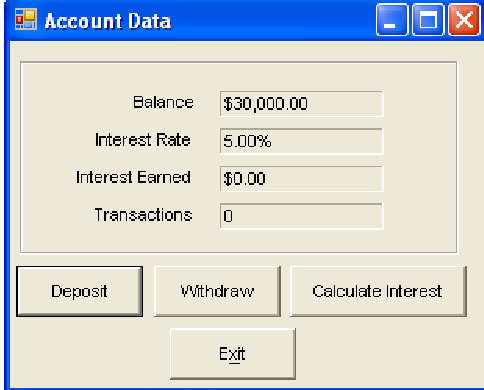
The GUI for the main form control is shown in Fig. which contains eight label controls in a GroupBox
and four button controls outside the group box. Among these eight label controls, i four are default
label controls whose text properties are shown in GUI of Fig. and ii the rest four label controls are
used to display the output data of each transaction and should have the name property; lblBalance,
lblIntRate, lblInterest and lblTransactions. The purpose of four button controls is listed as follows: i
the first one is to Deposit money, ii the second one is to Withdraw money, iii the third one is to
Calculate Interest on current balance and iv the fourth one is to Exit the application. The name
property of respective button control should be btnDeposit, btnWithraw, btnCalc and btnExit. Each
transaction is to be done with the help of an Input Message Box.
Account Data
Calculate Interest
Step by Step Solution
There are 3 Steps involved in it
1 Expert Approved Answer
Step: 1 Unlock

Question Has Been Solved by an Expert!
Get step-by-step solutions from verified subject matter experts
Step: 2 Unlock
Step: 3 Unlock
 Study Help