







Question: Visual Basic In this assignment you create a small project where you enter your first name and last name, then click on a button to
Visual Basic
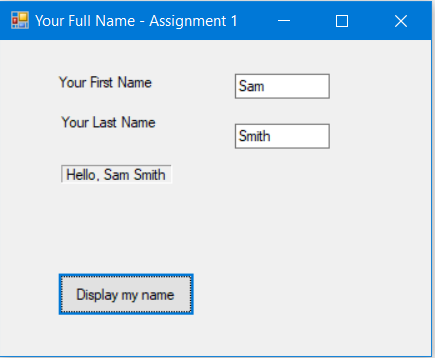
In this assignment you create a small project where you enter your first name and last name, then click on a button to display: Hello, . See below screenshot for completed project.
Here is the instructions:
Create a new project and name it as yourlastname-firstname-Assignment1. Save this project in VB folder you created earlier.
Using forms Text property, change the title to: Your full name Assignment 1.
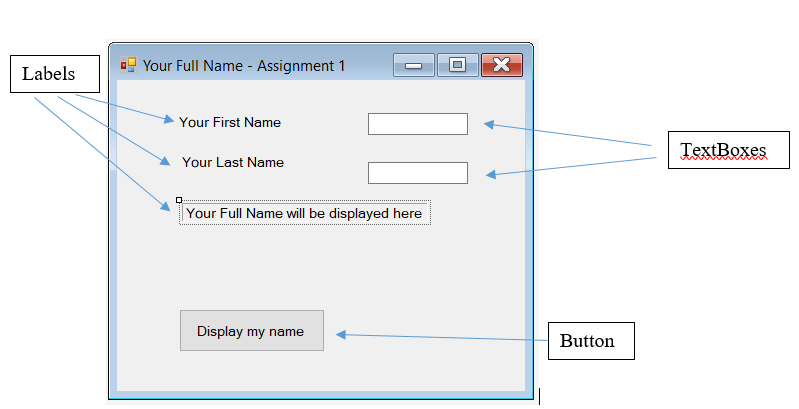
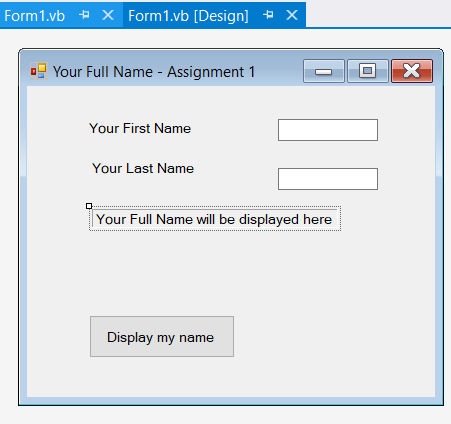
From Toolbox (Click on View menu option and choose Toolbox), Add three Labels, two TextBoxes, and a Button controls on the form. You use TextBoxes to input your first name and last name. See below Form Layout with Controls for more details.
Select Label1 and in its Text property type: Your First Name.
Select Label 2 and in its Text property type: Your Last Name.
Select Label3 and in its Text property type: Your Full name will be displayed here; Name Label3 as: lblFullName; change BorderStyle to Fixed3D; change AutoSize to True.
Select Button1 and in its Text property type: "Display my name" This is the label for the button. Name the Button as: btnDisplayName
Select TextBox1 and Name it as: txtFirstName.
Select TextBox2 and Name it as: txtLastName.
Double-click the button and type the following code inside the button Sub procedure to display:
"Hello, " & content of txtFirstName & space & content of txtLastName.
You can access the content of a TextBox from its Text property.
To start with your code, try this: lblFullName.text = "Hello, " & txtFirstName.text .... And continue.
Run the program, press the button, Hello, displays on the label.
How would you continue the code?
Thanks!
Labels Your Full Name-Assignment 1 Your First Name Your Last Name Your Full Name will be displayed here Display my name Button Form 1.vb Form 1.vb [Design] Your Full Name - Assignment 1 Your First Name Your Last Name Your Full Name will be displayed here Display my name Your Full Name-Assignment 1- Your First Name Sam Your Last Name Smith Hello.Sam Smith Display my name
Step by Step Solution
There are 3 Steps involved in it

Get step-by-step solutions from verified subject matter experts
 Study Help