







Question: Visual Basic Language/Visual Program (Requirements Provided in Image) Details provided to be able to easily duplicate the code in the visual studio would be greatly
Visual Basic Language/Visual Program (Requirements Provided in Image) Details provided to be able to easily duplicate the code in the visual studio would be greatly appreciated. Thanks!
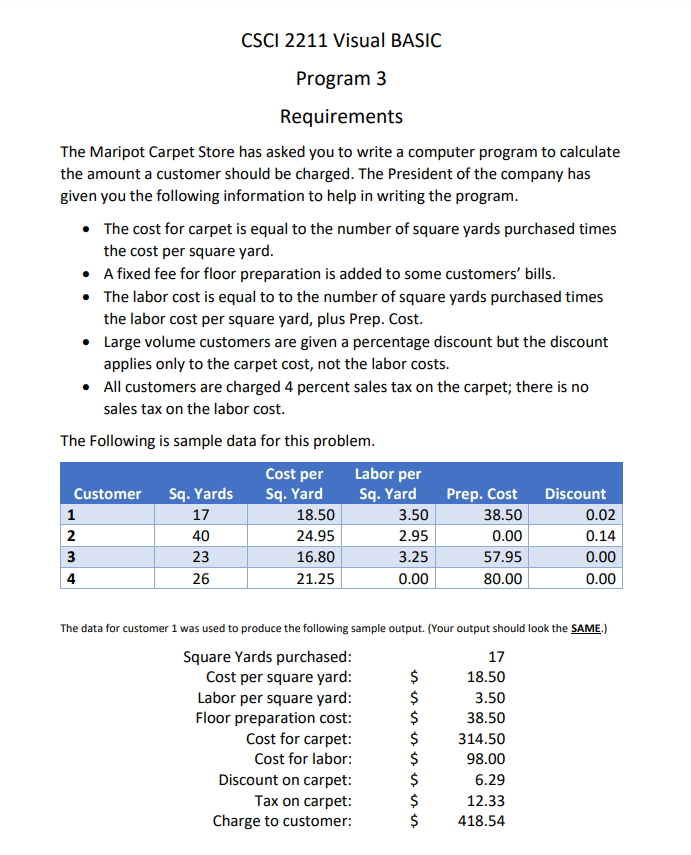
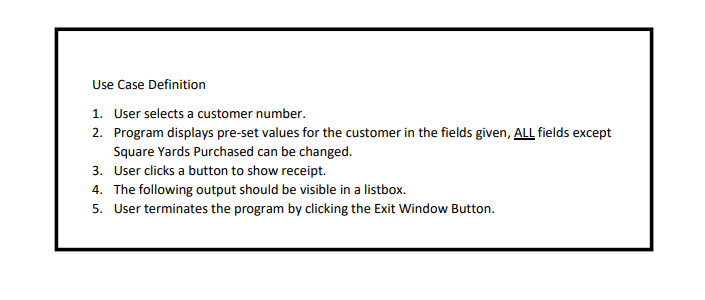
CSCI 2211 Visual BASIC Program 3 Requirements The Maripot Carpet Store has asked you to write a computer program to calculate the amount a customer should be charged. The President of the company has given you the following information to help in writing the program. The cost for carpet is equal to the number of square yards purchased times the cost per square yard. A fixed fee for floor preparation is added to some customers' bills. The labor cost is equal to to the number of square yards purchased times the labor cost per square yard, plus Prep. Cost. Large volume customers are given a percentage discount but the discount applies only to the carpet cost, not the labor costs. All customers are charged 4 percent sales tax on the carpet; there is no sales tax on the labor cost. The Following is sample data for this problem. Cost per Labor per Customer Sq.Yards Sq.Yard Sq.Yard Prep. Cost Discount 1 17 18.50 3.50 38.50 0.02 2 24.95 2.95 0.00 0.14 3 16.80 3.25 57.95 0.00 4 26 21.25 0.00 80.00 0.00 40 23 $ The data for customer 1 was used to produce the following sample output. (Your output should look the SAME.) Square Yards purchased: 17 Cost per square yard: $ 18.50 Labor per square yard: 3.50 Floor preparation cost: $ 38.50 Cost for carpet: $ 314.50 Cost for labor: $ 98.00 Discount on carpet: 6.29 Tax on carpet: $ 12.33 Charge to customer: $ 418.54 Use Case Definition 1. User selects a customer number. 2. Program displays pre-set values for the customer in the fields given, ALL fields except Square Yards Purchased can be changed. 3. User clicks a button to show receipt. 4. The following output should be visible in a listbox. 5. User terminates the program by clicking the Exit Window Button
Step by Step Solution
There are 3 Steps involved in it

Get step-by-step solutions from verified subject matter experts
 Study Help