







Question: Visual Basic operates in a GUI (Graphical User Interface) environment. Provide a detailed response to the following questions, following the correct order of steps required
Visual Basic operates in a GUI (Graphical User Interface) environment. Provide a detailed response to the following questions, following the correct order of steps required to complete your response;
- As you may encounter from the following screen capture, the interface and initial properties are specified. (1) The title bar caption portrays Text Box, with (2) the appropriate control objects on the form are illustrated.
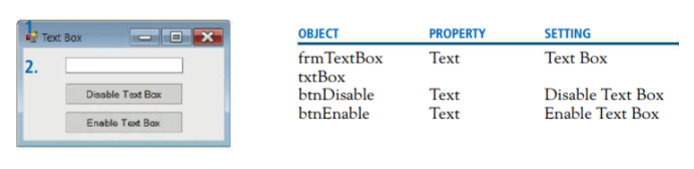 - Write the required lines of code (statements) to carry out the selected tasks.
 - The user can disable or enable the textbox by clicking on the appropriate button.
- After the user clicks on the Enable button, the textbox should receive the focus.
SETTING Text Box Disable Text Box PROPERTY OBJECT frm TextBox txtBox btnDisable Text btnEnable ? Text Box Text 2. Disable Text Box Text Enable Text Box Enable Tet Box
Step by Step Solution
There are 3 Steps involved in it
1 Expert Approved Answer
Step: 1 Unlock

Question Has Been Solved by an Expert!
Get step-by-step solutions from verified subject matter experts
Step: 2 Unlock
Step: 3 Unlock
 Study Help