







Question: Visual Basic please help! Windows forms.NET All of problem 1 needs to be done. There is an example of what the output looks like below.
Visual Basic please help! Windows forms.NET
All of problem 1 needs to be done. There is an example of what the output looks like below. Please follow the tasks.

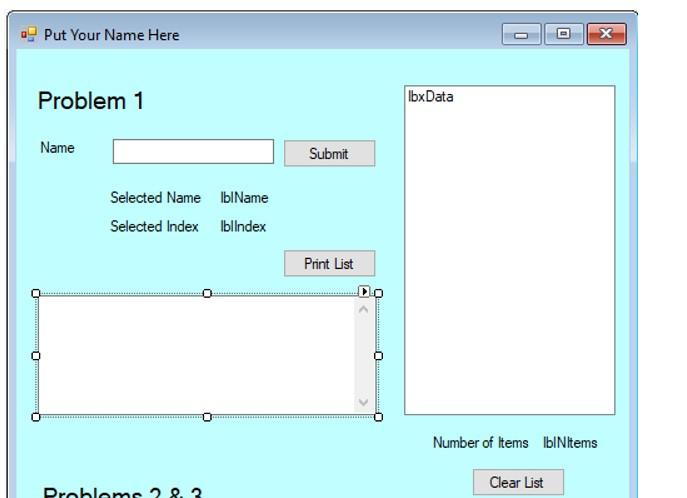
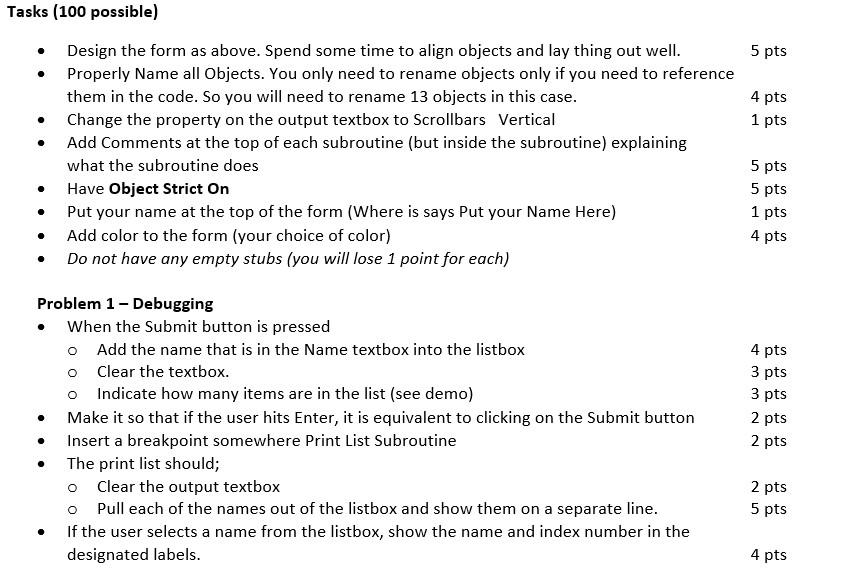
Problem 1- At run time let the user enter names one at a time into the application, and each time add them to a list box. At any time, the user can hit the Print List button, which will output the list of names to a text box, with each name on a separate line. You need to have a breakpoint set in the code where it is printing the list. Put Your Name Here x Problem 1 IbxData Name Submit Selected Name blame Selected Index blindex Print List 0 Number of Items lblNItems Clear List Probleme 28.2 5 pts 4 pts 1 pts Tasks (100 possible) Design the form as above. Spend some time to align objects and lay thing out well. Properly Name all Objects. You only need to rename objects only if you need to reference them in the code. So you will need to rename 13 objects in this case. Change the property on the output textbox to Scrollbars Vertical Add Comments at the top of each subroutine (but inside the subroutine) explaining what the subroutine does Have Object Strict On Put your name at the top of the form (Where is says Put your Name Here) Add color to the form (your choice of color) Do not have any empty stubs (you will lose 1 point for each) 5 pts 5 pts 1 pts 4 pts . . Problem 1 - Debugging When the Submit button is pressed o Add the name that is in the Name textbox into the listbox o clear the textbox. o Indicate how many items are in the list (see demo) Make it so that if the user hits Enter, it is equivalent to clicking on the Submit button Insert a breakpoint somewhere Print List Subroutine The print list should; o clear the output textbox o Pull each of the names out of the listbox and show them on a separate line. If the user selects a name from the listbox, show the name and index number in the designated labels. 4 pts 3 pts 3 pts 2 pts 2 pts . 2 pts 5 pts 4 pts
Step by Step Solution
There are 3 Steps involved in it

Get step-by-step solutions from verified subject matter experts
 Study Help