







Question: Visual Basic Program: Find attached case programming assignment. Please show the screenshots of the output. Case Programming Assignments 4 Design a Windows application and write
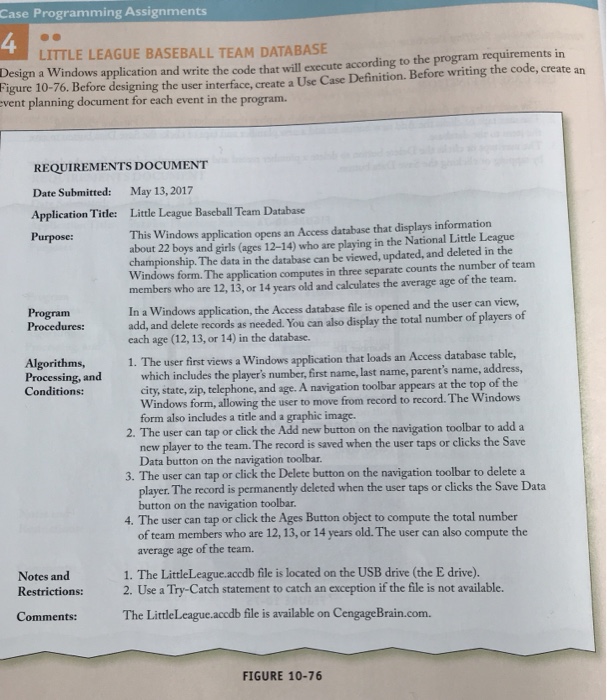
Case Programming Assignments 4 Design a Windows application and write the code that will execute according to the program requirements in LITTLE LEAGUE BASEBALL TEAM DATABASE igure 10-76. Before designing the user interface, create a Use Case Definition. Before writing the code, create an vent planning document for each event in the REQUIREMENTS DOCUMENT Date Submitted: May 13, 2017 Application Title: Little League Baseball Team Database Purpose: This Windows application opens an Access database that displays information about 22 boys and girls (ages 12-14) who are playing in the National Little League championship. The data in the database can be viewed, updated, and deleted in the Windows form. The application computes in three separate counts the number of team members who are 12, 13, or 14 years old and calculates the average age of the team. Program Procedures: In a Windows application, the Access database file is opened and the user can view, add, and delete records as needed. You can also display the total number of players of each age (12, 13, or 14) in the database. user first views a Windows application that loads an Access database table Algorithms, Processing, and Conditions: players number, first name, last name, parent's name, address, which includes the city, state, zip, telephone, and age. A navigation toolbar appears at the top of the indows form, allowing the user to move from record to record. The Windows form also includes a title and a graphic image. 2. The user can tap or click the Add new button on the navigation toolbar to add a 3. The user can tap or click the Delete button on the navigation toolbar to delete a 4. The user can tap or click the Ages Button object to compute the total number 1. The LittleLeague.accdb file is located on the USB drive (the E drive). new player to the team. The record is saved when the user taps or clicks the Save Data button on the navigation toolbar player. The record is permanently deleted when the user taps or clicks the Save Data button on the navigation toolbar. of team members who are 12, 13, or 14 years old. The user can also compute the average age of the team. Notes and Restrictions: Comments: 2. Use a Try-Catch statement to catch an exception if the file is not available. The LittleLcague.accdb file is available on CengageBrain.com. FIGURE 10-76 Case Programming Assignments 4 Design a Windows application and write the code that will execute according to the program requirements in LITTLE LEAGUE BASEBALL TEAM DATABASE igure 10-76. Before designing the user interface, create a Use Case Definition. Before writing the code, create an vent planning document for each event in the REQUIREMENTS DOCUMENT Date Submitted: May 13, 2017 Application Title: Little League Baseball Team Database Purpose: This Windows application opens an Access database that displays information about 22 boys and girls (ages 12-14) who are playing in the National Little League championship. The data in the database can be viewed, updated, and deleted in the Windows form. The application computes in three separate counts the number of team members who are 12, 13, or 14 years old and calculates the average age of the team. Program Procedures: In a Windows application, the Access database file is opened and the user can view, add, and delete records as needed. You can also display the total number of players of each age (12, 13, or 14) in the database. user first views a Windows application that loads an Access database table Algorithms, Processing, and Conditions: players number, first name, last name, parent's name, address, which includes the city, state, zip, telephone, and age. A navigation toolbar appears at the top of the indows form, allowing the user to move from record to record. The Windows form also includes a title and a graphic image. 2. The user can tap or click the Add new button on the navigation toolbar to add a 3. The user can tap or click the Delete button on the navigation toolbar to delete a 4. The user can tap or click the Ages Button object to compute the total number 1. The LittleLeague.accdb file is located on the USB drive (the E drive). new player to the team. The record is saved when the user taps or clicks the Save Data button on the navigation toolbar player. The record is permanently deleted when the user taps or clicks the Save Data button on the navigation toolbar. of team members who are 12, 13, or 14 years old. The user can also compute the average age of the team. Notes and Restrictions: Comments: 2. Use a Try-Catch statement to catch an exception if the file is not available. The LittleLcague.accdb file is available on CengageBrain.com. FIGURE 10-76
Step by Step Solution
There are 3 Steps involved in it

Get step-by-step solutions from verified subject matter experts
 Study Help