







Question: Visual Basic programming please help! Create an application named Kayak Browser that lets the user select different types of kayaks from a list box. When
Visual Basic programming please help!
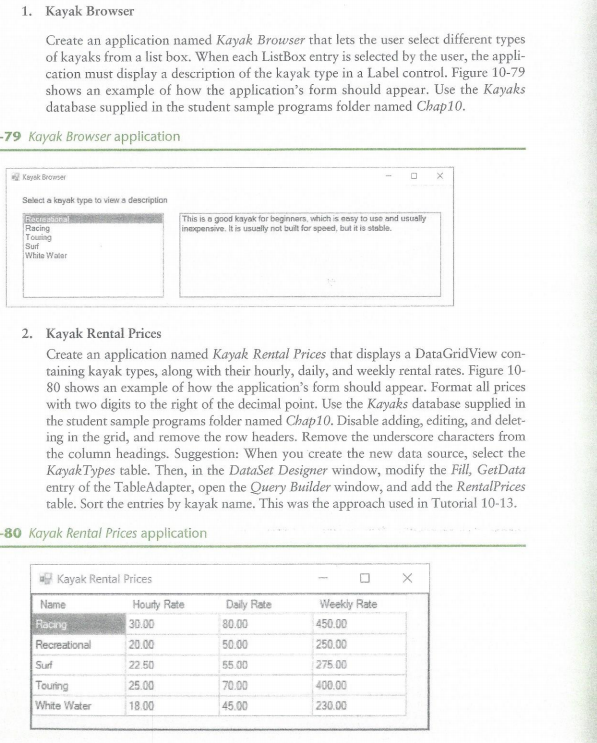
Create an application named Kayak Browser that lets the user select different types of kayaks from a list box. When each ListBox entry is selected by the user, the application must display a description of the kayak type in a Label control. Figure 10-79 shows an example of how the application's form should appear. Use the Kayaks database supplied in the student sample programs folder named Chap10. Kayak Rental Prices Create an application named Kayak Rental Prices that displays a DataGridView containing kayak types, along with their hourly, daily, and weekly rental rates. Figure 10-80 shows an example of how the application's form should appear. Format all prices with two digits to the right of the decimal point. Use the Kayaks database supplied in the student sample programs folder named Chap10. Disable adding, editing, and deleting in the grid, and remove the row headers. Remove the underscore characters from the column headings. Suggestion: When you create the new data source, select the KayakTypes table. Then, in the DataSet Designer window, modify the Fill, GetData entry of the TableAdapter, open the Query Builder window, and add the RentalPrices table. Sort the entries by kayak name. This was the approach used in Tutorial 10-13
Step by Step Solution
There are 3 Steps involved in it

Get step-by-step solutions from verified subject matter experts
 Study Help