







Question: Visual Basic Programming! Please Help! New to VB.NET. Please show or say the names of textboxes, radio buttons, etc. Thank you! Please help! Develop a
Visual Basic Programming! Please Help! New to VB.NET. Please show or say the names of textboxes, radio buttons, etc. Thank you! Please help!
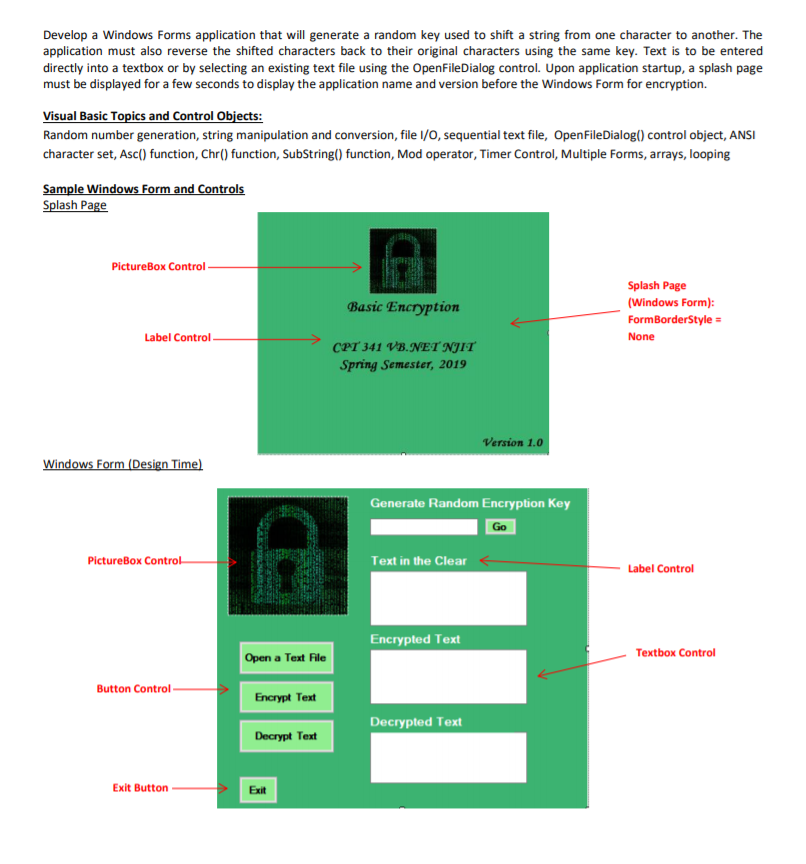
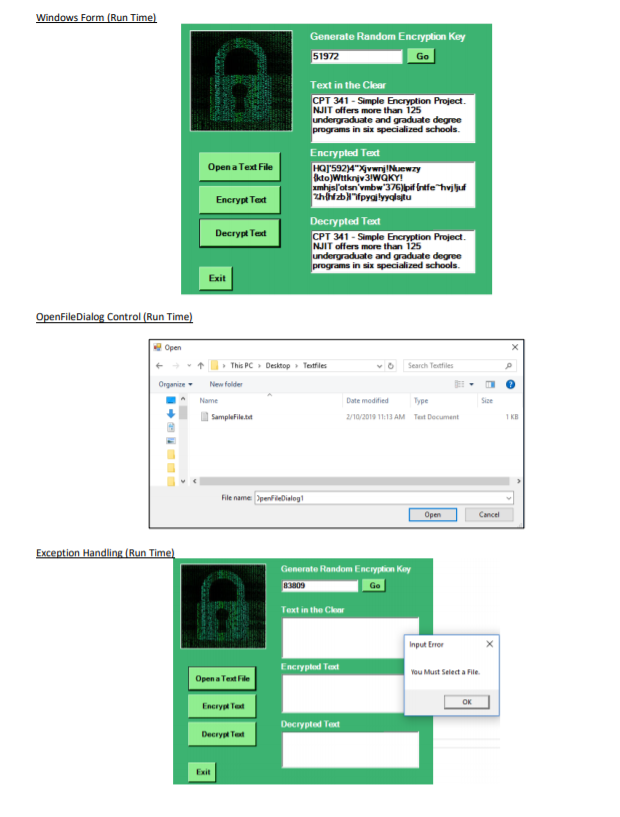
Develop a Windows Forms application that will generate a random key used to shift a string from one character to another. The application must also reverse the shifted characters back to their original characters using the same key. Text is to be entered directly into a textbox or by selecting an existing text file using the OpenFileDialog control. Upon application startup, a splash page must be displayed for a few seconds to display the application name and version before the Windows Form for encryption. Visual Basic Topics and Control Objects: Random number generation, string manipulation and conversion, file I/O, sequential text file, OpenFileDialog() control object, ANS character set, Asc() function, Chr() function, SubString() function, Mod operator, Timer Control, Multiple Forms, arrays, looping Splash Page PictureBox Control Splash Page (Windows Form): FormBorderStyle- None Basic Encryption Label Control CPI 341 VB.NET NgIT Spring Semester, 2019 Version 1.0 in Generate Random Encryption Key Go PictureBox C Text in the Clear Label Control Encrypted Text Textbox Control Open a Text File Button Control Encrypt Text Decrypted Text Decrypt Text Exit Button Exit Generate Random Encryption Key 51972 Go Text in the Clear CPT 341-Simple Encryption Project NJIT offHers more than 125 Encrypted Tet Open a Text File Encrypt Tet Decrypted Ted Decrypt Teat CPT 341-Simple Encryption Project NJIT offers more than 125 Exit FileDialog Control (Run Time tThis PC DesktopTeatiles v Search Tetfiles OrganiceNew folde Name Date modifiedType Size /10/2019 11:13 AM Test Document 1 KB File name penFleDialog Open Cancel Text in the Clonr Input Erro Encrypled Text ou Must Select a File Open a Text File Encrypt Ted Decrypt Tex Exit Develop a Windows Forms application that will generate a random key used to shift a string from one character to another. The application must also reverse the shifted characters back to their original characters using the same key. Text is to be entered directly into a textbox or by selecting an existing text file using the OpenFileDialog control. Upon application startup, a splash page must be displayed for a few seconds to display the application name and version before the Windows Form for encryption. Visual Basic Topics and Control Objects: Random number generation, string manipulation and conversion, file I/O, sequential text file, OpenFileDialog() control object, ANS character set, Asc() function, Chr() function, SubString() function, Mod operator, Timer Control, Multiple Forms, arrays, looping Splash Page PictureBox Control Splash Page (Windows Form): FormBorderStyle- None Basic Encryption Label Control CPI 341 VB.NET NgIT Spring Semester, 2019 Version 1.0 in Generate Random Encryption Key Go PictureBox C Text in the Clear Label Control Encrypted Text Textbox Control Open a Text File Button Control Encrypt Text Decrypted Text Decrypt Text Exit Button Exit Generate Random Encryption Key 51972 Go Text in the Clear CPT 341-Simple Encryption Project NJIT offHers more than 125 Encrypted Tet Open a Text File Encrypt Tet Decrypted Ted Decrypt Teat CPT 341-Simple Encryption Project NJIT offers more than 125 Exit FileDialog Control (Run Time tThis PC DesktopTeatiles v Search Tetfiles OrganiceNew folde Name Date modifiedType Size /10/2019 11:13 AM Test Document 1 KB File name penFleDialog Open Cancel Text in the Clonr Input Erro Encrypled Text ou Must Select a File Open a Text File Encrypt Ted Decrypt Tex Exit
Step by Step Solution
There are 3 Steps involved in it

Get step-by-step solutions from verified subject matter experts
 Study Help