







Question: !! Visual Basic !! The Scenario: I have 2 forms: one with a ListView that displays data for drivers and one that is a modal
!! Visual Basic !!
The Scenario: I have 2 forms: one with a ListView that displays data for drivers and one that is a modal to confirm the deletion of driver data.
The Question: How do I get the selected value from the ListView to the form with the Delete confirm?
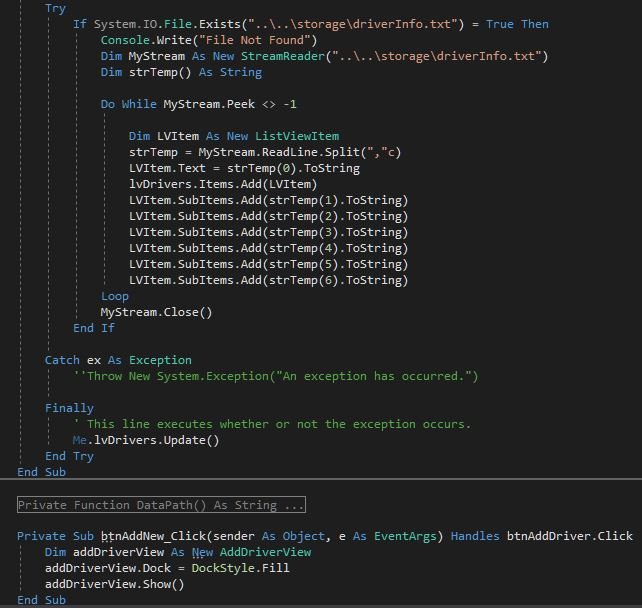
How I populate the list view:
How I've tried to get the selected value:
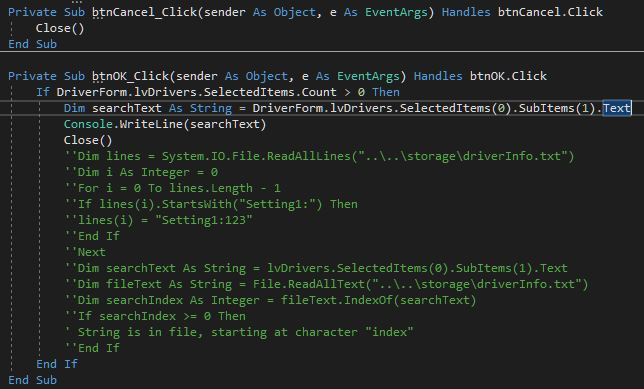
the Console.WriteLine doesn't do anything, and the close doesn't trigger either. Could there be something wrong with the buttons? I've double checked all the naming, so I don't think that is the issue.
ry If System. IO.File.Exists("1..1storageldriverInfo.txt")True Then Console.Write( File Not Found") Dim MyStream As New StreamReader("..\..\storage\driverInfo. txt") Dim strTemp() As String Do While MyStream. Peek-1 Dim LVItem As New ListViewItem strTemp MyStream . ReadLine. Split(","c LVtem. Text strTemp(0) . ToString lvDrivers.Items. Add(LVItem) LVItem. SubItems.Add (strTemp (1).ToString) LVItem. SubItems.Add (strTemp (2).ToString) LVItem. SubItems.Add (strTemp (3).ToString) LVItem. SubItems.Add (strTemp (4).ToString) LVItem. SubItems.Add (strTemp (5).ToString) LVItem. SubItems.Add (strTemp (6).ToString) Loop MyStream.Close() End If Catch ex As Exception 'Throw New System. Exception("An exception has occurred.") Finally " This line executes whether or not the exception occurs :Me.1vDrivers.Update() End Try End Sub Private Function DataPath) As Strin Private Sub btnAddNew Click(sender As object, e As EventArgs) Handles btnAddDriver.Click Dim addDriverView As New AddDriverView addDriverView.Dock DockStyle.Fill addDriverView.Show() End Sub
Step by Step Solution
There are 3 Steps involved in it

Get step-by-step solutions from verified subject matter experts
 Study Help