







Question: Visual Basic Windows Forms Application for polynomial calculators I am writing an application that will generate and output the root(s) for constant polynomials (including the
Visual Basic Windows Forms Application for polynomial calculators
I am writing an application that will generate and output the root(s) for constant polynomials (including the zero polynomial), first-degree polynomials, and second-degree polynomials depending on the users selection from a group box containing three radio buttons, one for each type of equation. The program must take as input one to three integer coefficients: a,b, and c and, depending on the selected radio button, use either the quadratic formula, the linear formula, or the zero polynomial definition to find and report the real roots of the equation, if there are any. Please do not report any complex conjugate roots.
If the discriminant of a quadratic is 0 then there is 1 real root; positive then there are 2 real roots; and negative then there are no real roots.
| Radio Button | Text Boxes | Output |
| Constant | Only one for C | "None" if c0 else "Infinite" |
| First degree | Two: B and C | Root on top line |
| Second degree | Three: A,B, and C | "None" if there are no real roots, OR the single root on top line, OR both roots each on own line |
If the constant radio button is selected, then the text boxes for coefficients 'a' and 'b' must either both be disabled or made invisible.
If the linear radio button is selected, then the text box for 'a' must be either disabled or made invisible.
The square root function must be used for quadratic formula.
Need 3 radio buttons in a group box. When the radio button for first degree is selected, then the text box for coefficient 'b' cannot be allowed to be given a zero value. When the radio button for second degree is selected, then the text box for coefficient 'a' cannot be allowed to be given a zero value. Three separate text box controls must be supplied for each of the three coefficients. Only integer values can be accepted as input for the coefficients. There must be a test for no input (i.e. an empty string in a text boxs Textproperty). A no input condition must generate a message box that states that values must be supplied for all coefficients. If a coefficient is zero, then a zero must be entered. No exception handling is allowed on the call to CInt (used to convert the text box Text propertys string to an integer coefficient). The conversion must always be successful. Rather string methods must be used to test for numeric input and for integer input. If any of the above tests fail, the error message given the user must specifically state which coefficient ('a', 'b', or 'c') has experienced what kind of data entry error and keyboard focus must be moved into the text box that exhibited the error. Only one button control must be used to initiate finding the roots. The button must execute using both an Alt+ access key (of your choice) and using the Enter accept key. Must create a meaningful tab sequence to move through the radio buttons, text boxes, and the find root(s) button. When a new radio button is selected, all text boxes and the output label must be cleared.
Constant tests
| c | output |
| 4 | none |
| 0 | infinite |
Linear Tests
| B | C | Output |
| 6 | -3 | 0.5000 |
| 1 | 2 | -2.0000 |
Quadratic Tests
| A | B | C | Output |
| -1 | 2 | -1 | 1.0000 |
| 1 | 5 | 28 | None |
| 1 | -11 | 28 | 7.0000 4.0000 |
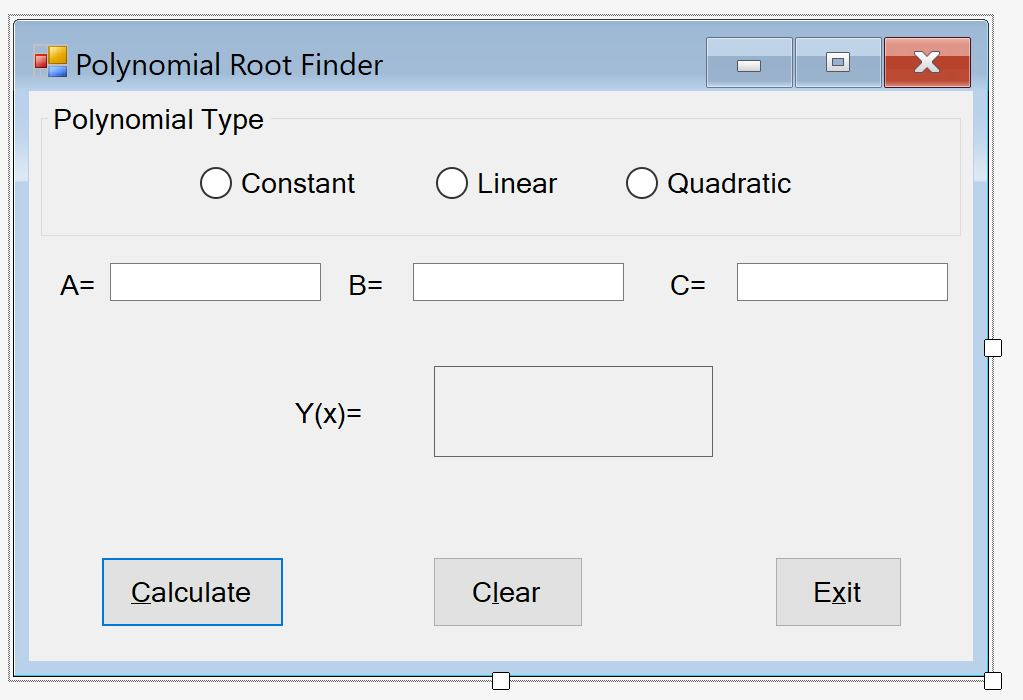
Polynomial Root Finder Polynomial Type Oconstant O Linear Quadratic A= B- C= Y(x)= Calculate Clear Exit Polynomial Root Finder Polynomial Type Oconstant O Linear Quadratic A= B- C= Y(x)= Calculate Clear Exit
Step by Step Solution
There are 3 Steps involved in it

Get step-by-step solutions from verified subject matter experts
 Study Help