







Question: Visual Basics 2012 Chapter 14 excercise 3 Please help with the 2 errors. Quick Leunch Crl+Q Drawing App - Microscft Visual Studio File Edit View
Visual Basics 2012
Chapter 14 excercise 3
Please help with the 2 errors.
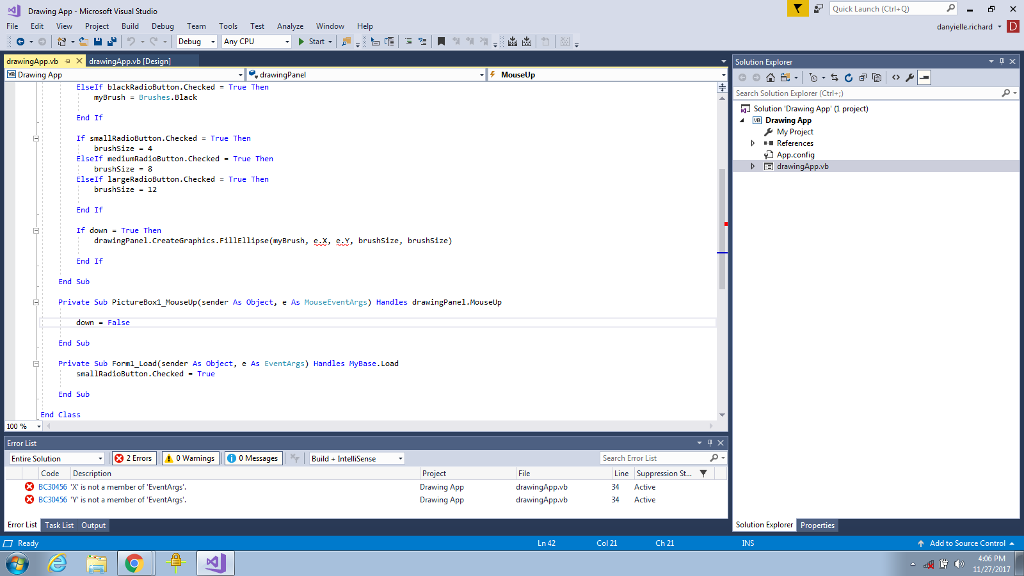
Quick Leunch Crl+Q Drawing App - Microscft Visual Studio File Edit View Project Build Debug Teem Tools Test Analyze WindHelp DebugAny CPU rewingApp.vb [Design Solution Explorer Dawing App drawingPane 5 MouseUp ElseIf blackRadioButton.Checked True Then Search Solution Explorer [Ctr+ ryrushBrushes.Dlack Solution Drawing App project) End Tf Drawing App a My Project References App.config FlseIf nediumadioButton Checked -True Then brusisize8 Elself largeRadioButton.Checked True Then brushsize-12 End If If down True Then drawingFanel.CreateGraphics.Fil1El1ipse(nyBrush, C.x, e.Y, brushsize, brushsize) End If End Sub Private Sub PictureBox1 MouseUp sender As 0bject, e As MouseEventirgs) Handles drawingPanel.MouseUp down-False End Sub Private Sub Fornl Load (sender As object, e As EventArgs) Handles HyEase.Load snallRadioButton.Checked True End Sub End Clas5 Error List | * 2 Errors | | 0 warmings || 0 0 Messages | Entire Solution BuildIntelliSense Search Error List Project Drawing App Crawing App Code Descniption File * BC30456 "K is nuts member of "EventArgs. BC30456 V is not a member of EventArgs' 3 Active 34 Active Frror List Task List Output Solution Explorer Ready Ln 42 Col 21 Ch 21 INS Add to Source Control 406 PM 11/27/2017
Step by Step Solution
There are 3 Steps involved in it

Get step-by-step solutions from verified subject matter experts
 Study Help