







Question: Visual Studio Code C# Well Document everyline saying what the code does. Include designer code and code Extra 7-1 Add exception handlingg to the simple
Visual Studio Code C#
Well Document everyline saying what the code does.
Include designer code and code
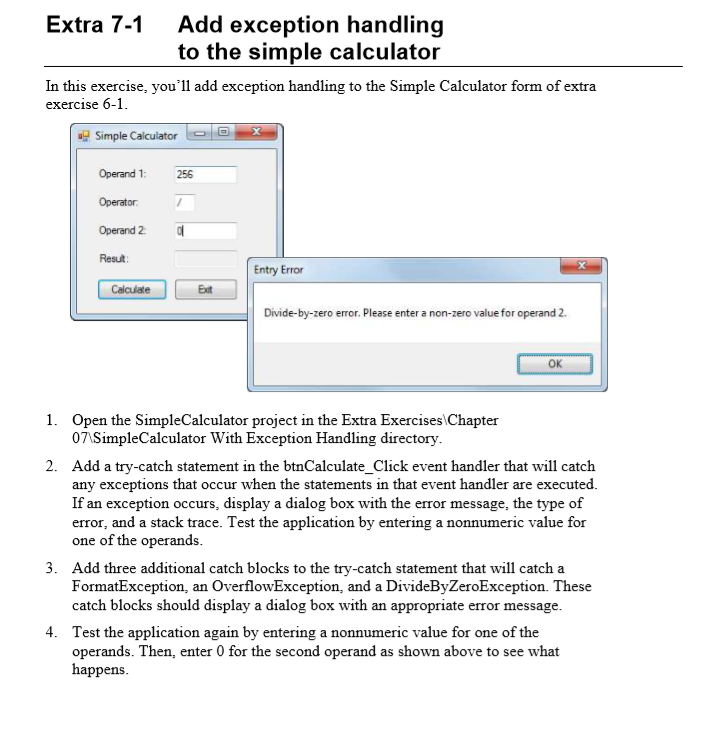
Extra 7-1 Add exception handlingg to the simple calculator In this exercise, you'l1 add exception handling to the Simple Calculator form of extra exercise 6-1 a Simple Calculator Operand 1: Operator Operand 2 Resut 256 Entry Error Divide-by-zero error. Please enter a non-zero value for operand 2 OK 1. Open the SimpleCalculator project in the Extra Exercises Chapter 07 SimpleCalculator With Exception Handling directory 2. Add a try-catch statement in the btnCalculate_Click event handler that will catch any exceptions that occur when the statements in that event handler are executed If an exception occurs, display a dialog box with the error message, the type of error, and a stack trace. Test the application by entering a nonnumeric value for one of the operands 3. Add three additional catch blocks to the try-catch statement that will catch a FormatException, an OverflowException, and a DivideByZeroException. These catch blocks should display a dialog box with an appropriate error message 4. Test the application again by entering a nonnumeric value for one of the operands. Then, enter 0 for the second operand as shown above to see what happens
Step by Step Solution
There are 3 Steps involved in it

Get step-by-step solutions from verified subject matter experts
 Study Help