







Question: VisualStudios 2019 Need help with this project c# Murach's 2015 Project 3-2 Assign tickets with time slots For this project, you'll develop an application that
VisualStudios 2019 Need help with this project c# Murach's 2015
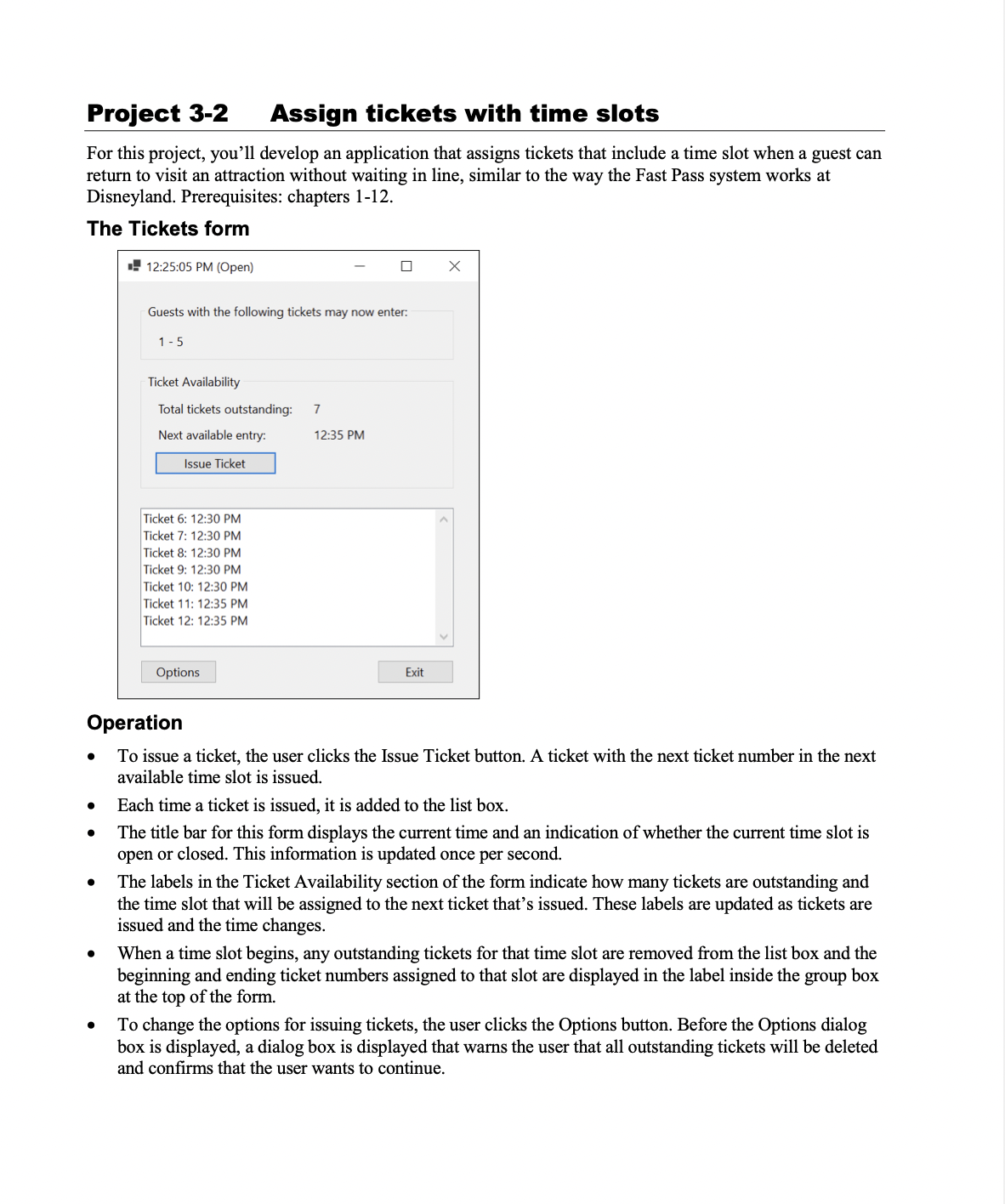
Project 3-2 Assign tickets with time slots For this project, you'll develop an application that assigns tickets that include a time slot when a guest can return to visit an attraction without waiting in line, similar to the way the Fast Pass system works at Disneyland. Prerequisites: chapters 1-12. The Tickets form I! 12:25:05 PM (Open) X Guests with the foliowing tickets may now enten 15 Ticket Availability Total tickets outstanding: 7 Next available entry: 1235 PM Ticket 6: 12:30 PM A Ticket "I: 12:30 PM Ticket 8: 12:30 PM Ticket 9: 12:30 PM Ticket 10: 12:30 PM Ticket 11: 12:35 PM Ticket 12: 12:35 PM |_ onion: fl i_ Eat j Operation 0 To iSSue a ticket, the user clicks the Issne Ticket button A ticket with the next ticket number in the next available time slot is issued 0 Each time a ticket is issued, it is added to the list box. a The title bar for this form displays the current time and an indication of whether the current time slot is open or closed. This information is updated once per second 0 The labels in the Ticket Availability section of the form indicate how many tickets are outstanding and the time slot that will be assigned to the next ticket that's issued. These labels are updated as tickets are issued and the time changes. a When a time slot begins, any outstanding tickets for that time slot are removed from the list box and the beginning and ending ticket numbers assigned to that slot are displayed in the label inside the group box at the top of the form. c To change the options for iSSuing tickets, the user clicks the Options button. Before the Options dialog bOx is displayed, a dialog box is displayed that warns the user that all outstanding tickets will be deleted and conrms that the user wants to continue
Step by Step Solution
There are 3 Steps involved in it

Get step-by-step solutions from verified subject matter experts
 Study Help