







Question: We created a calculator application using event handlers (for the button controls) to handle the input from the user. Now you will make a new
We created a calculator application using event handlers (for the button controls) to handle the input from the user.
Now you will make a new calculator program that allows the user to enter the operator into a text box. You will need to evaluate the entry and execute the result after the user clicks the calculate button.
Do not worry about validating what the user enters for the operator, we will assume the user always picks a +,-,* or / operator. If the user doesnt the application will crash for now. We will address this in Lab 5.
You will need to make a calculate method that takes 3 arguments operand 1, operand 2 and operator.
The exit button will close the form. use the code this.Close();
The finished application will look like:
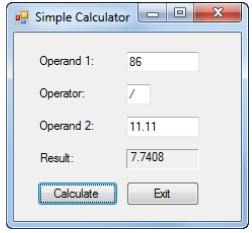
X Simple Calculator Operand 1: 86 Operator: / Operand 2 11.11 Result 7.7408 Calculate Exit
Step by Step Solution
There are 3 Steps involved in it

Get step-by-step solutions from verified subject matter experts
 Study Help