







Question: We need a python3.x script using the for statement. The code should include a line that specifies a new default workspace to /MN_Prec, and a
We need a python3.x script "using the for statement". The code should include a line that specifies a new default workspace to /MN_Prec, and a block of code that print out all raster data in the new subfolder (/MN_Prec). below I template and the
import arcpy
# Set the current workspace arcpy.env.workspace = "c:/data/DEMS"
# Get and print a list of GRIDs from the workspace rasters = ListRasters("*", "grd") for raster in rasters: print(raster)
below is the folder /MN this is not the subfolder we need to create (/MN_Prec,)
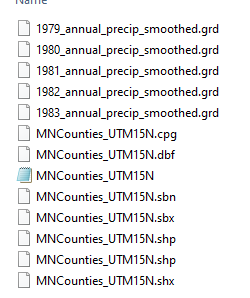
1979_annual_precip_smoothed.grd 1980_annual_precip_smoothed.grd 1981_annual_precip_smoothed.grd 1982_annual_precip_smoothed.grd 1983_annual_precip_smoothed.grd MNCounties_UTM15N.cpg MNCounties_UTM15N.dbf MNCounties_UTM15N MNCounties_UTM15N.sbn MNCounties_UTM15N.sbx MNCounties_UTM15N.shp MNCounties_UTM15N.shp MNCounties_UTM15N.shx 1979_annual_precip_smoothed.grd 1980_annual_precip_smoothed.grd 1981_annual_precip_smoothed.grd 1982_annual_precip_smoothed.grd 1983_annual_precip_smoothed.grd MNCounties_UTM15N.cpg MNCounties_UTM15N.dbf MNCounties_UTM15N MNCounties_UTM15N.sbn MNCounties_UTM15N.sbx MNCounties_UTM15N.shp MNCounties_UTM15N.shp MNCounties_UTM15N.shx
Step by Step Solution
There are 3 Steps involved in it

Get step-by-step solutions from verified subject matter experts
 Study Help