







Question: We need to use gates and write on code. Here are the And, Or and Not gates. If you are a vivado user, you know
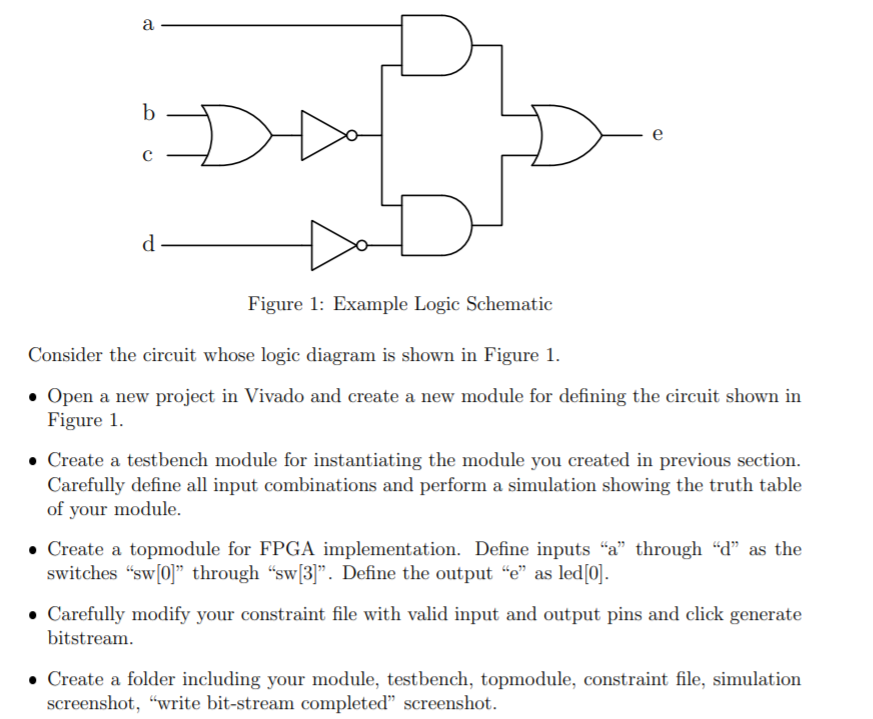
We need to use gates and write on code. Here are the "And", "Or" and "Not" gates. If you are a vivado user, you know what I mean.
a b e d Figure 1: Example Logic Schematic Consider the circuit whose logic diagram is shown in Figure 1. Open a new project in Vivado and create a new module for defining the circuit shown in Figure 1. Create a testbench module for instantiating the module you created in previous section. Carefully define all input combinations and perform a simulation showing the truth table of your module. Create a topmodule for FPGA implementation. Define inputs "a" through d as the switches sw[0] through sw[3]. Define the output e as led[0]. Carefully modify your constraint file with valid input and output pins and click generate bitstream. Create a folder including your module, testbench, topmodule, constraint file, simulation screenshot, "write bit-stream completed screenshot. a b e d Figure 1: Example Logic Schematic Consider the circuit whose logic diagram is shown in Figure 1. Open a new project in Vivado and create a new module for defining the circuit shown in Figure 1. Create a testbench module for instantiating the module you created in previous section. Carefully define all input combinations and perform a simulation showing the truth table of your module. Create a topmodule for FPGA implementation. Define inputs "a" through d as the switches sw[0] through sw[3]. Define the output e as led[0]. Carefully modify your constraint file with valid input and output pins and click generate bitstream. Create a folder including your module, testbench, topmodule, constraint file, simulation screenshot, "write bit-stream completed screenshot
Step by Step Solution
There are 3 Steps involved in it

Get step-by-step solutions from verified subject matter experts
 Study Help