







Question: Web development, make a php program rolling Dice exactly the same as image show which you have to follow the third point In this activity
Web development, make a php program rolling Dice exactly the same as image show which you have to follow the third point
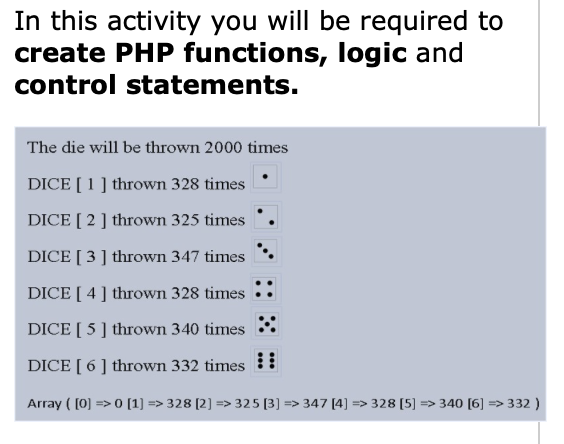
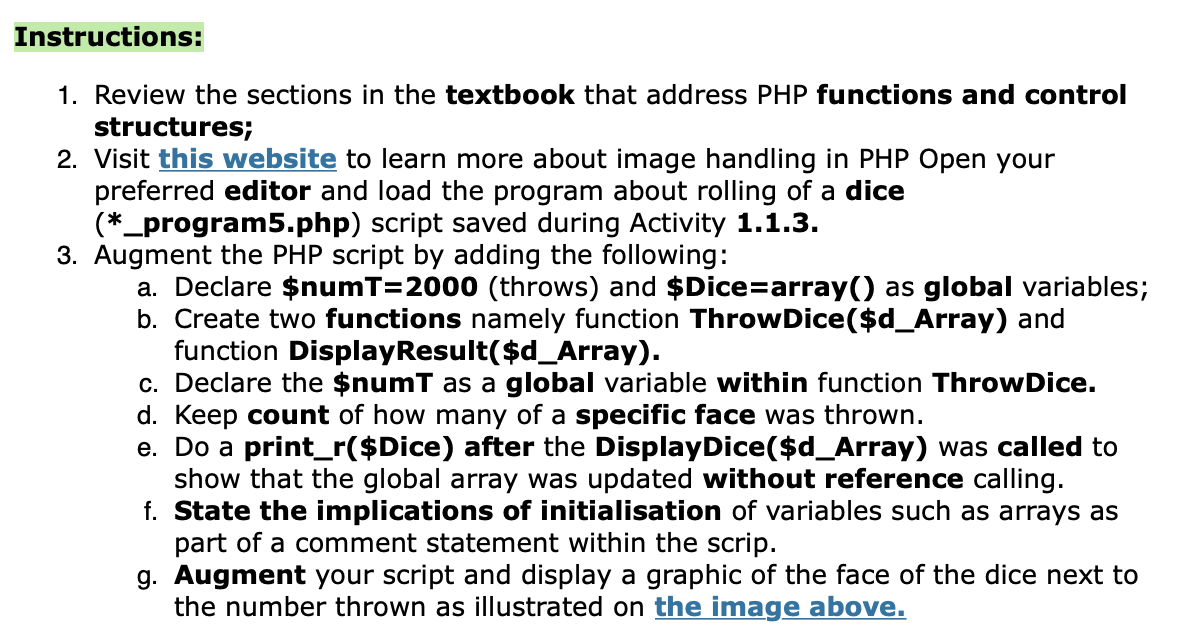
In this activity you will be required to create PHP functions, logic and control statements. The die will be thrown 2000 times DICE [ 1 ] thrown 328 times DICE [ 2 ] thrown 325 times . DICE [ 3 ] thrown 347 times DICE [ 4 ] thrown 328 times : : DICE [ 5 ] thrown 340 times :: DICE [ 6 ] thrown 332 times ! Array ( [0] => 0 [1] => 328 [2] => 325 [3] => 347 [4] => 328 [5] => 340 [6] => 332 ) Instructions: 1. Review the sections in the textbook that address PHP functions and control structures; 2. Visit this website to learn more about image handling in PHP Open your preferred editor and load the program about rolling of a dice (*_program5.php) script saved during Activity 1.1.3. 3. Augment the PHP script by adding the following: a. Declare $numT=2000 (throws) and $Dice=array() as global variables; b. Create two functions namely function Throw Dice($d_Array) and function Display Result($d_Array). c. Declare the $numT as a global variable within function Throw Dice. d. Keep count of how many of a specific face was thrown. e. Do a print_r($Dice) after the Display Dice($d_Array) was called to show that the global array was updated without reference calling. f. State the implications of initialisation of variables such as arrays as part of a comment statement within the scrip. g. Augment your script and display a graphic of the face of the dice next to the number thrown as illustrated on the image above. In this activity you will be required to create PHP functions, logic and control statements. The die will be thrown 2000 times DICE [ 1 ] thrown 328 times DICE [ 2 ] thrown 325 times . DICE [ 3 ] thrown 347 times DICE [ 4 ] thrown 328 times : : DICE [ 5 ] thrown 340 times :: DICE [ 6 ] thrown 332 times ! Array ( [0] => 0 [1] => 328 [2] => 325 [3] => 347 [4] => 328 [5] => 340 [6] => 332 ) Instructions: 1. Review the sections in the textbook that address PHP functions and control structures; 2. Visit this website to learn more about image handling in PHP Open your preferred editor and load the program about rolling of a dice (*_program5.php) script saved during Activity 1.1.3. 3. Augment the PHP script by adding the following: a. Declare $numT=2000 (throws) and $Dice=array() as global variables; b. Create two functions namely function Throw Dice($d_Array) and function Display Result($d_Array). c. Declare the $numT as a global variable within function Throw Dice. d. Keep count of how many of a specific face was thrown. e. Do a print_r($Dice) after the Display Dice($d_Array) was called to show that the global array was updated without reference calling. f. State the implications of initialisation of variables such as arrays as part of a comment statement within the scrip. g. Augment your script and display a graphic of the face of the dice next to the number thrown as illustrated on the image above
Step by Step Solution
There are 3 Steps involved in it

Get step-by-step solutions from verified subject matter experts
 Study Help