







Question: Week 1 0 Programming Assignment 0 3 Due Monday by 1 1 : 5 9 pm Points 1 0 Submitting a file upload Available Nov
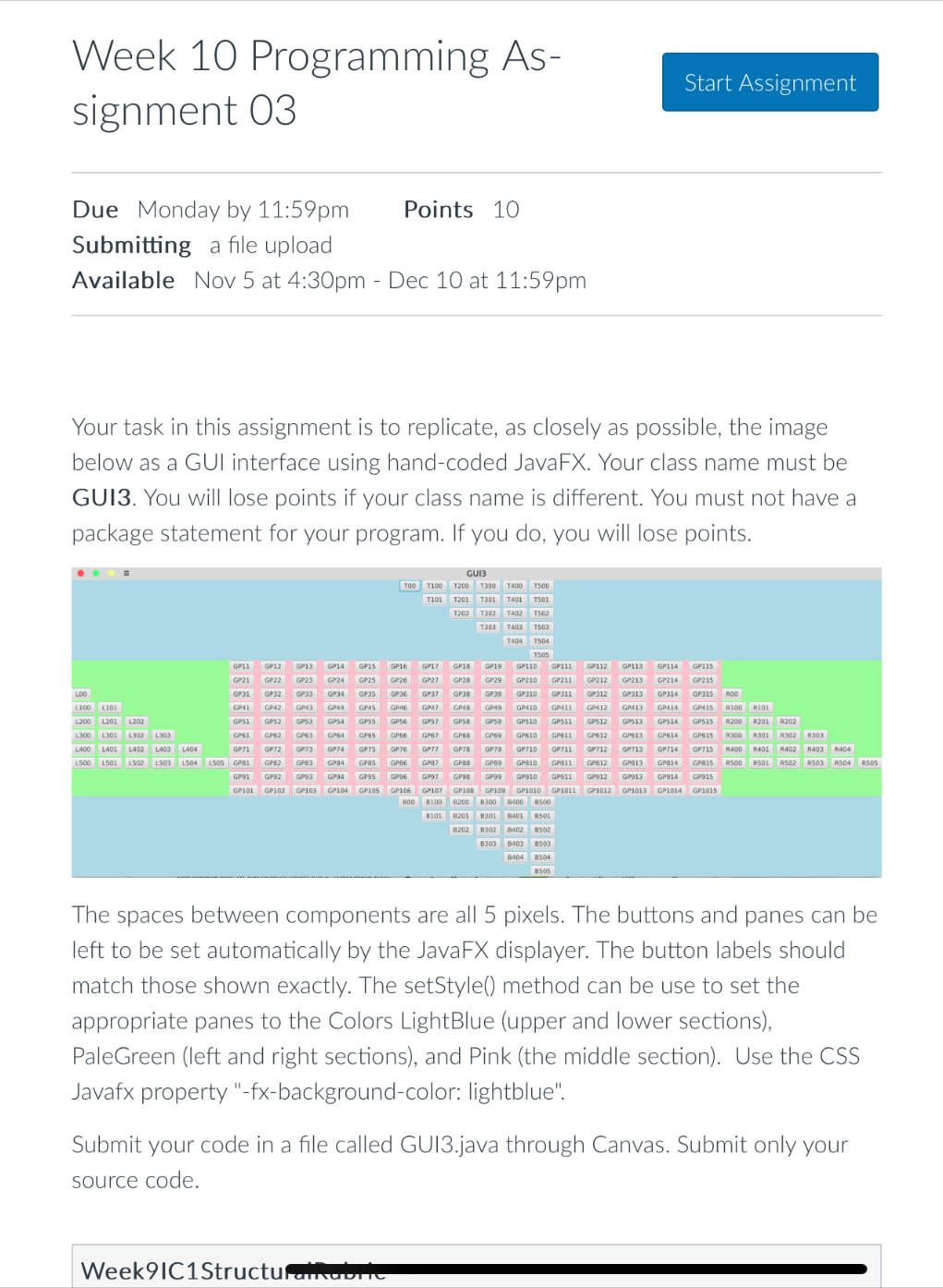
Week Programming Assignment Due Monday by :pm Points Submitting a file upload Available Nov at :pm Dec at :pm Your task in this assignment is to replicate, as closely as possible, the image below as a GUI interface using handcoded JavaFX. Your class name must be GUI You will lose points if your class name is different. You must not have a package statement for your program. If you do you will lose points.GUIScreenshot.pngThe spaces between components are all pixels. The buttons and panes can be left to be set automatically by the JavaFX displayer. The button labels should match those shown exactly. The setStyle method can be use to set the appropriate panes to the Colors LightBlue upper and lower sections PaleGreen left and right sections and Pink the middle section Use the CSS Javafx property fxbackgroundcolor: lightblue".Submit your code in a file called GUIjava through Canvas. Submit only your source code.RubricWeekICStructuralRubricWeekICStructuralRubricCriteriaRatingsPtsThis criterion is linked to a Learning Outcome Does it compile? ptsFull MarksCompiles with no errors and no warnings due to the use of raw generic classes ptsMostlyCompiles with no errors but has warnings related to the use of generic classes as raw types ptsNo MarksOne or more syntatic or semantic compilation errors in the code ptsThis criterion is linked to a Learning Outcome Does it have runtime exceptions ptsFull MarksNo runtime exceptions occured during testing ptsNo MarksOne or more distinct unchecked runtime exceptions occurred ptsThis criterion is linked to a Learning Outcome Does your GUI match the image? ptsFull MarksStudent's GUI matches the image provided well enough ptsMinor differencesThe overall structure of student's GUI matches the image, but proportions are off, slight difference in text, etc ptsNo MarksStudent's GUI has substantial difference from the provided image: things are misssequenced, substantial labelling differences, etc ptsTotal Points: Week Programming Assignment
Due Monday by :pm
Points
Submitting a file upload
Available Nov at :pm Dec at :pm
Your task in this assignment is to replicate, as closely as possible, the image below as a GUI interface using handcoded JavaFX. Your class name must be GUI You will lose points if your class name is different. You must not have a package statement for your program. If you do you will lose points.
The spaces between components are all pixels. The buttons and panes can be left to be set automatically by the JavaFX displayer. The button labels should match those shown exactly. The setStyle method can be use to set the appropriate panes to the Colors LightBlue upper and lower sections
PaleGreen left and right sections and Pink the middle section Use the CSS Javafx property fxbackgroundcolor: lightblue".
Submit your code in a file called GUIjava through Canvas. Submit only your source code.
WeekCStructurambirie
Step by Step Solution
There are 3 Steps involved in it
1 Expert Approved Answer
Step: 1 Unlock

Question Has Been Solved by an Expert!
Get step-by-step solutions from verified subject matter experts
Step: 2 Unlock
Step: 3 Unlock
 Study Help