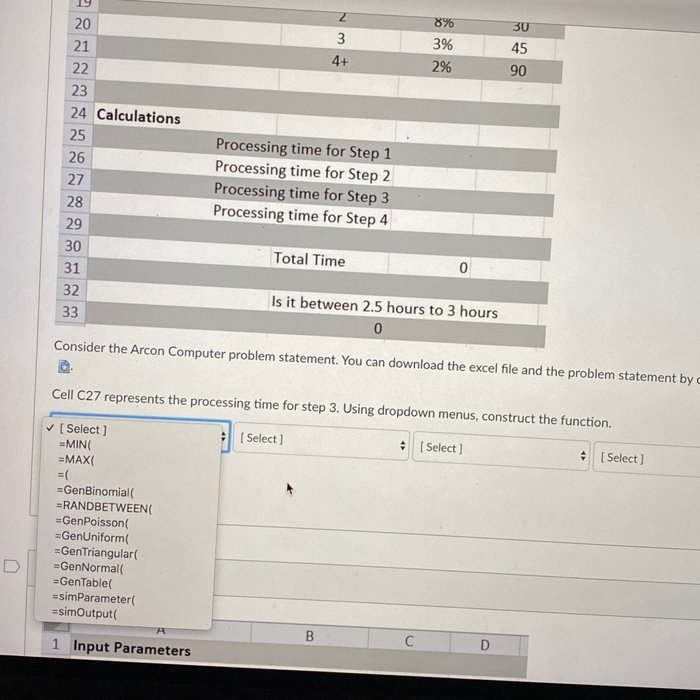
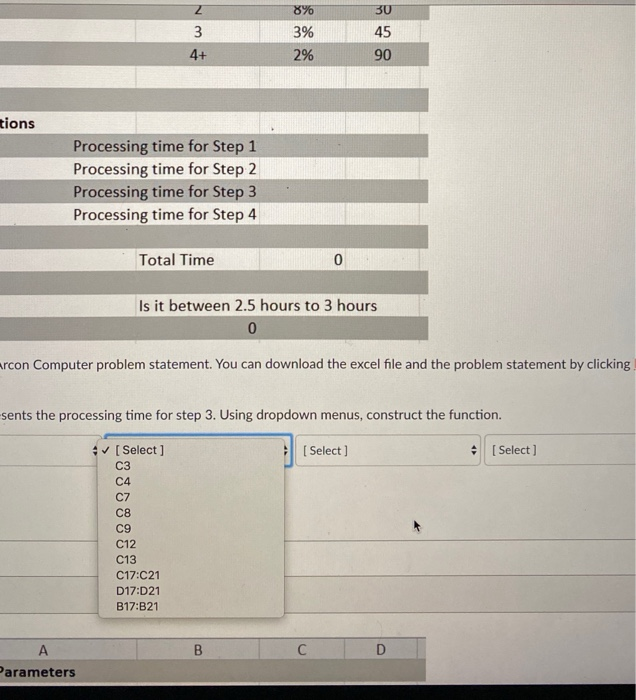
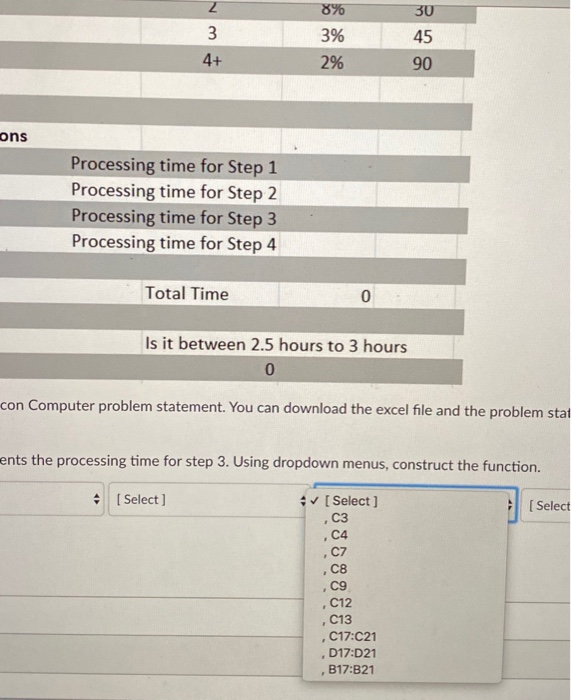
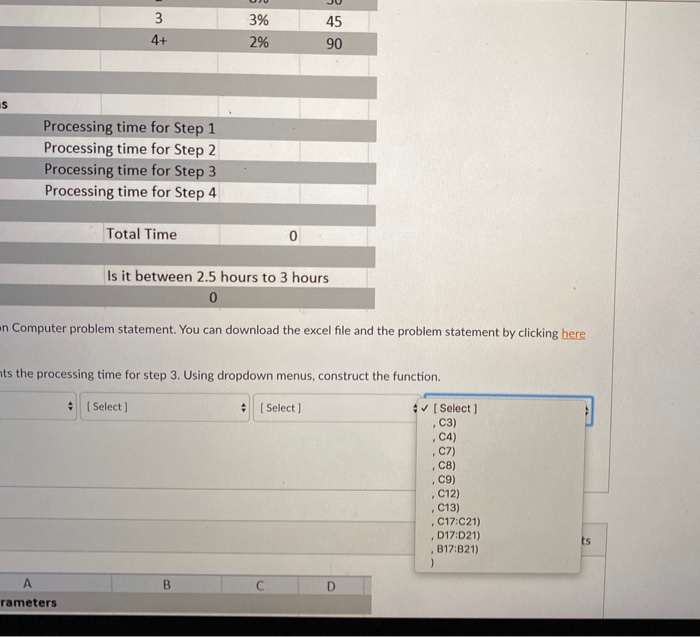
Question: what are the correct drop down options for the 4 questions. thanks Arcon Computer builds high-end custom PCs. There are four main steps in building
what are the correct drop down options for the 4 questions. thanks
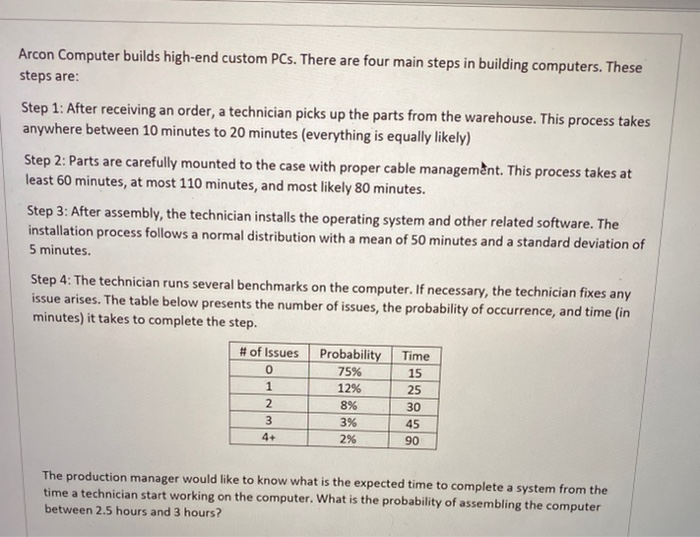
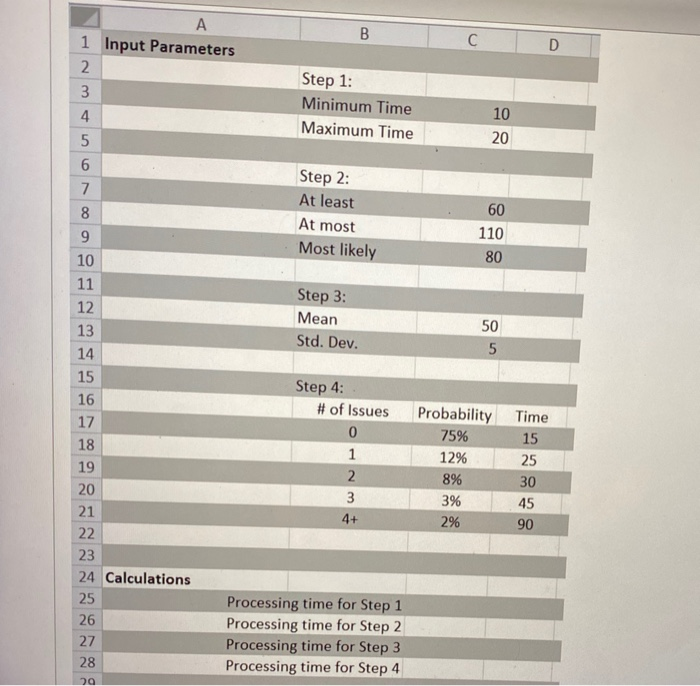
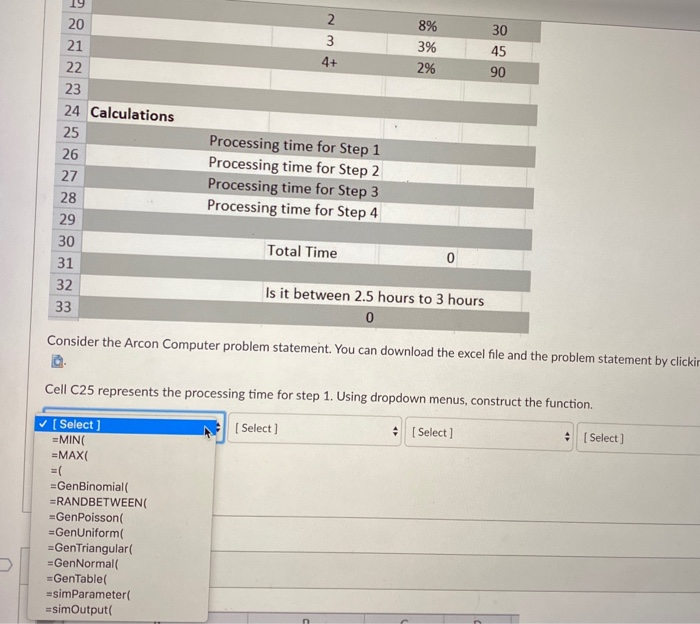
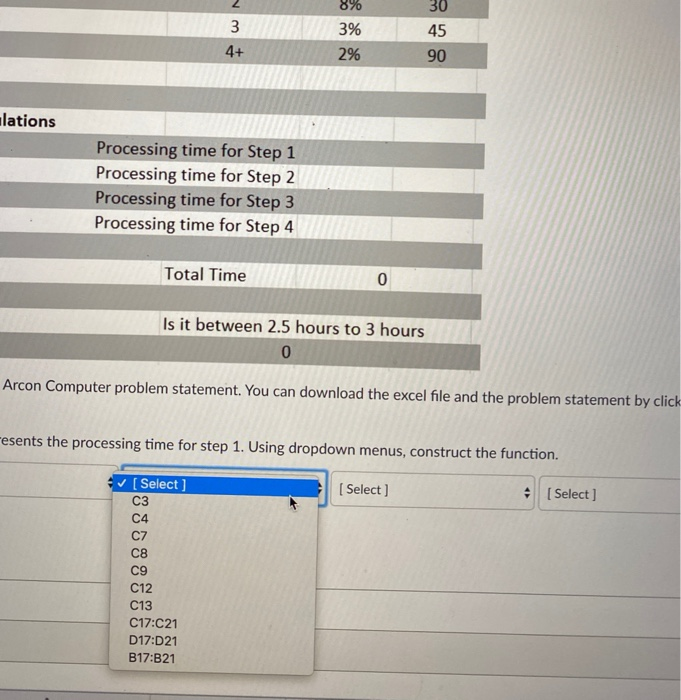
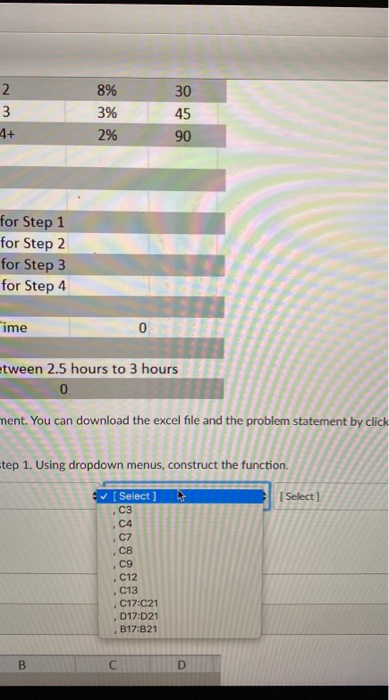
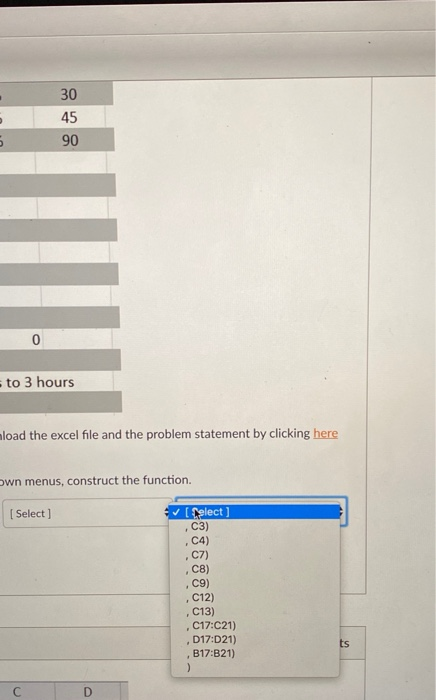
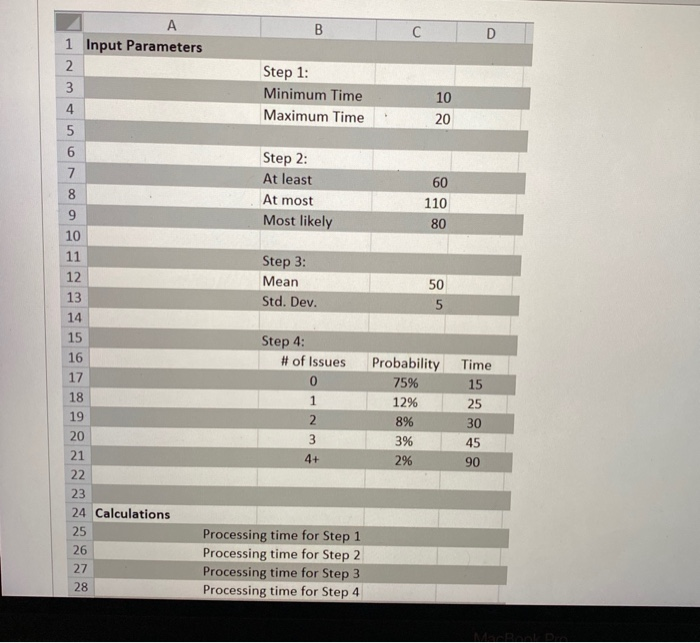
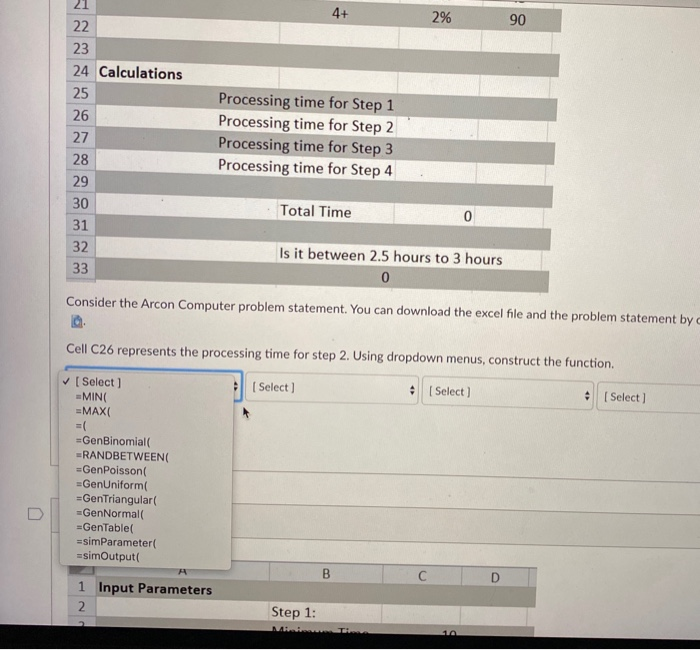
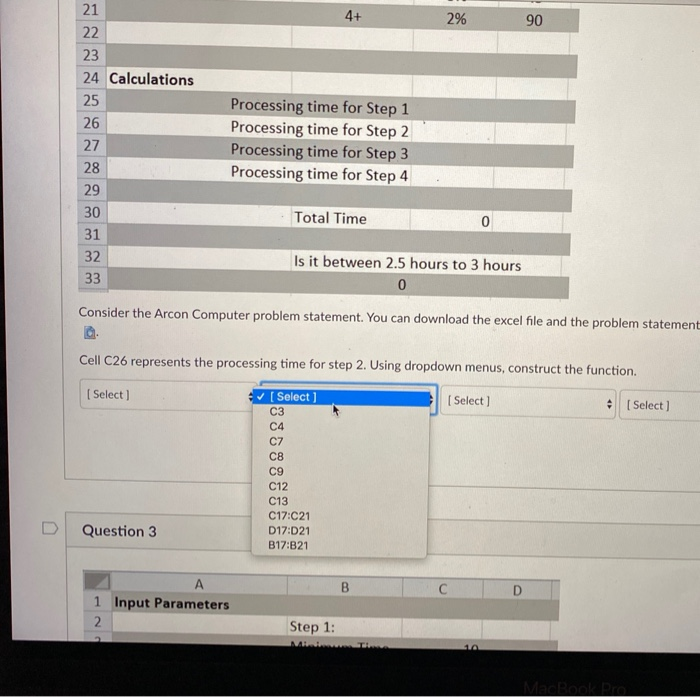
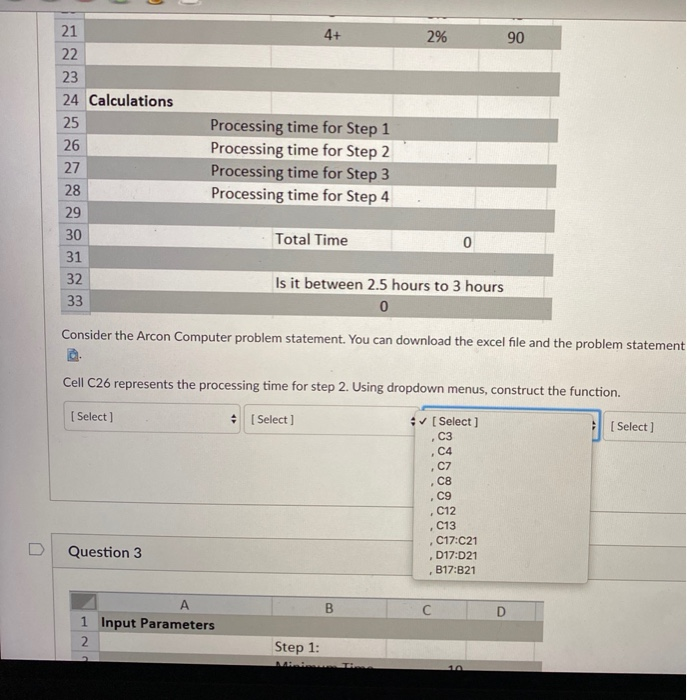
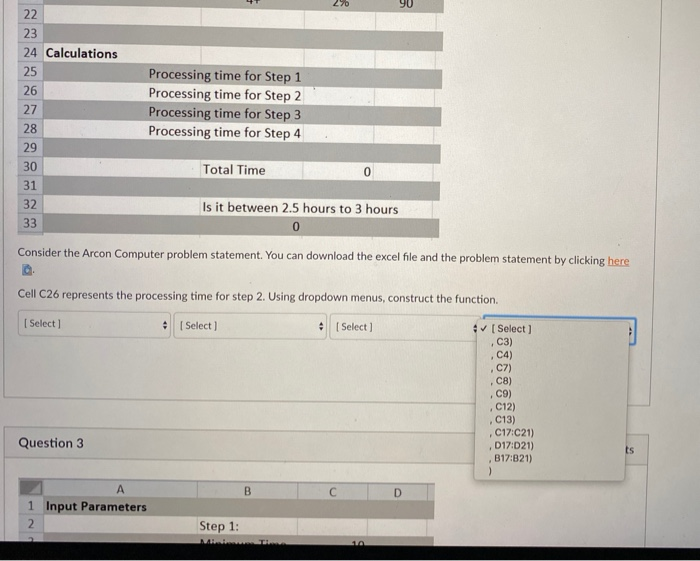
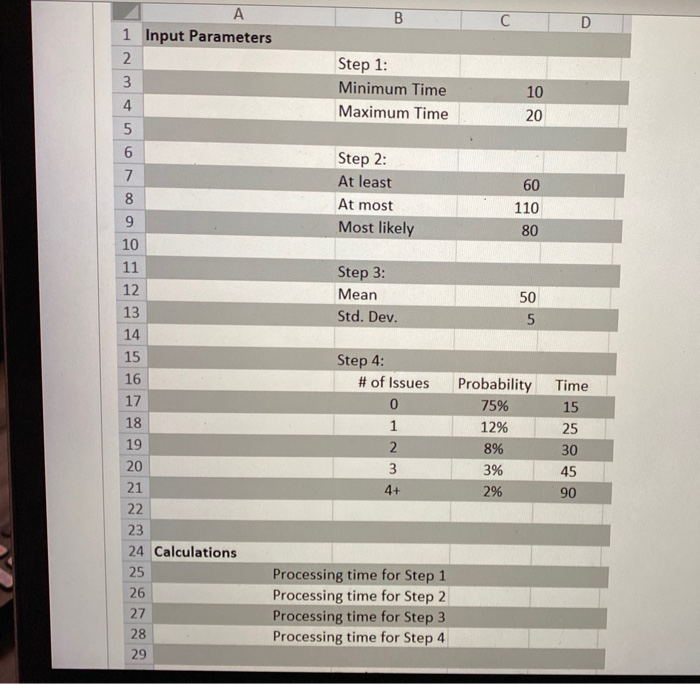
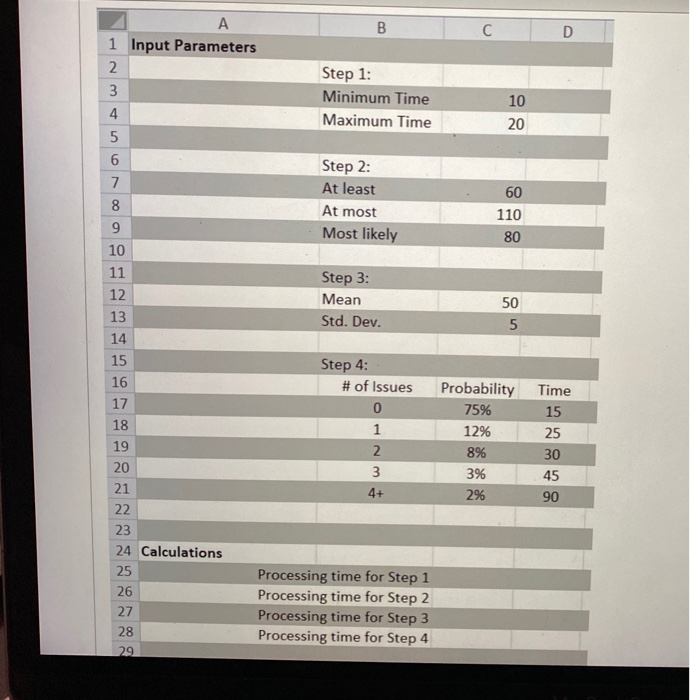
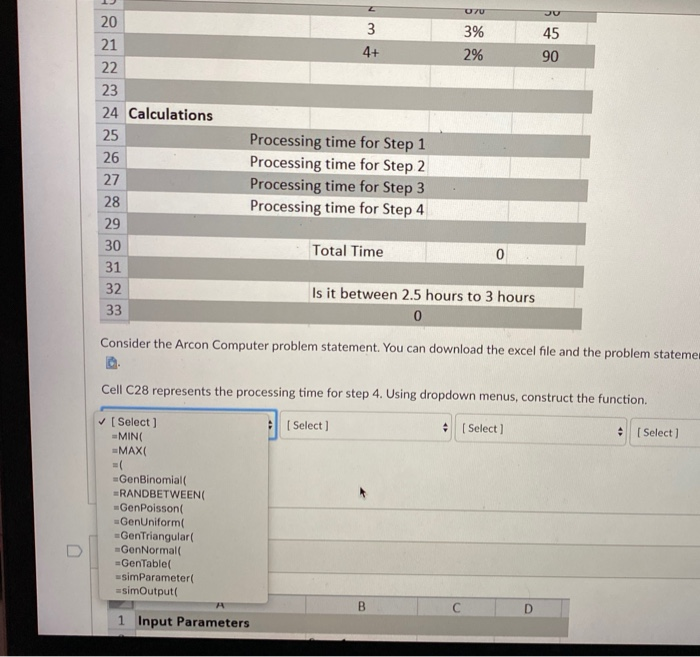
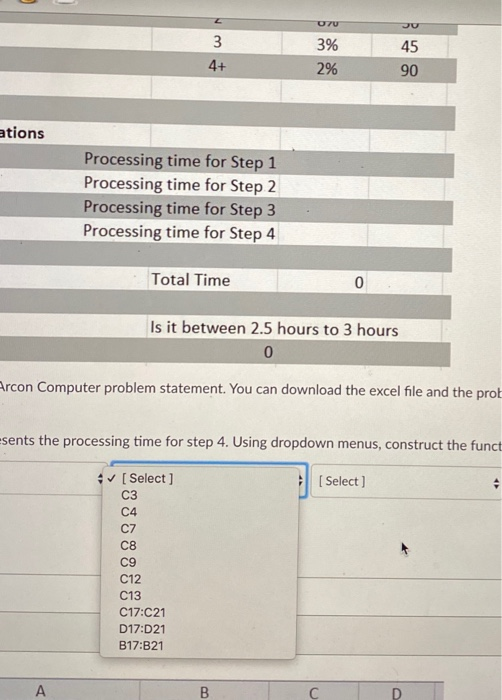
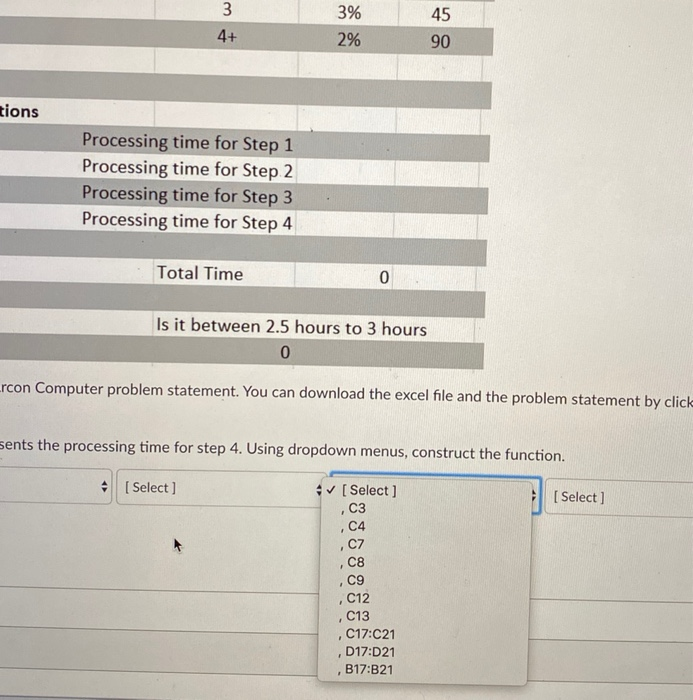
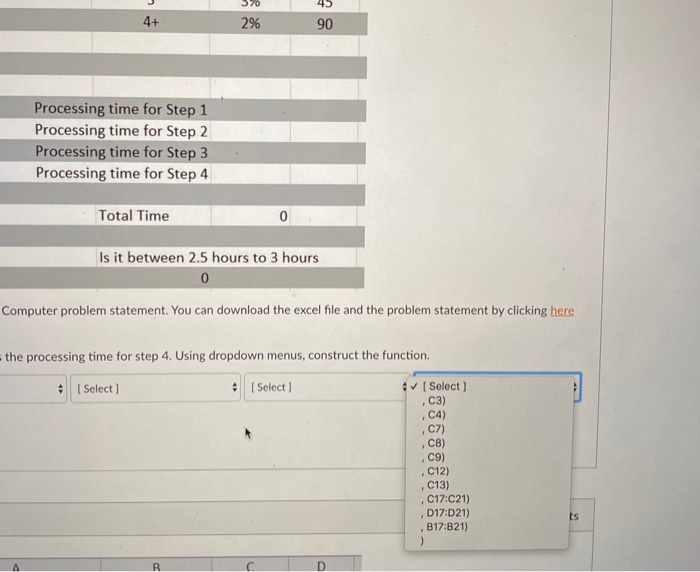
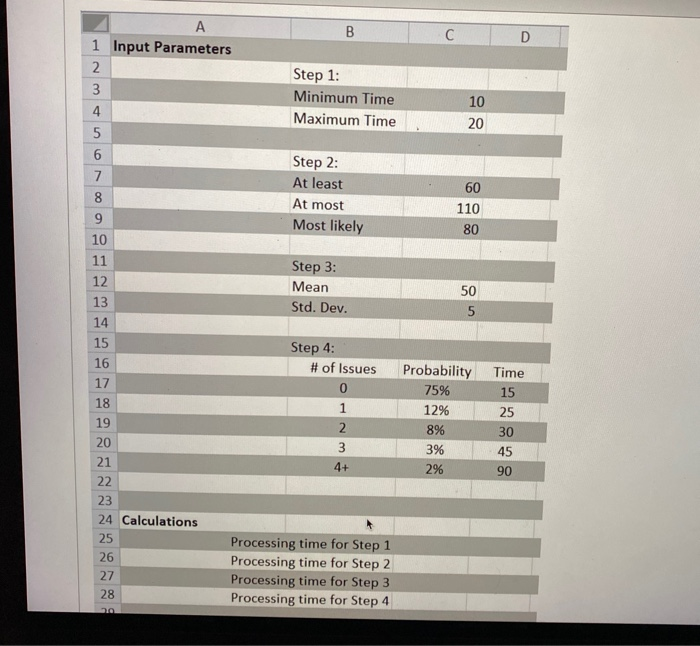
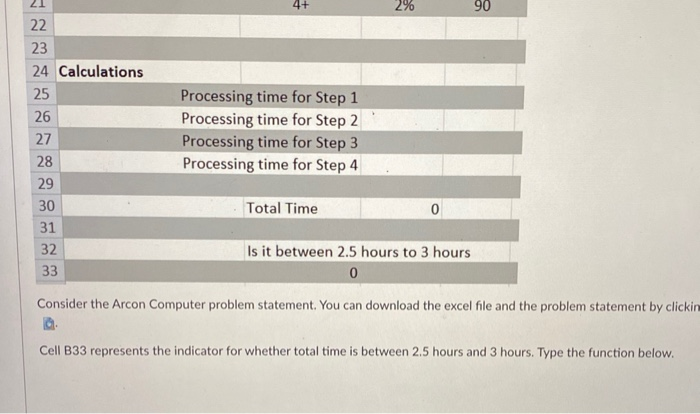
Arcon Computer builds high-end custom PCs. There are four main steps in building computers. These steps are: Step 1: After receiving an order, a technician picks up the parts from the warehouse. This process takes anywhere between 10 minutes to 20 minutes (everything is equally likely) Step 2: Parts are carefully mounted to the case with proper cable management. This process takes at least 60 minutes, at most 110 minutes, and most likely 80 minutes. Step 3: After assembly, the technician installs the operating system and other related software. The installation process follows a normal distribution with a mean of 50 minutes and a standard deviation of 5 minutes. Step 4: The technician runs several benchmarks on the computer. If necessary, the technician fixes any issue arises. The table below presents the number of issues, the probability of occurrence, and time (in minutes) it takes to complete the step. # of Issues Probability 0 1 2 3 4+ 75% 12% 8% 3% 2% Time 15 25 30 45 90 The production manager would like to know what is the expected time to complete a system from the time a technician start working on the computer. What is the probability of assembling the computer between 2.5 hours and 3 hours? B D Step 1: Minimum Time Maximum Time 10 20 A 1 Input Parameters 2. 3 4 5 6 7 8 9 10 11 12 Step 2: At least At most Most likely 60 110 80 Step 3: Mean Std. Dev. 13 50 5 14 15 16 17 18 19 20 21 22 23 24 Calculations 25 26 27 28 29 Step 4: # of Issues 0 1 2 3 4+ Probability 75% 12% 8% 3% 2% Time 15 25 30 45 90 Processing time for Step 1 Processing time for Step 2 Processing time for Step 3 Processing time for Step 4 2. 3 4+ 20 21 22 23 24 Calculations 8% 3% 2% 30 45 90 25 Processing time for Step 1 Processing time for Step 2 Processing time for Step 3 Processing time for Step 4 26 27 28 29 30 31 32 33 Total Time 0 Is it between 2.5 hours to 3 hours 0 Consider the Arcon Computer problem statement. You can download the excel file and the problem statement by clickir Cell C25 represents the processing time for step 1. Using dropdown menus, construct the function. [ Select Select) Select) Select ] =MING =MAX =( =GenBinomial =RANDBETWEEN =GenPoisson =GenUniform =Gen Triangular =GenNormal =GenTable =simParameter =simOutput n 8% 3 4+ 3% 2% 30 45 90 ulations Processing time for Step 1 Processing time for Step 2 Processing time for Step 3 Processing time for Step 4 Total Time 0 Is it between 2.5 hours to 3 hours 0 Arcon Computer problem statement. You can download the excel file and the problem statement by click Fesents the processing time for step 1. Using dropdown menus, construct the function. [Select] [Select) Select ] C3 C4 C7 C8 C9 C12 C13 C17:C21 D17:D21 B17:B21 2 w N 8% 3% 2% 30 45 90 4+ for Step 1 for Step 2 for Step 3 for Step 4 Time 0 tween 2.5 hours to 3 hours 0 ment. You can download the excel file and the problem statement by click tep 1. Using dropdown menus, construct the function. [Select] [Select) C3 C4 C7 CB . C9 . C12 . C13 C17:C21 D17:021 . B17:B21 B D 30 45 5 90 0 - to 3 hours mload the excel file and the problem statement by clicking here own menus, construct the function. [Select [ Select) C3) C4) C7) CB) C9) C12) C13) C17:C21) , D17:021) B17:B21) ) F ts B D A 1 Input Parameters 2 3 4 5 6 Step 1: Minimum Time Maximum Time 10 20 7 Step 2: At least At most Most likely 60 110 80 Step 3: 8 9 10 11 12 13 14 15 16 17 18 Mean Std. Dev. 50 5 Step 4: # of Issues 0 1 2 3 4+ 19 Probability 75% 12% 8% 3% 2% Time 15 25 30 45 90 20 21 22 23 24 Calculations 25 26 27 28 Processing time for Step 1 Processing time for Step 2 Processing time for Step 3 Processing time for Step 4 21 4+ 2% 90 22 23 24 Calculations 25 26 27 28 29 30 31 32 33 Processing time for Step 1 Processing time for Step 2 Processing time for Step 3 Processing time for Step 4 Total Time Is it between 2.5 hours to 3 hours 0 Consider the Arcon Computer problem statement. You can download the excel file and the problem statement by Cell C26 represents the processing time for step 2. Using dropdown menus, construct the function. Select Select) . [Select) [Select MINO =MAX =( =GenBinomial =RANDBETWEEN =GenPoisson -GenUniform =Gen Triangular GenNormal =GenTable =simParameter =simOutput B D 1 Input Parameters 2. Step 1: 21 4+ 2% 90 22 23 24 Calculations 25 26 27 28 29 30 31 32 33 Processing time for Step 1 Processing time for Step 2 Processing time for Step 3 Processing time for Step 4 Total Time 0 Is it between 2.5 hours to 3 hours 0 Consider the Arcon Computer problem statement. You can download the excel file and the problem statement Cell C26 represents the processing time for step 2. Using dropdown menus, construct the function. [Select) [Select Select) C3 C4 . [Select) C8 09 C12 C13 C17:21 D17:021 B17:B21 Question 3 B A 1 Input Parameters 2. Step 1: MacBOOK Pro 4+ 2% 90 21 22 23 24 Calculations 25 26 27 28 29 30 31 32 33 Processing time for Step 1 Processing time for Step 2 Processing time for Step 3 Processing time for Step 4 Total Time 0 Is it between 2.5 hours to 3 hours 0 Consider the Arcon Computer problem statement. You can download the excel file and the problem statement Cell C26 represents the processing time for step 2. Using dropdown menus, construct the function. [ Select) Select) 4 Select C3 [ Select . C4 ,C7 . C9 . C12 . Question 3 C13 C17:021 D17:021 B17:B21 B 1 Input Parameters 2. Step 1: 19 270 22 23 24 Calculations 25 26 27 28 29 30 Processing time for Step 1 Processing time for Step 2 Processing time for Step 3 Processing time for Step 4 Total Time 0 31 32 33 Is it between 2.5 hours to 3 hours 0 Consider the Arcon Computer problem statement. You can download the excel file and the problem statement by clicking here Cell C26 represents the processing time for step 2. Using dropdown menus, construct the function. [Select] Select (Select 4 [Select ] C3) C4) c7) C8) C9) C12) Question 3 C13) C17:C21) D17:021) B17:B21) ) ts B D A 1 Input Parameters 2 Step 1: B D 1 Input Parameters 2 3 4 5 6 7 Step 1: Minimum Time Maximum Time 10 20 8 Step 2: At least At most Most likely 60 110 80 Step 3: Mean Std. Dev. 50 5 9 10 11 12 13 14 15 16 17 18 19 20 21 22 23 24 Calculations 25 26 27 28 29 Step 4: # of Issues 0 1 2 3 4+ Probability 75% 12% 8% 3% 2% Time 15 25 30 45 90 Processing time for Step 1 Processing time for Step 2 Processing time for Step 3 Processing time for Step 4 19 2 8% 30 3 4+ 3% 2% 45 90 20 21 22 23 24 Calculations 25 26 27 28 29 30 31 32 33 Processing time for Step 1 Processing time for Step 2 Processing time for Step 3 Processing time for Step 4 Total Time 0 Is it between 2.5 hours to 3 hours 0 Consider the Arcon Computer problem statement. You can download the excel file and the problem statement by Cell C27 represents the processing time for step 3. Using dropdown menus, construct the function. [Select ] [Select) + [Select) [Select] =MING =MAXI =( =GenBinomial =RANDBETWEEN =GenPoisson =GenUniform =Gen Triangular =GenNormal =GenTable =simParameter =simOutput A B 1 Input Parameters C D Z 8% 30 3 4+ 3% 2% 45 90 tions Processing time for Step 1 Processing time for Step 2 Processing time for Step 3 Processing time for Step 4 Total Time 0 Is it between 2.5 hours to 3 hours 0 rcon Computer problem statement. You can download the excel file and the problem statement by clicking sents the processing time for step 3. Using dropdown menus, construct the function. [Select) [Select ] 4 [Select ] C4 C7 C8 C9 C12 C13 C17:C21 D17:021 B17:B21 B C Parameters 2 8% 3% 3 4+ 30 45 90 2% ons Processing time for Step 1 Processing time for Step 2 Processing time for Step 3 Processing time for Step 4 Total Time 0 Is it between 2.5 hours to 3 hours 0 con Computer problem statement. You can download the excel file and the problem stat ents the processing time for step 3. Using dropdown menus, construct the function. [Select] [Select 4 [Select ] C3 C4 .CZ CB . C9 . C12 C13 ,C17:C21 D17:D21 B17:B21 . 3 4+ 3% 2% 45 90 IS Processing time for Step 1 Processing time for Step 2 Processing time for Step 3 Processing time for Step 4 Total Time 0 Is it between 2.5 hours to 3 hours 0 en Computer problem statement. You can download the excel file and the problem statement by clicking here mts the processing time for step 3. Using dropdown menus, construct the function. Select] + (Select) 4 [Select) C3) , C4) C8) C9) . C12) C13) , C17:C21) D17D21) . B17:B21) ) ts A B D rameters D 10 20 60 110 80 50 5 B 1 Input Parameters 2 Step 1: 3 Minimum Time 4 Maximum Time 5 6 Step 2: 7 At least 8 At most 9 Most likely 10 11 Step 3: 12 Mean 13 Std. Dev. 14 15 Step 4: 16 # of Issues 17 0 18 1 19 2 20 3 21 4+ 22 23 24 Calculations 25 Processing time for Step 1 26 Processing time for Step 2 27 Processing time for Step 3 28 Processing time for Step 4 29 Probability 75% 12% 8% 3% 2% Time 15 25 30 45 90 UZU 3 4+ 3% 2% 45 90 20 21 22 23 24 Calculations 25 26 27 28 29 30 31 32 33 Processing time for Step 1 Processing time for Step 2 Processing time for Step 3 Processing time for Step 4 Total Time Is it between 2.5 hours to 3 hours 0 Consider the Arcon Computer problem statement. You can download the excel file and the problem stateme Cell C28 represents the processing time for step 4. Using dropdown menus, construct the function. Select] MING MAX [ Select) (Select] [Select) GenBinomial RANDBETWEEN GenPoisson GenUniform Gen Triangular GenNormal GenTable simParameter =simOutput B 1 Input Parameters UZU JU 3 4+ 3% 2% 45 90 ations Processing time for Step 1 Processing time for Step 2 Processing time for Step 3 Processing time for Step 4 Total Time 0 Is it between 2.5 hours to 3 hours 0 Arcon Computer problem statement. You can download the excel file and the prob esents the processing time for step 4. Using dropdown menus, construct the funct [Select) 4 [Select ] C3 C4 C7 C8 09 C12 C13 C17:C21 D17:D21 B17:B21 A B m 3% 2% 4+ 45 90 tions Processing time for Step 1 Processing time for Step 2 Processing time for Step 3 Processing time for Step 4 Total Time 0 Is it between 2.5 hours to 3 hours 0 Lrcon Computer problem statement. You can download the excel file and the problem statement by click sents the processing time for step 4. Using dropdown menus, construct the function. - [ Select] 4 [Select ] [ Select ] C3 C4 ,C7 ,C8 ,C9 , C12 , C13 C17:C21 D17:021 B17:B21 . 45 4+ 2% 90 Processing time for Step 1 Processing time for Step 2 Processing time for Step 3 Processing time for Step 4 Total Time Is it between 2.5 hours to 3 hours 0 Computer problem statement. You can download the excel file and the problem statement by clicking here = the processing time for step 4. Using dropdown menus, construct the function. + [Select Select v (Select] C3) + C4) C7) CB) C9) C12) C13) C17:C21) D17:D21) B17:B21) ts B D A 1 Input Parameters 2 3 4 5 6 Step 1: Minimum Time Maximum Time 10 20 Step 2: At least At most Most likely 60 110 80 7 8 9 10 11 12 13 14 15 16 17 18 19 Step 3: Mean Std. Dev. 50 5 Step 4: # of Issues 0 1 2 Probability 75% 12% 8% 3% 2% Time 15 25 30 45 90 20 3 4+ 21 22 23 24 Calculations 25 26 27 28 Processing time for Step 1 Processing time for Step 2 Processing time for Step 3 Processing time for Step 4 20 21 4+ 2% 90 22 23 24 Calculations 25 26 27 28 29 30 31 32 33 Processing time for Step 1 Processing time for Step 2 Processing time for Step 3 Processing time for Step 4 Total Time 0 Is it between 2.5 hours to 3 hours 0 Consider the Arcon Computer problem statement. You can download the excel file and the problem statement by clickin Cell B33 represents the indicator for whether total time is between 2.5 hours and 3 hours. Type the function below









 Study Help