







Question: What is the finished code in Java? Some code to start is provided. Make it clear and easy to understand. Use any image of your
What is the finished code in Java? Some code to start is provided. Make it clear and easy to understand. Use any image of your choice.
package gui;
import java.awt.BorderLayout; import java.awt.EventQueue;
import javax.swing.JFrame; import javax.swing.JPanel; import javax.swing.border.EmptyBorder;
public class ExampleGUI extends JFrame {
private JPanel contentPane;
/** * Launch the application. */ public static void main(String[] args) { EventQueue.invokeLater(new Runnable() { public void run() { try { ExampleGUI frame = new ExampleGUI(); frame.setVisible(true); } catch (Exception e) { e.printStackTrace(); } } }); }
/** * Create the frame. */ public ExampleGUI() { setDefaultCloseOperation(JFrame.EXIT_ON_CLOSE); setBounds(100, 100, 450, 300); contentPane = new JPanel(); contentPane.setBorder(new EmptyBorder(5, 5, 5, 5)); contentPane.setLayout(new BorderLayout(0, 0)); setContentPane(contentPane); }
}
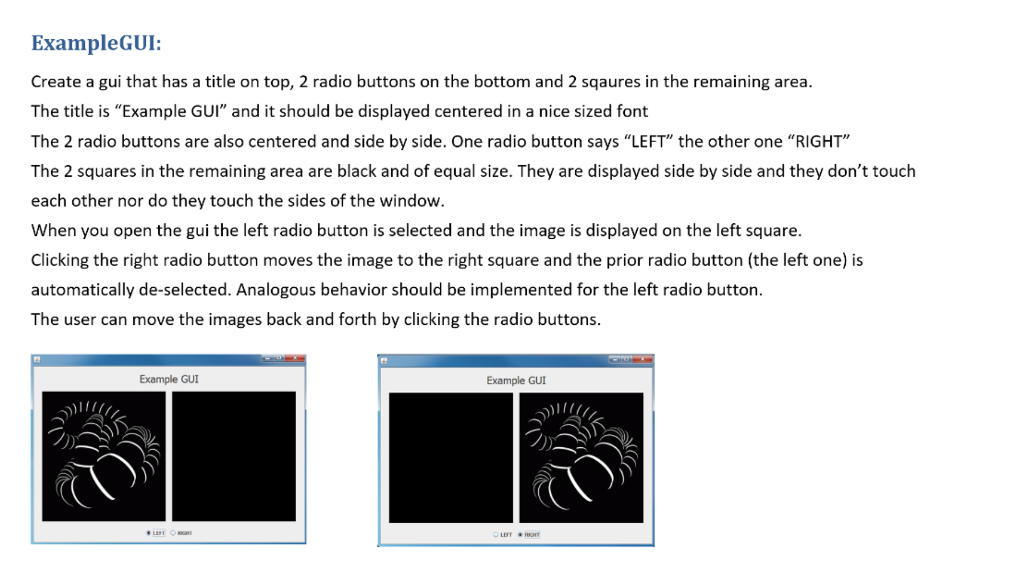
ExampleGUI: Create a gui that has a title on top, 2 radio buttons on the bottom and 2 sqaures in the remaining area The title is "Example GUI" and it should be displayed centered in a nice sized font The 2 radio buttons are also centered and side by side. One radio button says "LEFT" the other one "RIGHT" The 2 squares in the remaining area are black and of equal size. They are displayed side by side and they don't touch each other nor do they touch the sides of the window When you open the gui the left radio button is selected and the image is displayed on the left square Clicking the right radio button moves the image to the right square and the prior radio button (the left one) is automatically de-selected. Analogous behavior should be implemented for the left radio button The user can move the images back and forth by clicking the radio buttons Example GUI Example GUI LBT ExampleGUI: Create a gui that has a title on top, 2 radio buttons on the bottom and 2 sqaures in the remaining area The title is "Example GUI" and it should be displayed centered in a nice sized font The 2 radio buttons are also centered and side by side. One radio button says "LEFT" the other one "RIGHT" The 2 squares in the remaining area are black and of equal size. They are displayed side by side and they don't touch each other nor do they touch the sides of the window When you open the gui the left radio button is selected and the image is displayed on the left square Clicking the right radio button moves the image to the right square and the prior radio button (the left one) is automatically de-selected. Analogous behavior should be implemented for the left radio button The user can move the images back and forth by clicking the radio buttons Example GUI Example GUI LBT
Step by Step Solution
There are 3 Steps involved in it

Get step-by-step solutions from verified subject matter experts
 Study Help