







Question: What is the Get-CimClass cmdlet used for? What difference will it make to the output by moving the asterisk(*) to the beginning, end, or both
- What is the Get-CimClass cmdlet used for?
- What difference will it make to the output by moving the asterisk(*) to the beginning, end, or both in the below script?
Get-CimClass -ClassName *computer
Get-CimClass -ClassName computer*
Get-CimClass -ClassName *computer*
- The show output is produced with the below script. What changes can we make to further filter and obtain only the Win32 classes?
Get-CimClass -ClassName *computerSystem*
CimClassName CimClassMethods CimClassProperties
------------ --------------- ------------------ Win32_ComputerSystemEvent {} {SECURITY_DESCRIPTOR, TI...
CIM_ComputerSystem {} {Caption, Description, I...
CIM_UnitaryComputerSystem {SetPowerState} {Caption, Description, I... Win32_ComputerSystem {SetPowerState, R... {Caption, Description, I... CIM_ComputerSystemPackage {} {Antecedent, Dependent}
Win32_ComputerSystemProcessor {} {GroupComponent, PartCom...
CIM_ComputerSystemResource {} {GroupComponent, PartCom...
CIM_ComputerSystemMappedIO {} {GroupComponent, PartCom...
CIM_ComputerSystemDMA {} {GroupComponent, PartCom...
CIM_ComputerSystemIRQ {} {GroupComponent, PartCom... Win32_ComputerSystemProduct {} {Caption, Description, I...
- What is the use of the "?" character in the below CIM searches?
Get-CimClass -ClassName Win32_computerSystem?????
- What does the -method parameter specify in the Get-CimClass cmdlet?
- What does the select object -expandpropery parameter do?
- What is the use of the -Unique parameter and sort-object in the below script?
Get-CimClass -ClassName * -QualifierName * | Select-Object -
ExpandProperty Ci mClassQualifiers | Select-Object Name -Unique | Sort-Object Name
- What is the use of the worddeprecatedunder-QualifierNameas in the below command?
Get-CimClass -QualifierName deprecated
- What is a method to search for dynamic classes under *time classname?
- What is the use of the below set of commands?
$disk = Get-CimInstance -ClassName Win32_LogicalDisk -KeyOnly
Get-CimAssociatedInstance -InputObject $disk[1]
- What is the reason for the below error?
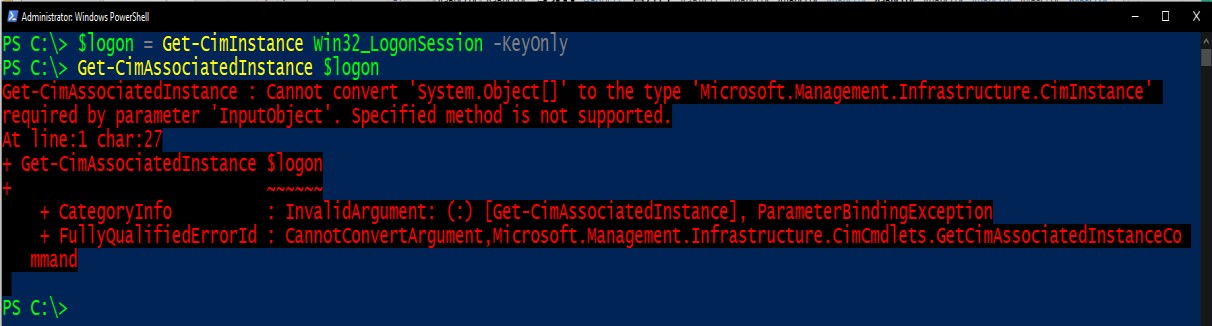
- What are two methods of correcting the above error?
Administrator: Windows PowerShell PS C:\> $logon = Get-CimInstance win32_LogonSession -Keyonly PS C:\> Get-CimAssociated Instance Slogon Get-CimAssociated Instance: Cannot convert System.object[] to the type 'Microsoft. Management. Infrastructure. CimInstance required by parameter 'Inputobject'. Specified method is not supported. At line:1 char:27 + Get-CimAssociated Instance $logon ~~~~~~ PS C:\> + CategoryInfo + FullyQualifiedErrorId: Cannot ConvertArgument, Microsoft. Management. mmand : Invalid argument: (:) [Get-CimAssociated Instance], ParameterBindingException X Infrastructure.cimcmdlets.GetCimAssociated InstanceCo
Step by Step Solution
There are 3 Steps involved in it

Get step-by-step solutions from verified subject matter experts
 Study Help