







Question: when i run my game using my code below it just runs in a straight which i dont want it to do could you fix
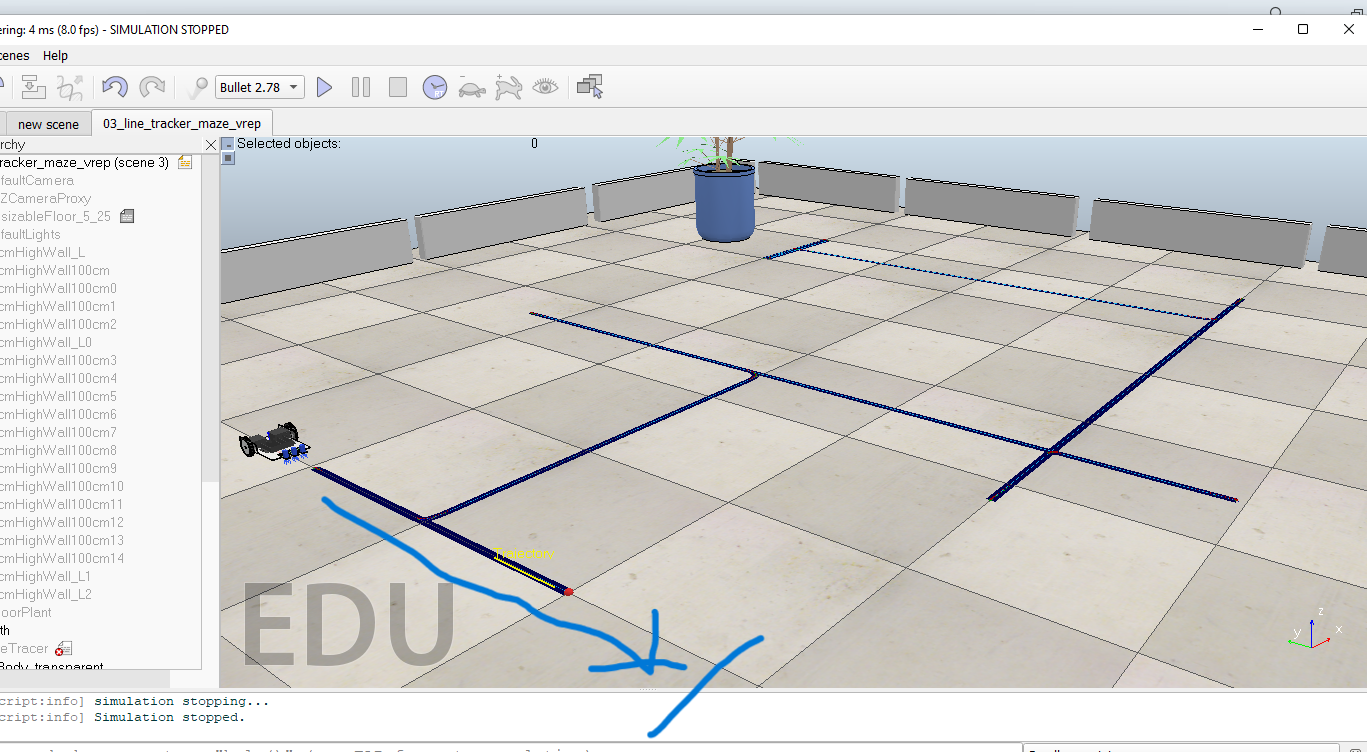
when i run my game using my code below it just runs in a straight which i dont want it to do could you fix my code so that it doesnt please below i have uploaded a screen pointing the direction in which the robot moves in my game using coppeliasim edu software.
class LineTracerRobot:
def __init__(self, sim, clientID): self._sim = sim self.clientID = clientID errCode = [0] * 5 ## attach actuators and sensors errCode[0], self.leftMotor = sim.simxGetObjectHandle(clientID, "DynamicLeftJoint", sim.simx_opmode_oneshot_wait ) errCode[1], self.rightMotor = sim.simxGetObjectHandle(clientID, "DynamicRightJoint", sim.simx_opmode_oneshot_wait ) errCode[2], self.leftSensor = sim.simxGetObjectHandle(clientID, "LeftSensor", sim.simx_opmode_oneshot_wait ) errCode[3], self.midSensor = sim.simxGetObjectHandle(clientID, "MiddleSensor", sim.simx_opmode_oneshot_wait ) errCode[4], self.rightSensor = sim.simxGetObjectHandle(clientID, "RightSensor", sim.simx_opmode_oneshot_wait ) if sum(errCode) > 0: print("*** Error initialising robot {}".format(errCode))
def rotate_right(self, speed=2.0): self._set_two_motor(speed, -speed)
def rotate_left(self, speed=2.0): self._set_two_motor(-speed, speed)
def move_forward(self, speed=2.0): self._set_two_motor(speed, speed)
def move_backward(self, speed=2.0): self._set_two_motor(-speed, -speed)
def _set_two_motor(self, left: float, right: float): self._sim.simxSetJointTargetVelocity(self.clientID, self.leftMotor, left, self._sim.simx_opmode_streaming ) self._sim.simxSetJointTargetVelocity(self.clientID, self.rightMotor, right, self._sim.simx_opmode_streaming )
def right_sensor(self): return self._sim.simxReadVisionSensor(self.clientID,self.rightSensor,self._sim.simx_opmode_oneshot_wait)[1]
def mid_sensor(self): return self._sim.simxReadVisionSensor(self.clientID,self.midSensor,self._sim.simx_opmode_oneshot_wait)[1]
def left_sensor(self): return self._sim.simxReadVisionSensor(self.clientID,self.leftSensor,self._sim.simx_opmode_oneshot_wait)[1]
def stop(self): self._set_two_motor(0.0, 0.0
print ('Program started') sim.simxFinish(-1) # just in case, close all opened connections
clientID=sim.simxStart('127.0.0.1',19997,True,True,5000,5) # Connect to CoppeliaSim
if clientID != -1: print ('Connected to remote API server') else: print('Connection failed!!') sys.exit('Could not connect')
# This is just to ensure that the loop will end after # a fixed time. You should increment this limit in # managable amounts as your solution develops TimeOutLimit = 10
## Create the robot object bot = LineTracerRobot(sim, clientID)
## move forward bot.move_forward(0.5) time.sleep(2)
startTime=time.time() ## Implement your robot behaviour within this loop while time.time()-startTime
## Add the following code within the while loop if bot.left_sensor is False: next_move = navigate_maze("Left Only") bot.rotate_left(1) continue
if bot.mid_sensor is False: next_move = navigate_maze("Straight or Left") bot.move_forward(1) continue
if bot.right_sensor is False: next_move = navigate_maze("Right Only") bot.rotate_right(1) continue
if bot.right_sensor() and bot.left_sensor() and bot.mid_sensor(): next_move = navigate_maze("Cross") if "Left" in next_move: bot.rotate_left(1) elif "Right" in next_move: bot.rotate_right(1) else: bot.move_forward(1) continue
## If none of the sensors are False, rotate right bot.rotate_right(1)
## Stop the robot bot.stop() time.sleep(0.5) ## delay to execute the command sim.simxFinish(-1) ## just in case, close all opened connections print("...done")
ering: 4ms(8.0fps) - SIMULATION STOPPED nx9 renes Help Bullet2.78 maze_vrep X Selected objects: 0 cript:info] simulation stopping... cript:info] Simulation stopped
Step by Step Solution
There are 3 Steps involved in it

Get step-by-step solutions from verified subject matter experts
 Study Help