







Question: When properly executed, using the INDIRECT function can make your INDEX and other functions much more versatile. In cell B3, create a formula to retrieve
| When properly executed, using the INDIRECT function can make your INDEX and other functions much more versatile. In cell B3, create a formula to retrieve the item within the category listed in cell B1. Enter an INDIRECT function nested in an INDEX function to return the item numbers by category. The function will reference cell B1 and return the value at the intersection of row 1, using the Category number in cell A3 and column 1. Nest the function in an IFERROR function to return a blank cell if no items exist within the category. Copy the formula down through cell B17. This will allow you to change the value in cell B1 to Golf, Inventory, Food, Reading, or Clothing and retrieve the desired data from the appropriate table. |
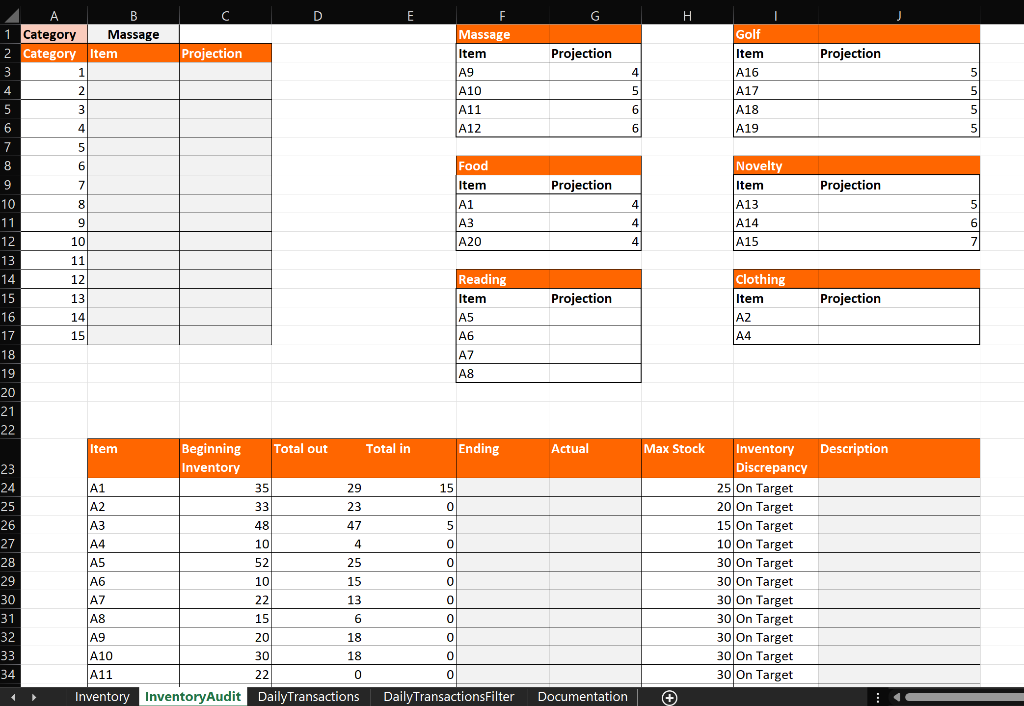
. Projection Projection 4 5 Golf Item A16 A17 A18 A19 5 5 5 6 6 5 Projection Projection 4 Novelty Item A13 A14 A15 5 4 6 4 Clothing Item Projection Projection AZ A4 B D E F. 1 Category Massage Massage 2 Category Item Projection Item 3 1 A9 4 2 A10 5 3 A11 6 4 A12 7 5 8 6 6 Food 9 7 Item 10 8 A1 11 9 9 A3 12 10 A20 13 11 14 12 Reading 15 13 Item 16 14 A5 17 15 A6 18 A7 19 A8 20 21 22 Item Beginning Total out Total in Ending 23 Inventory 24 A1 35 29 15 25 A2 33 23 0 26 A3 48 47 5 27 A4 10 4 0 0 28 A5 52 25 0 29 A6 10 15 0 0 30 A7 22 13 0 0 31 A8 15 6 0 32 A9 20 18 0 33 A10 30 18 0 34 A11 22 0 0 Inventory Inventory Audit DailyTransactions DailyTransactionsFilter Actual Max Stock Description Inventory Discrepancy 25 On Target 20 On Target 15 On Target 10 On Target 30 On Target 30 On Target 30 On Target 30 On Target 30 On Target 30 On Target 30 On Target Documentation + . Projection Projection 4 5 Golf Item A16 A17 A18 A19 5 5 5 6 6 5 Projection Projection 4 Novelty Item A13 A14 A15 5 4 6 4 Clothing Item Projection Projection AZ A4 B D E F. 1 Category Massage Massage 2 Category Item Projection Item 3 1 A9 4 2 A10 5 3 A11 6 4 A12 7 5 8 6 6 Food 9 7 Item 10 8 A1 11 9 9 A3 12 10 A20 13 11 14 12 Reading 15 13 Item 16 14 A5 17 15 A6 18 A7 19 A8 20 21 22 Item Beginning Total out Total in Ending 23 Inventory 24 A1 35 29 15 25 A2 33 23 0 26 A3 48 47 5 27 A4 10 4 0 0 28 A5 52 25 0 29 A6 10 15 0 0 30 A7 22 13 0 0 31 A8 15 6 0 32 A9 20 18 0 33 A10 30 18 0 34 A11 22 0 0 Inventory Inventory Audit DailyTransactions DailyTransactionsFilter Actual Max Stock Description Inventory Discrepancy 25 On Target 20 On Target 15 On Target 10 On Target 30 On Target 30 On Target 30 On Target 30 On Target 30 On Target 30 On Target 30 On Target Documentation +
Step by Step Solution
There are 3 Steps involved in it

Get step-by-step solutions from verified subject matter experts
 Study Help