Question: When to Scan Throughout this article the terms scanning and imaging are used interchangeably. There are varied approaches to launching projects that go by either
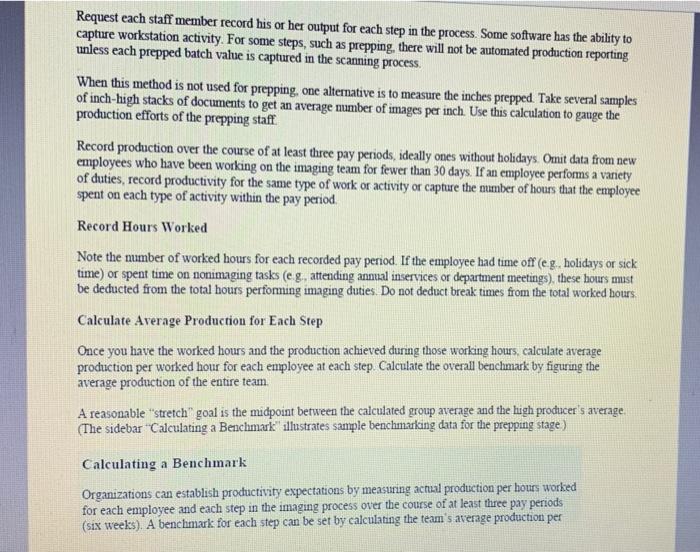
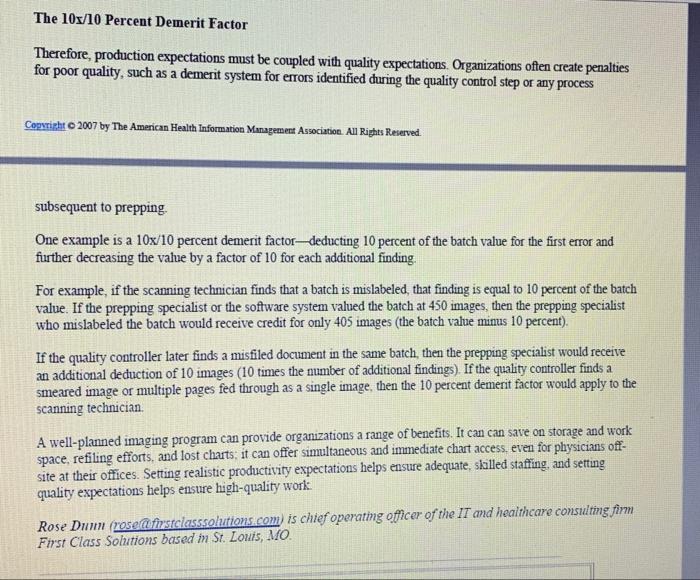
When to Scan Throughout this article the terms scanning and imaging are used interchangeably. There are varied approaches to launching projects that go by either name Some organizations choose an archival approach, which converts paper records to images at some point after the record is completed. Others choose to scan the record immediately upon receipt following discharge. Each approach has pros and cons and is often determined by setting Scanning after completion causes less stress on physicians because they do not have to learn an online completion system. It also eliminates the need for an online completion system. The option does not require that every form in the record be defined to a specific document type, usually through the use of bar codes. Some organizations have been able to use this approach to allow cancer registry to be performed remotely Scanning at completion does not permit coding or analysis to be performed remotely and only minimally reduces the need for file staff. As a result, the cost of maintaining the paper record, even if only for 30 days or more, adds to the imaging process Scanning at discharge, however, has many elements that factor into an imaging system's retum on investment Immediate scanning eliminates file folders, the need for file space and the space required for the physician record Copyright 2007 by The American Health Information Manapea Anecianes. All Rights Reserved completion function. It also enhances release of information and improves cliniciam access to documentation for follow-up care Scanning at the time of discharge allows coding, cancer registry, and analysis to be performed remotely. Remote workers often experience higher productivity because they lack the distractions present at the work site The drawbacks of scanning at discharge include the need to educate clinicians on using the systein to complete theu records (a temporary condition) and the need for sufficient staff to ensure the scanning function occurs seamlessly immediately following discharge For organizations that decide to scan at the time of discharge bar coding plays a very important role. The bar code links to the document topwhen recedente ng Shade mantenimento For organizations unwilling to add staff to perform the necessary preparation, scanning, indexing, and quality control functions, outsourcing may be the less expensive alternative. Many organizations are accustomed to outsourcing their microfilming efforts, so outsourcing scanning is not alien to HIM departments. The approach may not be ideal for organizations choosing to scan at time of discharge if the outsourcing firm is unable to twn the work around within 24 hours, since recently discharged records are the most active and important for continuity of care. Scanning in-house raises considerations of space, labor, and equipment. This article does not dive into equipment specifications, often these are defined by the imaging software vendor. However, the following three cautionary notes might be helpful It is wise to discount the throughput stated by the equipment manufacturer by 25 percent. Often the stated throughput is measured under optimum conditions and with uniformly sized paper. Unfortunately, medical records are anything but uniform in size and paper type. It is also wise to have backup scanners on hand. One big scanner will not do the job_equipment tends to break down. Finally, organizations should consider adding several desktop scanners to their equipment needs list, with at least one scanner offering color capability. Desktop scanners can be used at the release-of-information and birth registry areas and for those miscellaneous weirdly shaped documents that float in from time to time, such as implant cards and prescriptions When it comes to staffing the new imaging function management will want to ensure it hires the right type of individual with the right skills. This function, like some others in HIM can be monotonous but requires attention to detail. It is important to infuse some variation into the duties and crosstrain staff on all steps of the process (eg.. prepping, scanning, quality control, indexing, and routine maintenance) When seeking the right individual, organizations have noted the following ideal characteristics . Technology savvy (e.g- good with a PC, a mouse, and dealing with scanner Jams) Excellent keyboard skills (especially the number pad) Eye-keyboard transfer accuracy does not transpose, types what is printed) Eye-hand coordination (ability to page through stacks of paper, quickly observe misfiles, repair tears and remove staples, and organize mixed stacks of paper into segregated stacks) Sufficiently limber able to move around at the workstation and get up to pick up new stacks of work without limitations) Noise tolerant (some scanning equipment can be loud) Sufficiently motivated or competitive (which can be related to achieving production goals) . . Each of these characteristics will facilitate the scanning operation and play a part in achieving productivity goals, because without these skills, the processing effort will be delayed. Setting Scanning Expectations As with developing productivity expectations for any function, studying the process first is imperative Organizations should not assume that published productivity standards can be adopted without some evaluation and tweaking Every facility has its own idiosyncrasies and must develop its own productivity expectations. Expectations should be realistic yet require some stretching to reach the goal Copyrihto 2007 by The American Health Information Management Association. All Rights Reserved. Define Each Step of Your Scanning Process Organizations approach their imaging processes differently. Some couple prepping and scanning, others couple scanning and indexing, and others couple indexing and quality control. At some facilities, each step is a separate activity performed by a different individual. Defining what is done at each step of your process and segregating these steps from others will lead to more precise productivity expectations. Once you have each step defined and the productivity measure established, you can combine each for an overall functional expectation if you desire. Whether an organization chooses an archival or discharge approach to scanning does not affect its scanning productivity expectations, but it does serve as a basis for forecasting staffing needs. Capture Current Production Request each staff member record his or her output for each step in the process. Some software has the ability to capture workstation activity. For some steps, such as prepping, there will not be automated production reporting unless each prepped batch value is captured in the scanning process. Request each staff member record his or her output for each step in the process. Some software has the ability to capture workstation activity. For some steps, such as prepping, there will not be automated production reporting unless each prepped batch value is captured in the scanning process When this method is not used for prepping, one alternative is to measure the inches prepped. Take several samples of inch-high stacks of documents to get an average number of images per inch. Use this calculation to gauge the production efforts of the prepping staff Record production over the course of at least three pay periods, ideally ones without holidays. Omit data from new employees who have been working on the imaging team for fewer than 30 days. If an employee performs a variety of duties, record productivity for the same type of work or activity or capture the number of hours that the employee spent on each type of activity within the pay period. Record Hours Worked Note the number of worked hours for each recorded pay period. If the employee had time off (eg, holidays or sick time) or spent time on nonimaging tasks (eg, attending annual inservices or department meetings), these hours must be deducted from the total hours performing imaging duties. Do not deduct break times from the total worked bours Calculate Average Production for Each Step Once you have the worked hours and the production achieved during those working hours, calculate average production per worked hour for each employee at each step. Calculate the overall benchmark by figuring the average production of the entire team. A reasonable "stretch" goal is the midpoint between the calculated group average and the high producer's average. (The sidebar "Calculating a Benchmark" illustrates sample benchmarking data for the prepping stage) Calculating a Benchmark Organizations can establish productivity expectations by measuring actual production per hours worked for each employee and each step in the imaging process over the course of at least three pay periods (six weeks). A benchmark for each step can be set by calculating the team's average production per The 10x/10 Percent Demerit Factor Therefore, production expectations must be coupled with quality expectations. Organizations often create penalties for poor quality, such as a demerit system for errors identified during the quality control step or any process Copyright 2007 by The American Health Information Management Association. All Rights Reserved. subsequent to prepping One example is a 10x/10 percent demerit factordeducting 10 percent of the batch value for the first error and further decreasing the value by a factor of 10 for each additional finding For example, if the scanning technician finds that a batch is mislabeled that finding is equal to 10 percent of the batch value. If the prepping specialist or the software system valued the batch at 450 images , then the prepping specialist who mislabeled the batch would receive credit for only 405 images (the batch value minus 10 percent). If the quality controller later finds a misfiled document in the same batch, then the prepping specialist would receive an additional deduction of 10 images (10 times the number of additional findings). If the quality controller finds a smeared image or multiple pages fed through as a single image, then the 10 percent demerit factor would apply to the scanning technician A well-planned imaging program can provide organizations a range of benefits. It can can save on storage and work space, refiling efforts, and lost charts: it can offer simultaneous and immediate chart access, even for physicians off- site at their offices. Setting realistic productivity expectations helps ensure adequate, sicilled staffing, and setting quality expectations helps ensure high-quality work Rose Dunn (rose@firstclasssolutions.com) is chief operating officer of the IT and healthcare consulting firm First Class Solutions based in St. Louis, MO When to Scan Throughout this article the terms scanning and imaging are used interchangeably. There are varied approaches to launching projects that go by either name Some organizations choose an archival approach, which converts paper records to images at some point after the record is completed. Others choose to scan the record immediately upon receipt following discharge. Each approach has pros and cons and is often determined by setting Scanning after completion causes less stress on physicians because they do not have to learn an online completion system. It also eliminates the need for an online completion system. The option does not require that every form in the record be defined to a specific document type, usually through the use of bar codes. Some organizations have been able to use this approach to allow cancer registry to be performed remotely Scanning at completion does not permit coding or analysis to be performed remotely and only minimally reduces the need for file staff. As a result, the cost of maintaining the paper record, even if only for 30 days or more, adds to the imaging process Scanning at discharge, however, has many elements that factor into an imaging system's retum on investment Immediate scanning eliminates file folders, the need for file space and the space required for the physician record Copyright 2007 by The American Health Information Manapea Anecianes. All Rights Reserved completion function. It also enhances release of information and improves cliniciam access to documentation for follow-up care Scanning at the time of discharge allows coding, cancer registry, and analysis to be performed remotely. Remote workers often experience higher productivity because they lack the distractions present at the work site The drawbacks of scanning at discharge include the need to educate clinicians on using the systein to complete theu records (a temporary condition) and the need for sufficient staff to ensure the scanning function occurs seamlessly immediately following discharge For organizations that decide to scan at the time of discharge bar coding plays a very important role. The bar code links to the document topwhen recedente ng Shade mantenimento For organizations unwilling to add staff to perform the necessary preparation, scanning, indexing, and quality control functions, outsourcing may be the less expensive alternative. Many organizations are accustomed to outsourcing their microfilming efforts, so outsourcing scanning is not alien to HIM departments. The approach may not be ideal for organizations choosing to scan at time of discharge if the outsourcing firm is unable to twn the work around within 24 hours, since recently discharged records are the most active and important for continuity of care. Scanning in-house raises considerations of space, labor, and equipment. This article does not dive into equipment specifications, often these are defined by the imaging software vendor. However, the following three cautionary notes might be helpful It is wise to discount the throughput stated by the equipment manufacturer by 25 percent. Often the stated throughput is measured under optimum conditions and with uniformly sized paper. Unfortunately, medical records are anything but uniform in size and paper type. It is also wise to have backup scanners on hand. One big scanner will not do the job_equipment tends to break down. Finally, organizations should consider adding several desktop scanners to their equipment needs list, with at least one scanner offering color capability. Desktop scanners can be used at the release-of-information and birth registry areas and for those miscellaneous weirdly shaped documents that float in from time to time, such as implant cards and prescriptions When it comes to staffing the new imaging function management will want to ensure it hires the right type of individual with the right skills. This function, like some others in HIM can be monotonous but requires attention to detail. It is important to infuse some variation into the duties and crosstrain staff on all steps of the process (eg.. prepping, scanning, quality control, indexing, and routine maintenance) When seeking the right individual, organizations have noted the following ideal characteristics . Technology savvy (e.g- good with a PC, a mouse, and dealing with scanner Jams) Excellent keyboard skills (especially the number pad) Eye-keyboard transfer accuracy does not transpose, types what is printed) Eye-hand coordination (ability to page through stacks of paper, quickly observe misfiles, repair tears and remove staples, and organize mixed stacks of paper into segregated stacks) Sufficiently limber able to move around at the workstation and get up to pick up new stacks of work without limitations) Noise tolerant (some scanning equipment can be loud) Sufficiently motivated or competitive (which can be related to achieving production goals) . . Each of these characteristics will facilitate the scanning operation and play a part in achieving productivity goals, because without these skills, the processing effort will be delayed. Setting Scanning Expectations As with developing productivity expectations for any function, studying the process first is imperative Organizations should not assume that published productivity standards can be adopted without some evaluation and tweaking Every facility has its own idiosyncrasies and must develop its own productivity expectations. Expectations should be realistic yet require some stretching to reach the goal Copyrihto 2007 by The American Health Information Management Association. All Rights Reserved. Define Each Step of Your Scanning Process Organizations approach their imaging processes differently. Some couple prepping and scanning, others couple scanning and indexing, and others couple indexing and quality control. At some facilities, each step is a separate activity performed by a different individual. Defining what is done at each step of your process and segregating these steps from others will lead to more precise productivity expectations. Once you have each step defined and the productivity measure established, you can combine each for an overall functional expectation if you desire. Whether an organization chooses an archival or discharge approach to scanning does not affect its scanning productivity expectations, but it does serve as a basis for forecasting staffing needs. Capture Current Production Request each staff member record his or her output for each step in the process. Some software has the ability to capture workstation activity. For some steps, such as prepping, there will not be automated production reporting unless each prepped batch value is captured in the scanning process. Request each staff member record his or her output for each step in the process. Some software has the ability to capture workstation activity. For some steps, such as prepping, there will not be automated production reporting unless each prepped batch value is captured in the scanning process When this method is not used for prepping, one alternative is to measure the inches prepped. Take several samples of inch-high stacks of documents to get an average number of images per inch. Use this calculation to gauge the production efforts of the prepping staff Record production over the course of at least three pay periods, ideally ones without holidays. Omit data from new employees who have been working on the imaging team for fewer than 30 days. If an employee performs a variety of duties, record productivity for the same type of work or activity or capture the number of hours that the employee spent on each type of activity within the pay period. Record Hours Worked Note the number of worked hours for each recorded pay period. If the employee had time off (eg, holidays or sick time) or spent time on nonimaging tasks (eg, attending annual inservices or department meetings), these hours must be deducted from the total hours performing imaging duties. Do not deduct break times from the total worked bours Calculate Average Production for Each Step Once you have the worked hours and the production achieved during those working hours, calculate average production per worked hour for each employee at each step. Calculate the overall benchmark by figuring the average production of the entire team. A reasonable "stretch" goal is the midpoint between the calculated group average and the high producer's average. (The sidebar "Calculating a Benchmark" illustrates sample benchmarking data for the prepping stage) Calculating a Benchmark Organizations can establish productivity expectations by measuring actual production per hours worked for each employee and each step in the imaging process over the course of at least three pay periods (six weeks). A benchmark for each step can be set by calculating the team's average production per The 10x/10 Percent Demerit Factor Therefore, production expectations must be coupled with quality expectations. Organizations often create penalties for poor quality, such as a demerit system for errors identified during the quality control step or any process Copyright 2007 by The American Health Information Management Association. All Rights Reserved. subsequent to prepping One example is a 10x/10 percent demerit factordeducting 10 percent of the batch value for the first error and further decreasing the value by a factor of 10 for each additional finding For example, if the scanning technician finds that a batch is mislabeled that finding is equal to 10 percent of the batch value. If the prepping specialist or the software system valued the batch at 450 images , then the prepping specialist who mislabeled the batch would receive credit for only 405 images (the batch value minus 10 percent). If the quality controller later finds a misfiled document in the same batch, then the prepping specialist would receive an additional deduction of 10 images (10 times the number of additional findings). If the quality controller finds a smeared image or multiple pages fed through as a single image, then the 10 percent demerit factor would apply to the scanning technician A well-planned imaging program can provide organizations a range of benefits. It can can save on storage and work space, refiling efforts, and lost charts: it can offer simultaneous and immediate chart access, even for physicians off- site at their offices. Setting realistic productivity expectations helps ensure adequate, sicilled staffing, and setting quality expectations helps ensure high-quality work Rose Dunn (rose@firstclasssolutions.com) is chief operating officer of the IT and healthcare consulting firm First Class Solutions based in St. Louis, MO










 Study Help