







Question: When you run the script I have provided, you will see a new database named hackmageddon created and it will contain one table named q1data.
When you run the script I have provided, you will see a new database named "hackmageddon" created and it will contain one table named "q1data". The Q1Data table contains a total of 12 fields, which are described below:
- Date Reported - This is the date the incident was publicly reported. Every record has a date reported value
- Date Occurred - Sometimes this value is null or a range like November 2020. Because it is optional, it may not be as useful as the Date Reported field.
- Date Discovered - Sometimes this value is null or a range like November 2020. Because it is optional, it may not be as useful as the Date Reported field.
- Author - This field identifies the author or source of the attack, if it is known.
- Target - Company/Person targeted by the attack. Sometimes this value is ambiguous like "multiple targets".
- Description - Description of the attack and who was targeted.
- Attack - Type of attack used. In this dataset, the types of attacks are:
- Malware
- Unknown
- Account Takeover
- Vulnerability
- Targeted Attack
- Misconfiguration
- Fake Websites/Social Network accounts
- Business Email Compromise
- DDoS
- Zoom bombing
- Malicious Browser Extension
- Malicious Script Injection
- Defacement
- Credential Stuffing
- >1
- DNS Hijacking
- SQLi
- Malvertising
- Brute-Force
- Evil Contract
- Web shells
- SPAM
- Malicious Google search ads
- SIM swap
- Windows Bit locker
- Malicious Wordpress plugin
- SEO Spam
- Password-spray
- Compromised certificate
- Target Class - This field is used to designate the industry of the attack victim. Possible values in this data set are:
- Multiple Industries
- Human health and social work
- Individual
- Public admin, defence, social security
- Education
- Professional scientific technical activities
- Financial and insurance
- Other service activities
- Manufacturing
- Administration and support service
- Information and communication
- Unknown
- Arts entertainment and recreation
- Transportation and storage
- Electricity gas steam air conditioning
- Wholesale and retail
- Fintech
- Accommodation and food service
- Real estate
- Extraterritorial organizations and bodies
- Water supply, waste management, remediation
- Attack Class - This field is used to designate the implied motivations for the attack. Possible values are:
- CC - Cyber Crime
- CE - Cyber Espionage
- N/A - undetermined
- CW - Cyber Warfare
- H - Hacktivism
- >1 - More than one motivation
- Country - This field indicates what country the target is located in. Sometimes the value is N/A or >1 (multiple countries)
- Link - URL containing information about the attack.
- Tags - Metadata tags for the event, probably not useful for our purposes.
This dataset contains 714 records. Your task for this project will be to create the database by running the provided script and then create several SQL queries on the data.
Question:
Number of Attacks by Motivation in March - I need help writing a query that shows the number of attacks that occurred for each motivation category only during the month of March. Sort the results in descending order. You will combine techniques from the previous two queries to get this to work. Sample results:
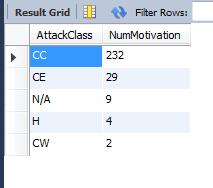
Result Grid AttackClass CC CE N/A H CW Filter Rows: NumMotivation 232 29 942
Step by Step Solution
3.39 Rating (143 Votes )
There are 3 Steps involved in it
To retrieve the number of attacks by motivation category in March you can use SQL to filter the data... View full answer

Get step-by-step solutions from verified subject matter experts
 Study Help