







Question: - while - increment/decrement operators Submission Information Submit this assignment by following the instructions given by your TA. SUBMIT ONLY the e file (no-a.out or
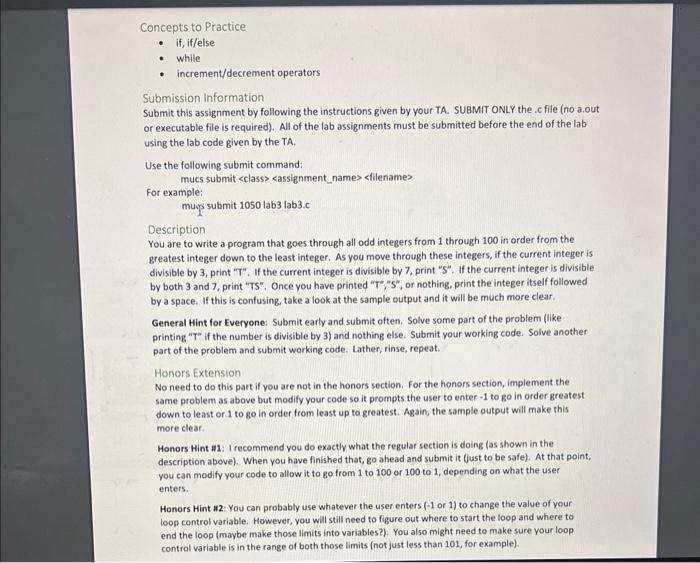
- while - increment/decrement operators Submission Information Submit this assignment by following the instructions given by your TA. SUBMIT ONLY the e file (no-a.out or executable file is required). All of the lab assignments must be submitted before the end of the lab using the lab code given by the TA. Use the following submit command: mucs submit For example: mugs submit 1050 lab3 lab 3.c Description You are to write a program that goes through all odd integers from 1 through 100 in order from the greatest integer down to the least integer. As you move through these integers, if the current integer is divisible by 3, print " T ". If the current integer is divisible by 7 , print " 5 ". If the current integer is divisible by both 3 and 7, print "TS". Once you have printed "T", " S ", or nothing, print the integer itself followed by a space. If this is confusing, take a look at the sample output and it will be much more clear. General Hint for Everyone: Submit early and submit often. Solve some part of the problem (like printing "T" if the number is divisible by 3 ) and nothing else. Submit your working code. Solve another part of the problem and submit working code. Lather, rinse, repeat. Honors Extension No need to do this part if you are not in the honors section. For the honors section, implement the same problem as above but modify your code so it prompts the user to enter -1 to go in order greatest down to least or 1 to go in order from least up to greatest. Again, the sample output will make this more clear. Honors Hint 11: I recommend you do exactly what the regular section is doing (as shown in the description above). When you have finished that, go ahead and submit it (just to be safe). At that point, you can modify your code to allow it to go from 1 to 100 or 100 to 1 , depending on what the user enters. Honors Hint 12: You can probably use whatever the user enters (-1 or 1) to change the value of your loop control variable. However, you will still need to figure out where to start the loop and where to end the loop (maybe make those limits into variables?). You also might need to make sure your loop control variable is in the range of both those limits (not just less than 101, for example)
Step by Step Solution
There are 3 Steps involved in it
To tackle this problem well break it down step by step Steps to Implement the Program Initialize the ... View full answer

Get step-by-step solutions from verified subject matter experts
 Study Help