







Question: White papers are important for sharing knowledge and research results. The SANS Institute contains thousands of security related white papers in its library. Writing a
White papers are important for sharing knowledge and research results. The SANS Institute contains thousands of security related white papers in its library. Writing a good white paper is made easier with the use of a ready-made template.
Purpose
During this project you will visit the SANS website, open an email security policy template, and make revisions to the policy document.
Directions
Read and execute the instructions for Hands-on Project 1.
Write a paper describing your experience and project results. MINIMUM 150 words. Describe the results, the meaning of the results and the challenges you encountered.
3. Paste the screenshots into your paper. For each screenshot, describe in DETAIL what is taking place.
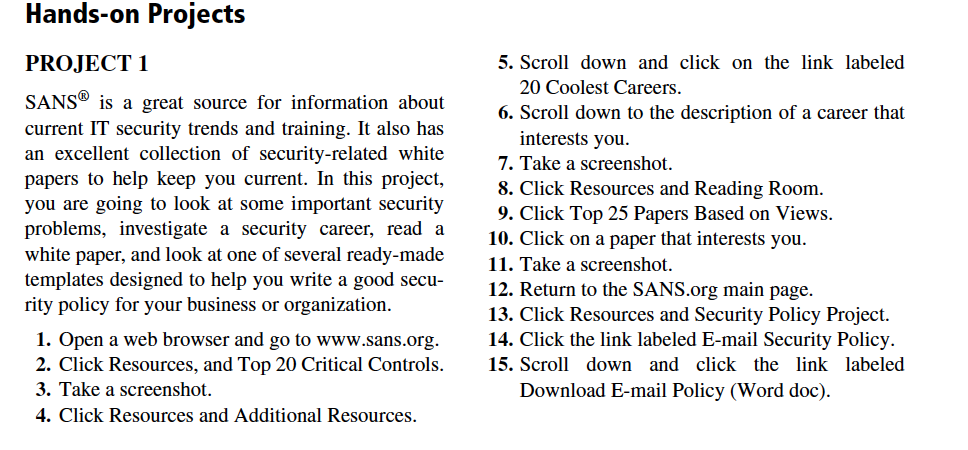
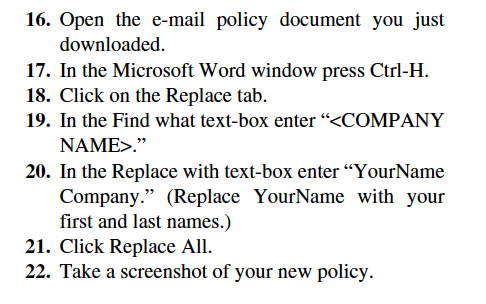
Hands-on Proiects PROJECT 1 5. Scroll down and click on thelink labeled 20 Coolest Careers 6. Scroll down to the description of a career that SANSG is a great source for information about current IT security trends and training. It also has an excellent collection of security-related white papers to help keep you current. In this project, you are going to look at some important security problems, investigate a security career, read a white paper, and look at one of several ready-made templates designed to help you write a good secu- rity policy for your business or organization interests you 7. Take a screenshot. 8. Click Resources and Reading Room 9. Click Top 25 Papers Based on Views. 10. Click on a paper that interests you 11. Take a screenshot 12. Return to the SANS.org main page. 13. Click Resources and Security Policy Project. 14. Click the link labeled E-mail Security Policy 1. Open a web browser and go to www.sans.org. 2. Click Resources, and Top 20 Critical Controls.15. Scroll down and click the link labeled 3. Take a screenshot. 4. Click Resources and Additional Resources Download E-mail Policy (Word doc) Hands-on Proiects PROJECT 1 5. Scroll down and click on thelink labeled 20 Coolest Careers 6. Scroll down to the description of a career that SANSG is a great source for information about current IT security trends and training. It also has an excellent collection of security-related white papers to help keep you current. In this project, you are going to look at some important security problems, investigate a security career, read a white paper, and look at one of several ready-made templates designed to help you write a good secu- rity policy for your business or organization interests you 7. Take a screenshot. 8. Click Resources and Reading Room 9. Click Top 25 Papers Based on Views. 10. Click on a paper that interests you 11. Take a screenshot 12. Return to the SANS.org main page. 13. Click Resources and Security Policy Project. 14. Click the link labeled E-mail Security Policy 1. Open a web browser and go to www.sans.org. 2. Click Resources, and Top 20 Critical Controls.15. Scroll down and click the link labeled 3. Take a screenshot. 4. Click Resources and Additional Resources Download E-mail Policy (Word doc)
Step by Step Solution
There are 3 Steps involved in it

Get step-by-step solutions from verified subject matter experts
 Study Help