







Question: Who knows Access, please help??? https://drive.google.com/file/d/1FVRZCkdmdUBrO8j1YQxAB5f0McmJLEVV/view?usp=sharing here is the link to excel file StepInstruction Points Download the 'Access Data 2-2' Excel file to the desktop
Who knows Access, please help??? https://drive.google.com/file/d/1FVRZCkdmdUBrO8j1YQxAB5f0McmJLEVV/view?usp=sharing here is the link to excel file
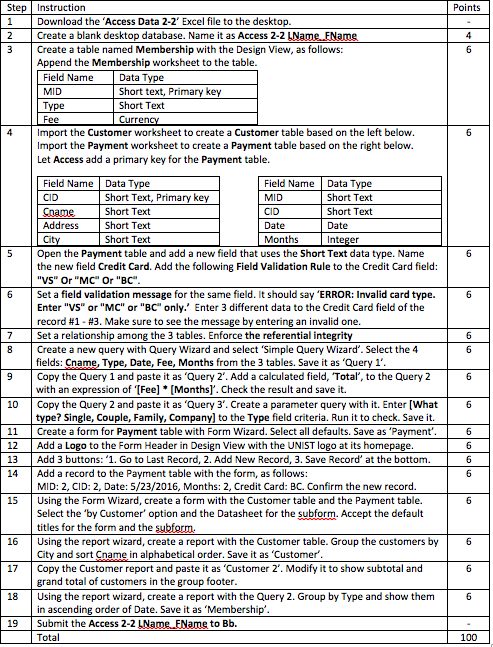
StepInstruction Points Download the 'Access Data 2-2' Excel file to the desktop Create a blank desktop database. Name it as Access 2-2 LName. FName 3 Create a table named Membership with the Design View, as follows: Append the Membership worksheet to the table. Short text, Primary key Short Text MID Type 4mport the Customer worksheet to create a Customer table based on the left below Import the Payment worksheet to create a Payment table based on the right below. Let Access add a primary key for the Payment table. Field Name Data Type HID 113 Date Field Name Data Type 113 Short Text, Primary key Date Short Text 5 Open the Payment table and add a new field that uses the Short Text data type. Name field Credit Card. Add the following Field Validation Rule to the Credit Card field the "VS" Or "MC Or "BC 6 Set a field validation message for the same field. It should say 'ERROR: Invalid card type Enter "VS or "MC" or "BC" only. Enter 3 different data to the Credit Card field of the record #1-#3. Make sure to see the message by entering an invalid one 7 Set a relationship among the 3 tables. Enforce the referential integrity 8 Create a new query with Query Wizard and select 'Simple Query Wizard'. Select the 4 'Query 1 fields: Cname, Type, Date, Fee, Months from the 3 tables. Save it as Copy the Query 1 and paste it as 'Query 2'. Add a calculated field, Total, to the Query 2 with an expression of '[Fee] [Monthsl. Check the result and save i type? Single, Couple, Family, Company] to the Type field criteria. Run it to check. Save it. 11 Create a form for Payment table with Form Wizard. Select all defaults. Save as 'Payment' 12 Add a Logo to the Form Header in Design View with the UNIST logo at its homepage 13 Add 3 buttons: '1. Go to Last Record, 2. Add New Record, 3. Save Record' at the bottom6 14 Add a record to the Payment table with the form, as follows MID: 2, CID: 2, Date: 5/23/2016, Months: 2, Credit Card: BC. Confirm the new record 15 Using the Form Wizard, create a form with the Customer table and the Payment table. Select the 'by Customer' option and the Datasheet for the subform. Accept the default 16 Using the report wizard, create a report with the Customer table. Group the customers b 17 Copy the Customer report and paste it as 'Customer 2'. Modify it to show subtotal and 18 Using the report wizard, create a report with the Query 2. Group by Type and show them 19 Submit the Access 2-2 LName FName to Bb. titles for the form and the subferm. City and sort Cname in alphabetical order. Save it as 'Customer' grand total of customers in the group footer in ascending order of Date. Save it as 'Membership' 100
Step by Step Solution
There are 3 Steps involved in it

Get step-by-step solutions from verified subject matter experts
 Study Help