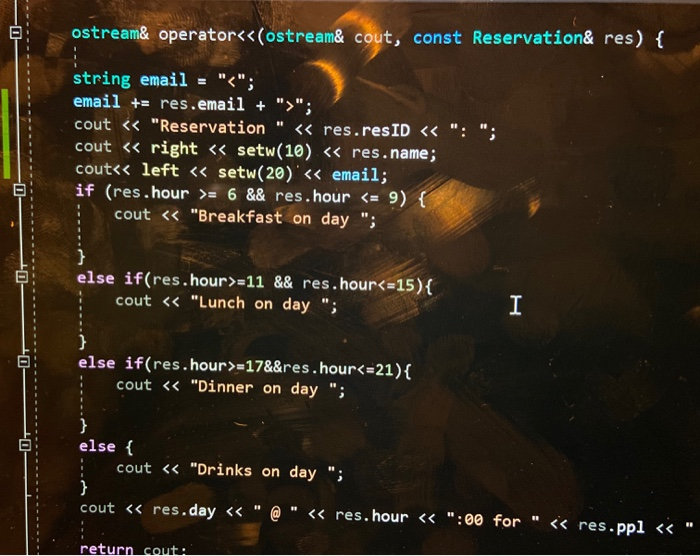
Question: why is my output not alligning? here is my code and how it is supposed to be this is how it comes out ostream& operator;
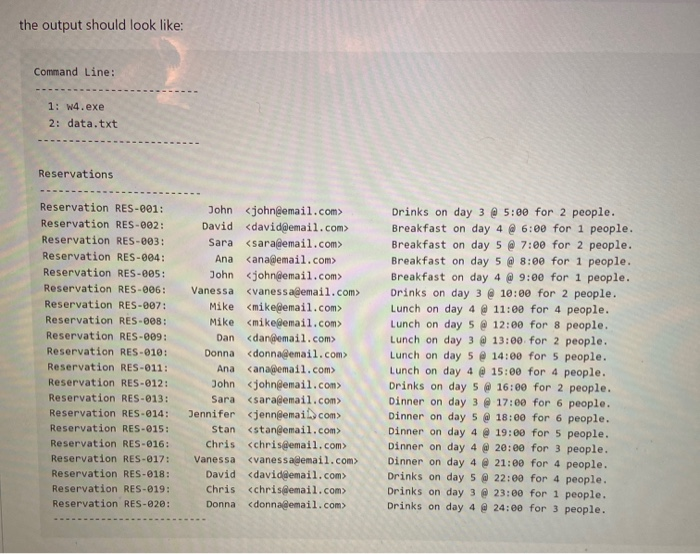
why is my output not alligning? here is my code and how it is supposed to be
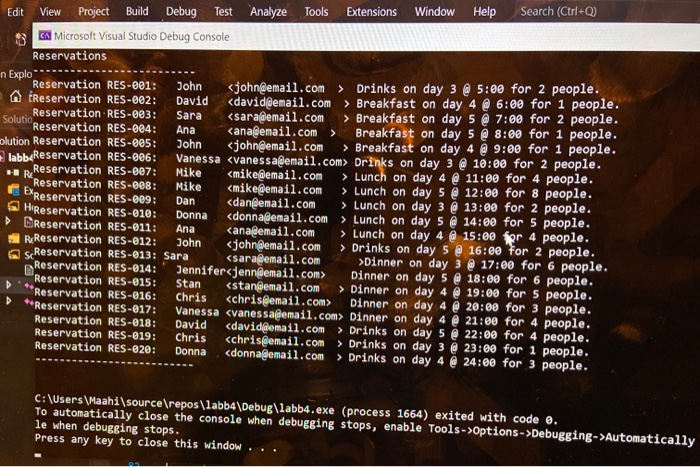
this is how it comes out
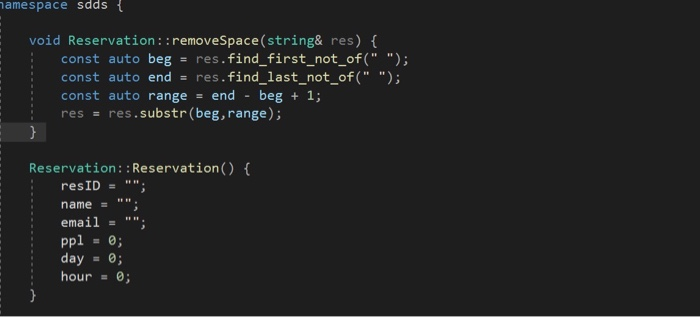
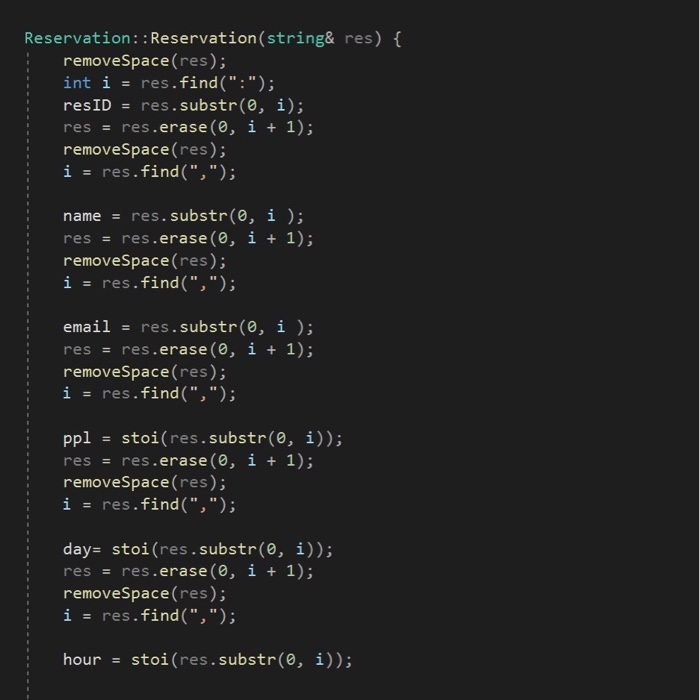
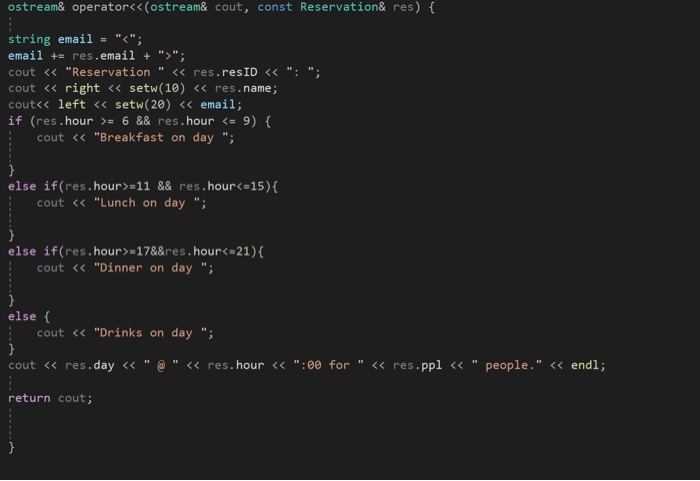
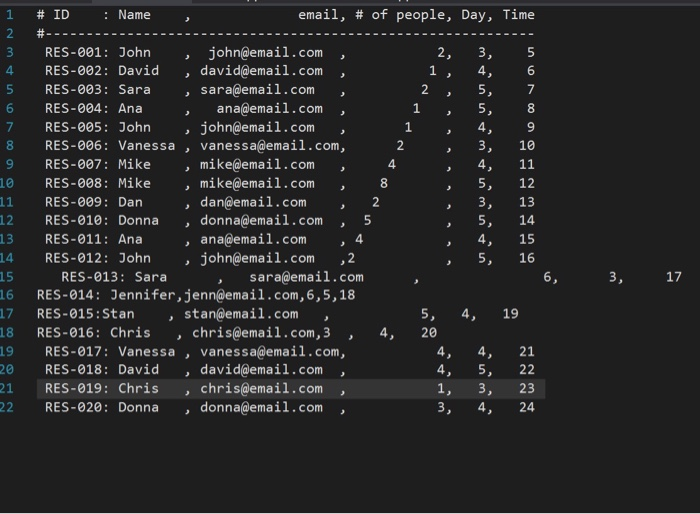
ostream& operator"; cout = 6 && res. hour =11 && res.hour=17&&res.hour Drinks on day 3 @ 5:00 for 2 people. Reservation RES-002: David Breakfast on day 4 @ 6:08 for 1 people, Reservation.RES-003: Sara Breakfast on day 5 7:09 for 2 people, Solutio Reservation RES-004: Ana canadenail.com > Breakfast on day 5 8:00 for 1 people, plution Reservation RES-005: John Breakfast on day 4 9:00 for 1 people, Reservation RES-006: Vanessa Drinks on day 3 @ 10:00 for 2 people. R Reservation RES-007: Mike Lunch on day 4 @11:00 for 4 people. Reservation RES-008: Mike mikeemail.com > Lunch on day 5 @ 12:00 for 8 people, Reservation RES-009: Lunch on day 3 @ 13:00 for 2 people, HiReservation RES-010: Donna Lunch on day 5 @ 14:00 for 5 people, DReservation RES-011: Ana canademail.com > Lunch on day 4 @ 15:00 or 4 people, Reservation RES-012: John john@email.com > Drinks on day 5 @ 16:00 For 2 people, L s Reservation RES-013: Sara Dinner on day 3 @ 17:00 for 6 people. Reservation RES-014: Jennifer Jennilemall.com Dinner on day 5 18:00 for 6 people. Reservation RES-015: Stan Dinner on day 4 Reservation RES-016: 19:00 for 5 people, Chris chris@email.com> Dinner on day 4 20:00 for 3 people, Reservation RES-@17: Vanessa Dinner on day 4 21:00 for 4 people, Reservation RES-018: David Drinks on day 5 Reservation RES-019: 22:00 for 4 people, Chris cchris email.com > Drinks on day 3 23:00 for 1 people, Reservation RES-628: Donna donnagemail.com > Drinks on day 4 24:08 for 3 people. 29: Dan C:\Users\Maahisource epos\labb4\Debug\labb.exe (process 1664) exited with code , To automatically close the console when debugging stops, enable Tools -> Options ->Debugging->Automatically le when debugging stops. Press any key to close this window .. the output should look like: Command Line: 1: w4.exe 2: data.txt Reservations Reservation RES-001: Reservation RES-002: Reservation RES-203: Reservation RES-004: Reservation RES-005: Reservation RES-006: Reservation RES-007: Reservation RES-008: Reservation RES-009: Reservation RES-010: Reservation RES-011: Reservation RES-012: Reservation RES-013: Reservation RES-014: Reservation RES-015: Reservation RES-016: Reservation RES-017: Reservation RES-018: Reservation RES-019: Reservation RES-020: John David Sara Ana John Vanessa Mike Mike Dan Donna Ana John Sara Jennifer Stan Chris cchrisgemail.com> Vanessa David Chris Donna donnagemail.com> Drinks on day 3 @ 5:00 for 2 people. Breakfast on day 4 @ 6:00 for 1 people. Breakfast on day 5 @ 7:00 for 2 people, Breakfast on day 5 @ 8:00 for 1 people. Breakfast on day 4 @ 9:00 for 1 people. Drinks on day 3 @ 10:00 for 2 people. Lunch on day 4 @ 11:09 for 4 people. Lunch on day 5 @ 12:00 for 8 people. Lunch on day 3 @ 13:00 for 2 people. Lunch on day 5 @ 14:00 for 5 people. Lunch on day 4 @ 15:00 for 4 people. Drinks on day 5 @ 16:00 for 2 people. Dinner on day 3 @ 17:00 for 6 people. Dinner on day 5 @ 18:00 for 6 people. Dinner on day 4 @ 19:00 for 5 people. Dinner on day 4 @ 20:00 for 3 people. Dinner on day 4 @ 21:00 for 4 people. Drinks on day 5 @ 22:00 for 4 people. Drinks on day 3 @ 23:00 for 1 people. Drinks on day 4 @ 24:00 for 3 people. namespace sdds { void Reservation :: removeSpace(string& res) { const auto beg = res.find_first_not_of(" "); const auto end = res.find_last_not_of(" "); const auto range = end - beg + 1; res = res.substr(beg, range); Reservation: : Reservation() { resID = ""; name = ""; email = ""; ppl = 0; day = 0; hour = 0; Reservation:: Reservation(string& res) { removeSpace(res); int i = res.find(":"); resID = res.substr(0, i); res = res.erase , i + 1); removeSpace(res); i = res.find(","); name = res. substr(0, i); res = res.erase , i + 1); removeSpace(res); i = res.find(","); email = res.substr(0, i ); res = res.erase(0, i + 1); removeSpace(res); i = res.find(","); ppl = stoi(res.substr(0, i)); res = res.erase(0, i + 1); removeSpace(res); i = res.find(","); day= stoi(res.substr(0, i)); res = res.erase , i + 1); removeSpace(res); i = res.find(","); hour = stoi(res.substr(0, i)); ostream& operator"; cout = 6 && res.hour =11 && res.hour=178&res.hour









 Study Help