







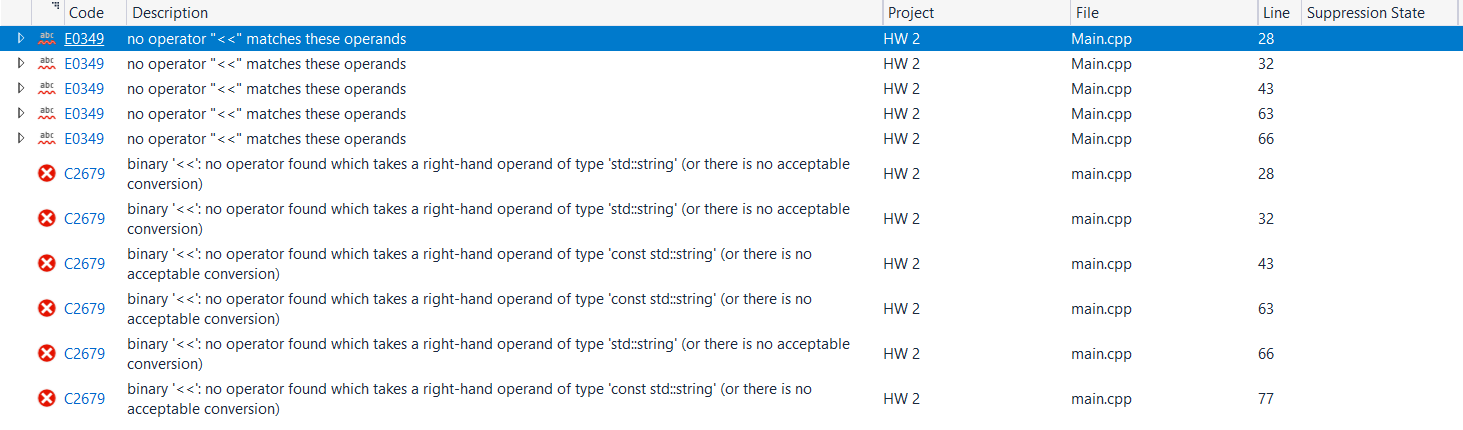
Question: Why wont my code run? #include #include #include using namespace std; class ShoppingCart { private: struct Item { string name; } ; vector items; public:
Why wont my code run?
#include
#include
#include
using namespace std;
class ShoppingCart
private:
struct Item
string name;
;
vector items;
public:
Function to add an item to the cart
void addItemstring name
Item newItem;
newItem.name name;
items.pushbacknewItem;
Function to remove an item from the cart
void removeItemstring name
for auto it items.begin; it items.end; it
if itname name
items.eraseit;
cout "Item name removed from cart." endl;
return;
cout "Item name not found in the cart." endl;
Function to display the items in the cart
void listItems
if itemsempty
cout "The cart is empty." endl;
return;
cout "Items in the cart:" endl;
for const auto& item : items
cout item.name endl;
Function to get the number of items in the cart
int getNumOfItems
return items.size;
Function to clear the cart
void clearCart
items.clear;
cout "Cart cleared." endl;
Function to save the content of the cart to a file
void saveCartstring filename
ofstream filefilename;
if fileisopen
for const auto& item : items
file item.name endl;
file.close;
cout "Cart saved to filename endl;
else
cout "Unable to open file." endl;
Overloading the insertion operator to display the content of the cart
friend ostream& operatorostream& os const ShoppingCart& cart
os "Items in the cart:" endl;
for const auto& item : cart.items
os item.name endl;
return os;
;
int main
ShoppingCart cart;
cart.addItemLaptop;
cart.addItemPhone;
cart.addItemBook;
cout "Number of items in the cart: cart.getNumOfItems endl;
cout cart; Display items in the cart using operator
cart.removeItemPhone;
cart.removeItemTablet;
cout "Number of items in the cart: cart.getNumOfItems endl;
cart.listItems;
cart.clearCart;
cout "Number of items in the cart: cart.getNumOfItems endl;
cart.saveCartcarttxt;
return ;
Step by Step Solution
There are 3 Steps involved in it
1 Expert Approved Answer
Step: 1 Unlock

Question Has Been Solved by an Expert!
Get step-by-step solutions from verified subject matter experts
Step: 2 Unlock
Step: 3 Unlock
 Study Help