







Question: Will give thumbs up directly after recieving answer. - please READ carefully and include ALL points in the answer. Use python. ( Numpy and ML
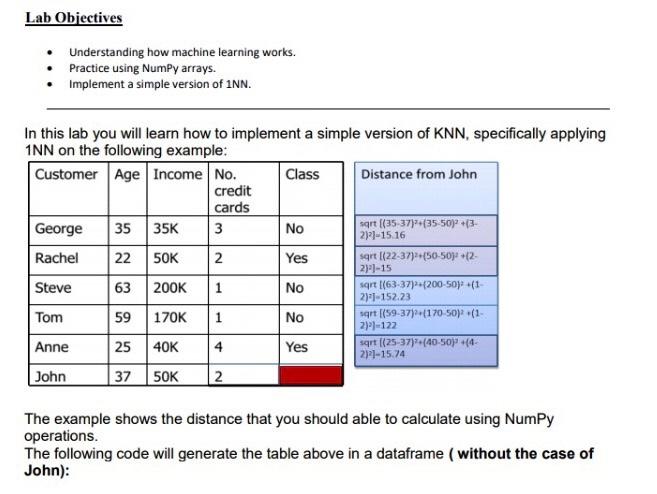
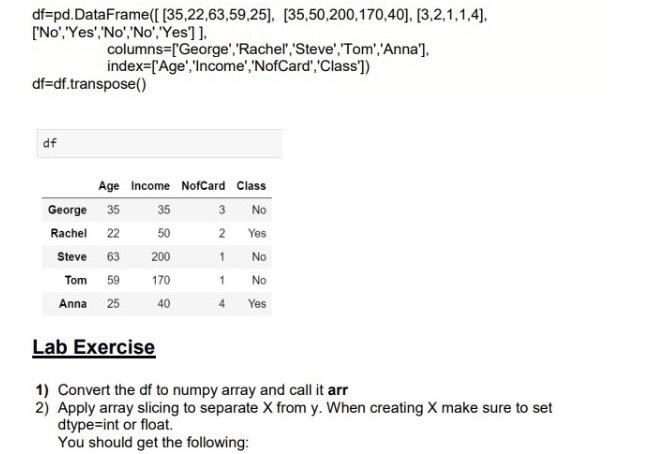
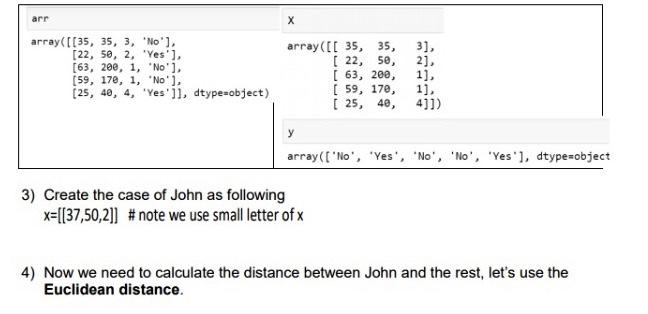
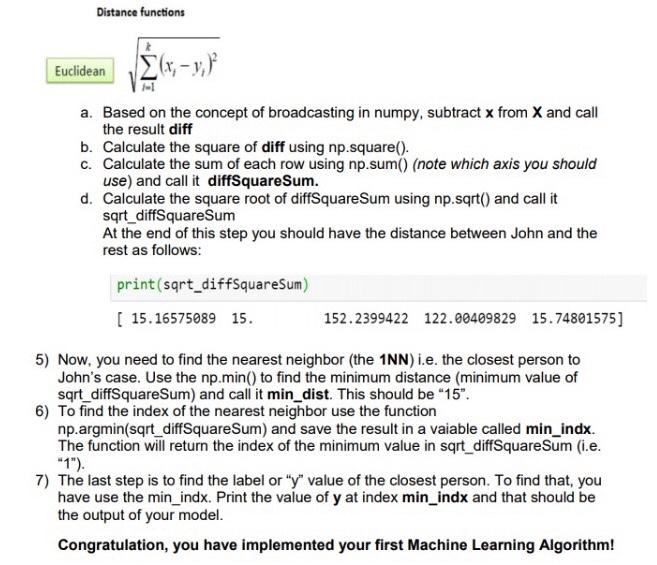

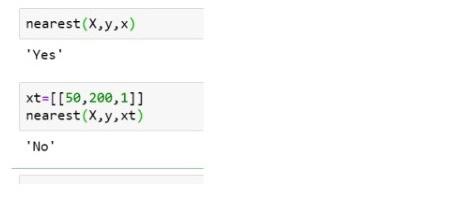
Lab Objectives Understanding how machine learning works. Practice using Numpy arrays. Implement a simple version of INN. NO In this lab you will learn how to implement a simple version of KNN, specifically applying 1NN on the following example: Customer Age Income No. Class Distance from John credit cards George 35 35K 3 sqrt (35-37}*(35-50) +(3 21:1-15 16 Rachel 50K 2 Yes sqrt (22-37) (50-50:-(2- 2)-15 Steve 63 200K 1 No sqrt (63-37) 200-50(1- 2)1-152.23 Tom 59 170K 1 No qrt (59-37) (170 50) (1- 21-122 Anne 25 40K 4 Yes sqrt (25-37)+(40-50j +(4- 2121-15.74 John 37 50K 2 22 The example shows the distance that you should able to calculate using Numpy operations. The following code will generate the table above in a dataframe (without the case of John): df=pd. DataFrame({ [35,22,63,59,25), [35,50,200,170,40], [3,2,1,1,4]. ['No', 'Yes', 'No', 'No', 'Yes'] }, columns=['George', 'Rachel','Steve', 'Tom', 'Anna'), index=['Age', 'Income', 'NofCard', 'Class']) df=df.transpose() df Age Income NofCard Class George 35 35 3 No Rachel 22 50 2 Yes Steve 63 200 No Tom 59 170 No Anna 25 40 4 Yes 1 1 Lab Exercise 1) Convert the df to numpy array and call it arr 2) Apply array slicing to separate X from y. When creating X make sure to set dtype=int or float You should get the following: arr array([[35, 35, 3, 'No'], [22, 50, 2, 'Yes'], [63, 200, 1, "No"], (59, 170, 1, 'No'), 25, 40, 4, 'Yes'ji, dtype=object) array([[ 35, 35, [ 22, 50, ( 63, 200, [ 59, 170, [ 25, 48, 3) 2] 1) 1]. 4]]) array(['No', 'Yes', 'No', 'No', 'Yes'], dtype=object 3) Create the case of John as following x=[[37,50,2]] # note we use small letter of x 4) Now we need to calculate the distance between John and the rest, let's use the Euclidean distance. Distance functions Euclidean a. Based on the concept of broadcasting in numpy, subtract x from X and call the result diff b. Calculate the square of diff using np.square(). C. Calculate the sum of each row using np.sum() (note which axis you should use) and call it diffSquare Sum. d. Calculate the square root of diffSquare Sum using np.sqrt() and call it sqrt_diffSquareSum At the end of this step you should have the distance between John and the rest as follows: print(sqrt_diffSquare Sum) [ 15.16575089 15. 152.2399422 122.00489829 15.74801575] 5) Now, you need to find the nearest neighbor (the 1NN) i.e. the closest person to John's case. Use the np.min() to find the minimum distance (minimum value of sqrt_diffSquare Sum) and call it min_dist. This should be "15". 6) To find the index of the nearest neighbor use the function np.argmin(sqrt_diffSquare Sum) and save the result in a vaiable called min_indx. The function will return the index of the minimum value in sqrt_diffSquare Sum (i.e. "1"). 7) The last step is to find the label or "y" value of the closest person. To find that, you have use the min_indx. Print the value of y at index min_indx and that should be the output of your model. Congratulation, you have implemented your first Machine Learning Algorithm! 8) Define a function that takes three arrays, that is X, y, and x. The function should predict x based on X and y. (Note: you just need to copy paste your codes into the function body). Note x should be the test data so you may change its value and test your function. def nearest(X.y.x) Example of use: nearest(X,Y,x) 'Yes' xt=[[50,200,1]] nearest(x,y, xt) 'No
Step by Step Solution
There are 3 Steps involved in it

Get step-by-step solutions from verified subject matter experts
 Study Help