







Question: Windows computer Bash Assignment Follow these steps in order at the command line in your Bash. 1. Go to your Desktop and then create a
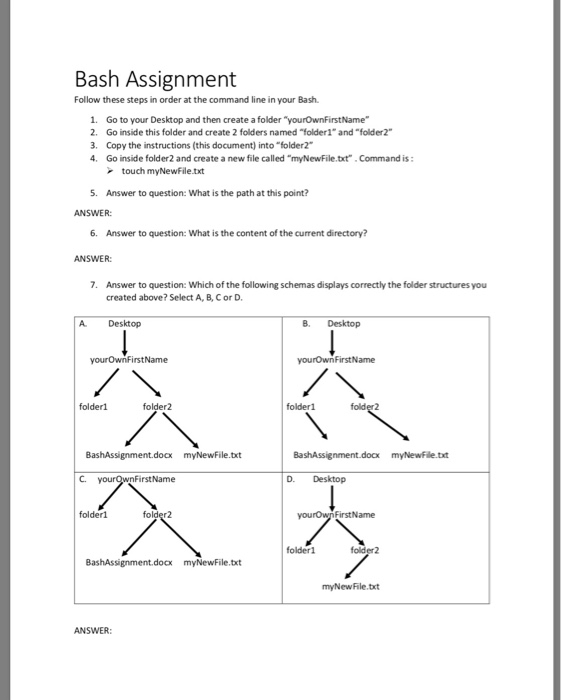
Bash Assignment Follow these steps in order at the command line in your Bash. 1. Go to your Desktop and then create a folder "yourOwnFirstName 2. Go inside this folder and create 2 folders named "folder1" and "folder2" 3. Copy the instructions (this document) into "folder2 4. Go inside folder2 and create a new file called "myNewFile.txt . Command is: touch myNewFile.txt 5. Answer to question: What is the path at this point? ANSWER 6. Answer to question: What is the content of the current directory ANSWER: 7. Answer to question: Which of the following schemas displays correctly the folder structures you created above? Select A, B, Cor D. A Desktop yourownFirstName yourOwnFirstName folder1 folder2 folder1 BashAssignment.doax myNewFile.txt iD. Desktop C. nFirst Name folderl Name folder BashAssignment.docx myNewFile.txt myNewFile.txt
Step by Step Solution
There are 3 Steps involved in it

Get step-by-step solutions from verified subject matter experts
 Study Help