Question: Working with the code: import javax.swing.*; import java.awt.event.*; publicclass JavaMenus extends JFrame{ public JavaMenus() { super (Java Menu Example); JMenu file = new JMenu(File); file.setMnemonic('F');

Working with the code:

import javax.swing.*;

import java.awt.event.*;

publicclassJavaMenusextends JFrame{

public JavaMenus()

{

super("Java Menu Example");

JMenu file = new JMenu("File");

file.setMnemonic('F');

JMenuItem ItemNew = new JMenuItem("New");

ItemNew.setMnemonic('N');

file.add(ItemNew);

JMenuItem ItemOpen = new JMenuItem("Open");

ItemOpen.setMnemonic('O');

file.add(ItemOpen);

JMenuItem ItemExit = new JMenuItem("Exit");

ItemExit.setMnemonic('x');

file.add(ItemExit);

final JLabel label1 = new JLabel(" Welcome");

add(label1);

this.setSize(100, 100);

setVisible(true);

ItemNew.addActionListener(

new ActionListener(){

publicvoid actionPerformed(ActionEvent e)

{

label1.setText(" New");

JOptionPane.showMessageDialog(null, "New was Clicked",

"Result", JOptionPane.PLAIN_MESSAGE);

}

}

);

ItemOpen.addActionListener(

new ActionListener(){

publicvoid actionPerformed(ActionEvent e)

{

label1.setText(" Open");

JOptionPane.showMessageDialog(null, "Open was Clicked",

"Result", JOptionPane.PLAIN_MESSAGE);

}

}

);

ItemExit.addActionListener(

new ActionListener(){

publicvoid actionPerformed(ActionEvent e)

{

label1.setText(" Exit");

JOptionPane.showMessageDialog(null, "Exit was Clicked",

"Result", JOptionPane.PLAIN_MESSAGE);

}

}

);

JMenuBar bar = new JMenuBar();

setJMenuBar(bar);

bar.add(file);

getContentPane();

setSize(250, 250);

setVisible(true);

}

publicstaticvoid main(String[] args)

{

JavaMenus appMenu = new JavaMenus();

appMenu.setDefaultCloseOperation(JFrame.EXIT_ON_CLOSE);

}

}

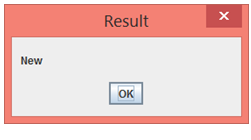
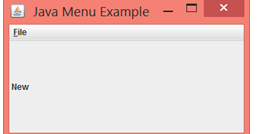
When finished building, compiling and executing the program the output is:

Working with the code: import javax.swing.*; import java.awt.event.*; publicclassJavaMenusextends JFrame{ public JavaMenus()

Also the label within the application changes its text:

{ super("Java Menu Example"); JMenu file = new JMenu("File"); file.setMnemonic('F'); JMenuItem ItemNew

Next, modify the program:the program will include a new menu item. To do this alter the menu component items scheme to appear as follows:

Open Item

A Graphic image appears drawn out in the Frame

New Item

A historical quoteappears in the Frame along with a corresponding image related to the quote.

Example- picture of Steve Jobs along with a Jobs quote of sorts.

Edit Item

A message box appears with the users name.

Exit Item

Test code.

The application exits.

Modify the program again: program will include a new second column of menu items. To do this alter the menubar such that it will contain these items.

Welcome Item

A message box appears that describes the program.

About Item

A message box appears with your name, as the programmer and version number of the app.

New Result OK

Step by Step Solution

There are 3 Steps involved in it

1 Expert Approved Answer
Step: 1 Unlock blur-text-image
Question Has Been Solved by an Expert!

Get step-by-step solutions from verified subject matter experts

Step: 2 Unlock
Step: 3 Unlock

Students Have Also Explored These Related Databases Questions!