







Question: How can I add the load function to this code as well as when I save these files of persons how can I make it
How can I add the load function to this code as well as when I save these files of persons how can I make it so I can view the entries of persons I saved as well as when I press the new button while I was creating a person how do I have it say save before when I try to create a new person and haven't saved that yet? So implement this in simpler terms Select "New." You should get the "Save first?" pop up
Say no
then load the file you just made.
View current list of entries import javax.swing.
;
import java.awt.
;
import java.awt.event.
;
import java.io
File;
public class GuiDemo extends JFrame
private JMenuBar menuBar;
private JMenu fileMenu;
private JMenuItem newMenuItem, saveMenuItem, saveAsMenuItem, exitMenuItem;
private JPanel mainPanel;
private JButton personButton, registeredPersonButton, occcPersonButton;
private JLabel nameLabel, idLabel;
private JTextField nameField, idField;
private JDialog saveDialog;
private JButton saveButton, cancelButton;
public GuiDemo
super
GUI Demo"
;
setSize
;
setDefaultCloseOperation
JFrame
DO
NOTHING
ON
CLOSE
;
menuBar
new JMenuBar
;
fileMenu
new JMenu
File
;
menuBar.add
fileMenu
;
newMenuItem
new JMenuItem
New
;
saveMenuItem
new JMenuItem
Save
;
saveAsMenuItem
new JMenuItem
Save As
;
exitMenuItem
new JMenuItem
Exit
;
fileMenu.add
newMenuItem
;
fileMenu.add
saveMenuItem
;
fileMenu.add
saveAsMenuItem
;
fileMenu.addSeparator
;
fileMenu.add
exitMenuItem
;
saveMenuItem.setEnabled
false
;
saveAsMenuItem.setEnabled
false
;
setJMenuBar
menuBar
;
mainPanel
new JPanel
;
mainPanel.setLayout
new GridLayout
;
personButton
new JButton
Person
;
registeredPersonButton
new JButton
Registered Person"
;
occcPersonButton
new JButton
OCCC Person"
;
nameLabel
new JLabel
Name:
;
idLabel
new JLabel
ID:
;
nameField
new JTextField
;
idField
new JTextField
;
mainPanel.add
personButton
;
mainPanel.add
registeredPersonButton
;
mainPanel.add
occcPersonButton
;
mainPanel.add
nameLabel
;
mainPanel.add
nameField
;
mainPanel.add
idLabel
;
mainPanel.add
idField
;
nameField.setEnabled
false
;
idField.setEnabled
false
;
add
mainPanel
;
saveDialog
new JDialog
this
Save true
;
saveDialog.setLayout
new FlowLayout
;
Create the buttons and add them to the save dialog
saveButton
new JButton
Save
;
cancelButton
new JButton
Cancel
;
saveDialog.add
saveButton
;
saveDialog.add
cancelButton
;
Set the size and location of the save dialog
saveDialog.setSize
;
saveDialog.setLocationRelativeTo
this
;
Add action listeners to the buttons and menu items
personButton.addActionListener
new PersonButtonListener
;
registeredPersonButton.addActionListener
new RegisteredPersonButtonListener
;
occcPersonButton.addActionListener
new OcccPersonButtonListener
;
newMenuItem.addActionListener
new NewMenuItemListener
;
saveMenuItem.addActionListener
new SaveMenuItemListener
;
saveAsMenuItem.addActionListener
new SaveAsMenuItemListener
;
exitMenuItem.addActionListener
new ExitMenuItemListener
;
saveButton.addActionListener
new SaveButtonListener
;
cancelButton.addActionListener
new CancelButtonListener
;
Add a window listener to the frame
addWindowListener
new WindowCloseListener
;
Define a private inner class that implements ActionListener for the person button
private class PersonButtonListener implements ActionListener
public void actionPerformed
ActionEvent e
Enable the name field and disable the id field
nameField.setEnabled
true
;
idField.setEnabled
false
;
nameField.setText
;
idField.setText
;
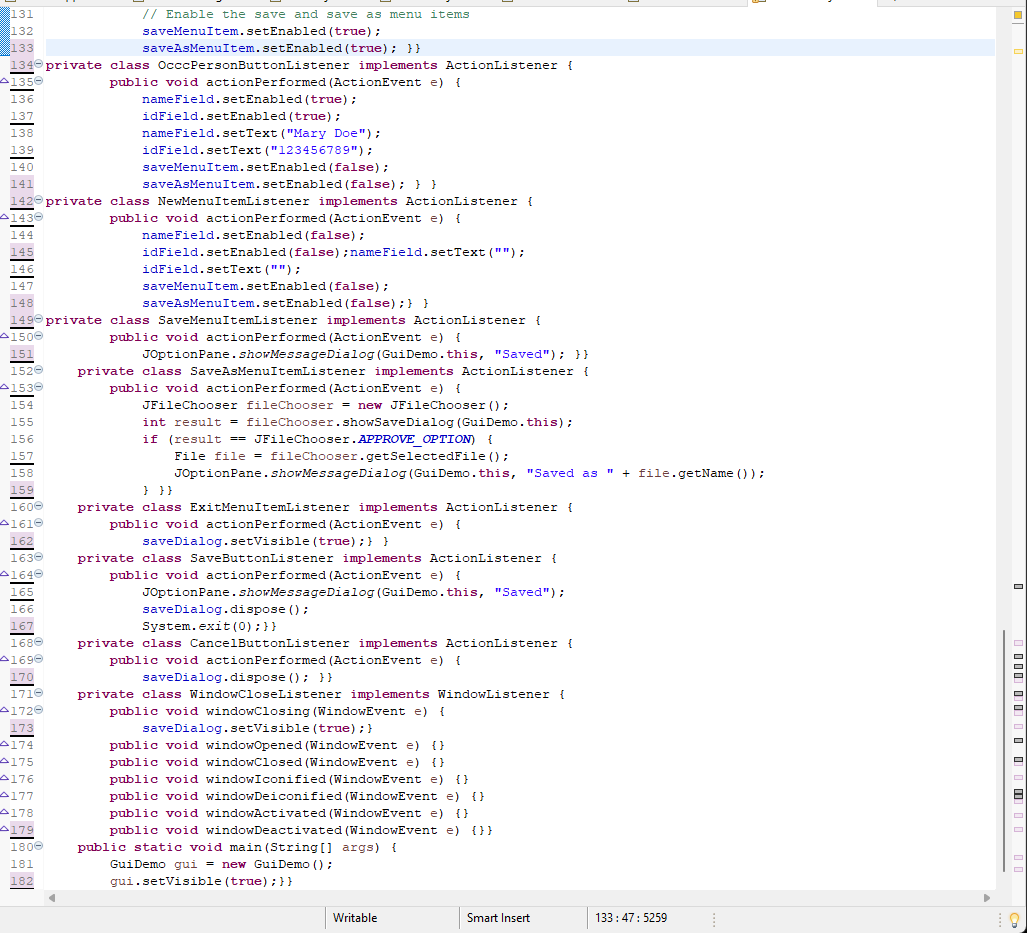
Enable the save and save as menu items Screenshot of remaining code is below
Step by Step Solution
There are 3 Steps involved in it
1 Expert Approved Answer
Step: 1 Unlock

Question Has Been Solved by an Expert!
Get step-by-step solutions from verified subject matter experts
Step: 2 Unlock
Step: 3 Unlock
 Study Help